The Secret to Achieving 99% Accuracy in Generative AI: Hands-On with AWS Automated Reasoning
Reference: AWS Introduces Automated Reasoning Checks[1]
This article is Day 3 entry of the KINTO Technologies Advent Calendar 2025 🎅🎄
0. Introduction
I'm YOU, an Infrastructure Architect in the Cloud Infrastructure Group (CIG) at KINTO Technologies.
In December 2024, AWS announced Automated Reasoning at re:Invent, enabling mathematical proofs and logical reasoning for generative AI. At that time, it was introduced as Automated Reasoning Checks, a feature of AWS Bedrock Guardrails. It became generally available in some US and EU regions in August of this year.
This approach fundamentally differs from probabilistic reasoning methods that address uncertainty by assigning probabilities to outcomes. In fact, Automated Reasoning Checks[2] provide up to 99% verification accuracy, offering provable guarantees for detecting AI hallucinations while also helping detect ambiguity when model outputs are open to multiple interpretations.
To briefly explain AWS Automated Reasoning:
Automated Reasoning Checks help verify the accuracy of content generated by foundation models (FMs) against domain knowledge. This helps prevent factual errors caused by AI hallucinations. This policy uses mathematical logic and formal verification techniques to verify accuracy, providing deterministic rules and parameters for checking the correctness of AI responses.
As described above, Automated Reasoning is designed to enable quantitative judgment, continuous tracking, response improvement, and further reduction of generative AI hallucinations. Through this approach, it fundamentally differs from probabilistic reasoning methods that rely on uncertainty, assigning probabilities to outcomes. This is why, as stated in the title, it provides up to 99% verification accuracy, offering provable guarantees for detecting AI hallucinations while also helping detect ambiguity when model outputs are open to multiple interpretations.
Automated reasoning itself was not originated by AWS—it is a field rooted in mathematical logic. The original automated reasoning began when formal verification techniques from software development started being applied, and AWS now offers this methodology as a service for generative AI.
For those who want to learn more about the concept of automated reasoning, please refer to these documents:
Since Automated Reasoning integrates with Bedrock Guardrails, understanding Bedrock Guardrails will make some aspects easier to grasp. This article explains the overall picture of Automated Reasoning functionality, so please note that explanations of Bedrock Guardrails are omitted.
For those interested in Bedrock Guardrails or wanting more details, I've written separate articles:
- AWS Bedrock Guardrails Deployment: Part 1 - The Need for Generative AI Security: The necessity of guardrails for generative AI
- TECH BOOK By KINTO Technologies Vol.01: How to implement Bedrock Guardrails on AWS
1. Target Readers, Considerations, and Objectives
Initially, I thought Automated Reasoning, based on its name alone, would be an automated service that easily prevents generative AI hallucinations. However, it's quite far from being easily accessible automation—it felt quite advanced. So I'll first explain specific situations where Automated Reasoning is needed and important considerations.
Target Readers
- Those who want to rigorously detect, track and mitigate LLM response hallucinations
- Those implementing generative AI with high governance or compliance requirements where errors are unacceptable
- Those developing generative AI applications with complex rules and requirements
- Those aiming to achieve AWS-centric Responsible AI
Considerations
- This article explains findings based on testing in an English environment. When Japanese support is added in the future, behavior and specifications may change.
- Automated Reasoning analyzes and detects only content related to text and documents provided by users. Therefore, it is a service that verifies hallucinations and accuracy—it does not automatically restrict or process content. The official documentation also recommends using it together with existing Bedrock Guardrails filters.
Amazon Bedrock Guardrails Automated Reasoning Checks do not protect against prompt injection attacks. These checks verify exactly what you submit. If malicious or manipulated content is provided as input, verification will be performed on that content as-is (inappropriate input/output). To detect and block prompt injection attacks, use content filters in combination with Automated Reasoning Checks.
Automated Reasoning only analyzes and detects text related to the Automated Reasoning policy. The remaining content is ignored, and it cannot tell developers whether responses are off-topic. If you need to detect off-topic responses, use other guardrail components such as topic policies.
As discussed later, Automated Reasoning automatically generates basic policies based on text and documents. However, you need to review and test these auto-generated policies. Understanding both the input context requirements and the Automated Reasoning structure is necessary, so please refer to the limitations and best practices in the links below:
Objectives
I want to focus mainly on understanding the Automated Reasoning structure mentioned in the Considerations section above. For this article, I hope you'll learn these three things to understand the big picture:
- Know what components Automated Reasoning has and how it works
- Know the flow for testing Automated Reasoning
Know when to use Automated Reasoning(This requires knowledge of Guardrails, so I'll discuss it in a separate article)
2. Overview
Roughly speaking, the overall picture of Automated Reasoning looks like the diagram below.
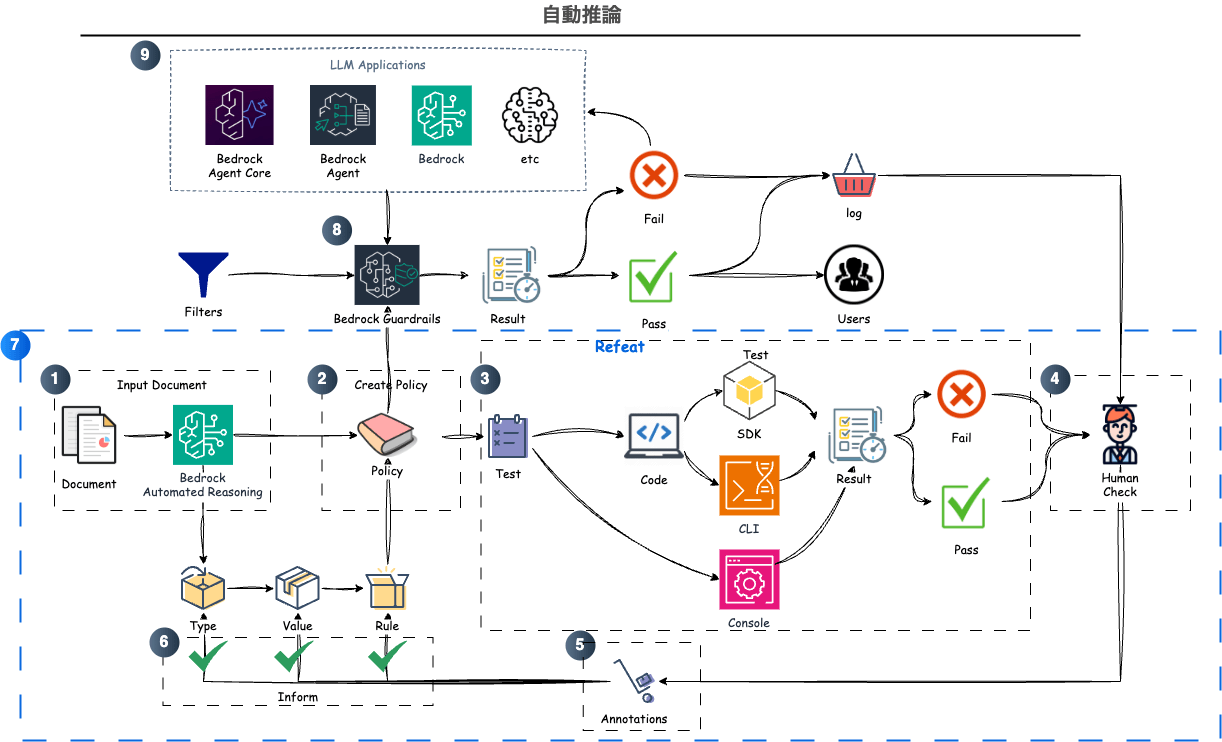
The procedure is:
- When you input text/documents into Automated Reasoning, a Policy is automatically created
- The policy auto-generates Definitions of types, variables, and rules based on the input information
a. Additional text or documents can be incorporated to expand policy definitions
b. Generated types, variables, and rules can be edited to match requirements and ensure consistency - Create Tests to verify the policy
a. Manual creation: Enter hypothetical interactions in QnA pair format
b. Automatic creation: Scenarios that can verify existing rules are auto-generated - Check verification results to confirm expected outcomes
a. Verify that expected results match actual results in test execution
b. If they don't match, return to step 5 - Identify the cause of mismatch and add Annotations to incorrect definitions
a. Information suggesting the cause is presented in test execution results
b. Annotations can be added to types, variables, and rules—mainly by modifying natural language descriptions, which triggers corresponding updates - After applying annotations, suggested modifications appear; accept changes if correct
- Repeat steps 3-6 to complete a policy that protects the text/document content
- Attach the completed policy to a Guardrail
- Either use an existing Guardrail or create a new one
- Pass LLM application input/responses to the Guardrail and utilize Automated Reasoning Check results
a. If successful, return results to the user as-is
b. If failed, use Automated Reasoning Check results to request regeneration from the LLM application
c. (Optional) Save Automated Reasoning Check results as logs and continue policy reviews
In summary, Automated Reasoning is created as a Policy, completed through iterations of Definition → Test → Annotation. The completed policy is attached to AWS Bedrock Guardrails, and when the Guardrail is applied to LLM responses, Automated Reasoning Checks are performed. Subsequent processing varies by the developer's decisions, but you gain the ability to quantitatively judge whether the LLM is producing correct responses.
By introducing Automated Reasoning, you can develop strategies to eliminate hallucinations while running parallel to existing Guardrails that block malicious content. Being able to verify the accuracy of generative AI with RAG and MCP that reference external information, and detect and correct erroneous LLM responses and uncontrollable incorrect inputs, is extremely attractive.
Next, I'll use samples provided by AWS to explain the three main elements—Definition, Test, and Annotation—following the procedure from Policy creation.
3. Policy
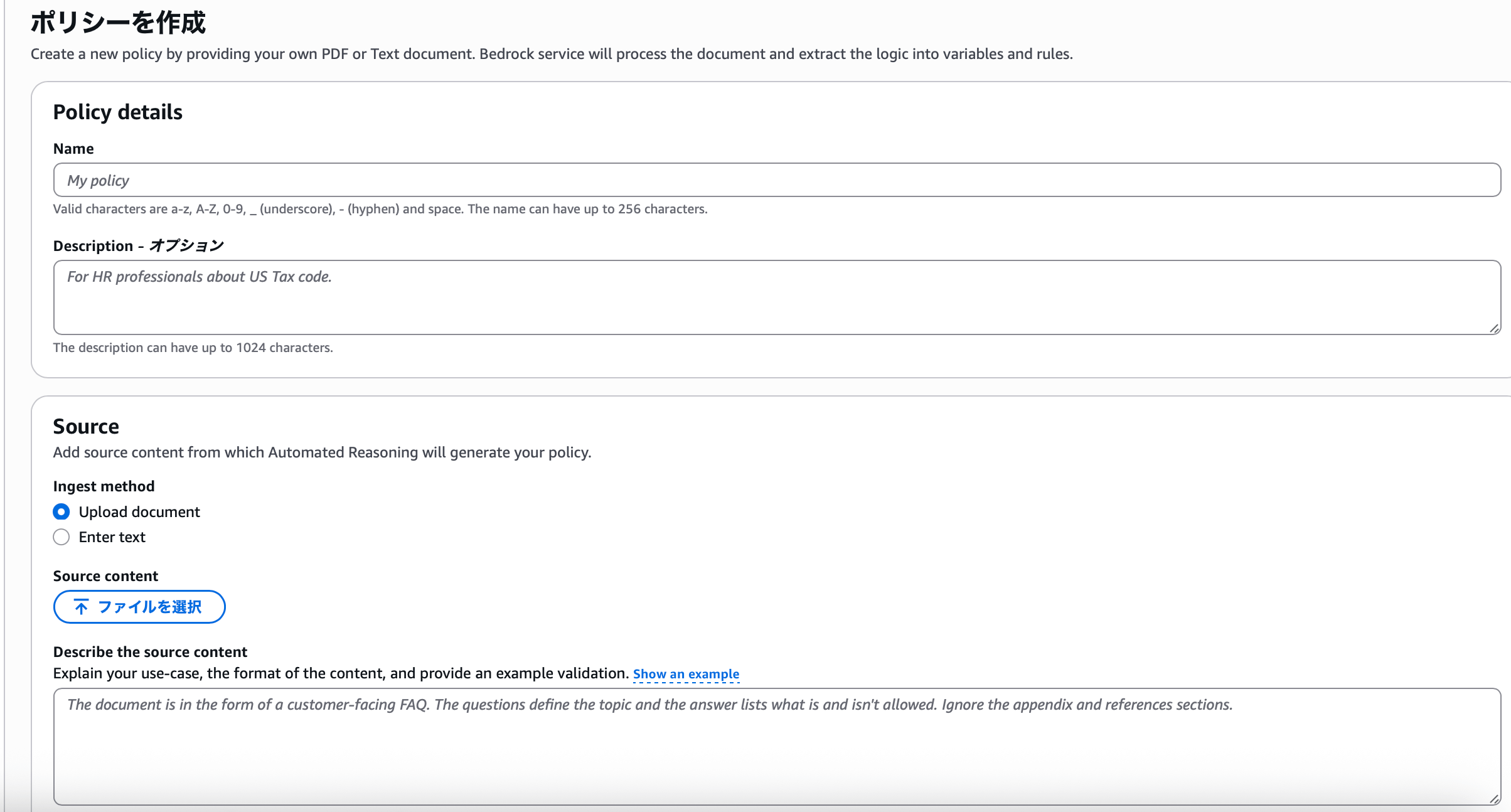
Basically, like other AWS resources, Automated Reasoning can be operated via console, CLI, or SDK.
CloudFormation is not currently supported. CloudFormation support will be available soon.
Creating an Automated Reasoning policy on the console is straightforward.
- Name
- Description (optional)
- Source (document/text)
- Source description
After entering the above content and clicking the Create Policy button, the policy contents are automatically created. I used a medical PDF file prepared in the AWS sample, and the policy was generated in about 5-10 minutes. The time to create definitions likely varies depending on the length of the input document.
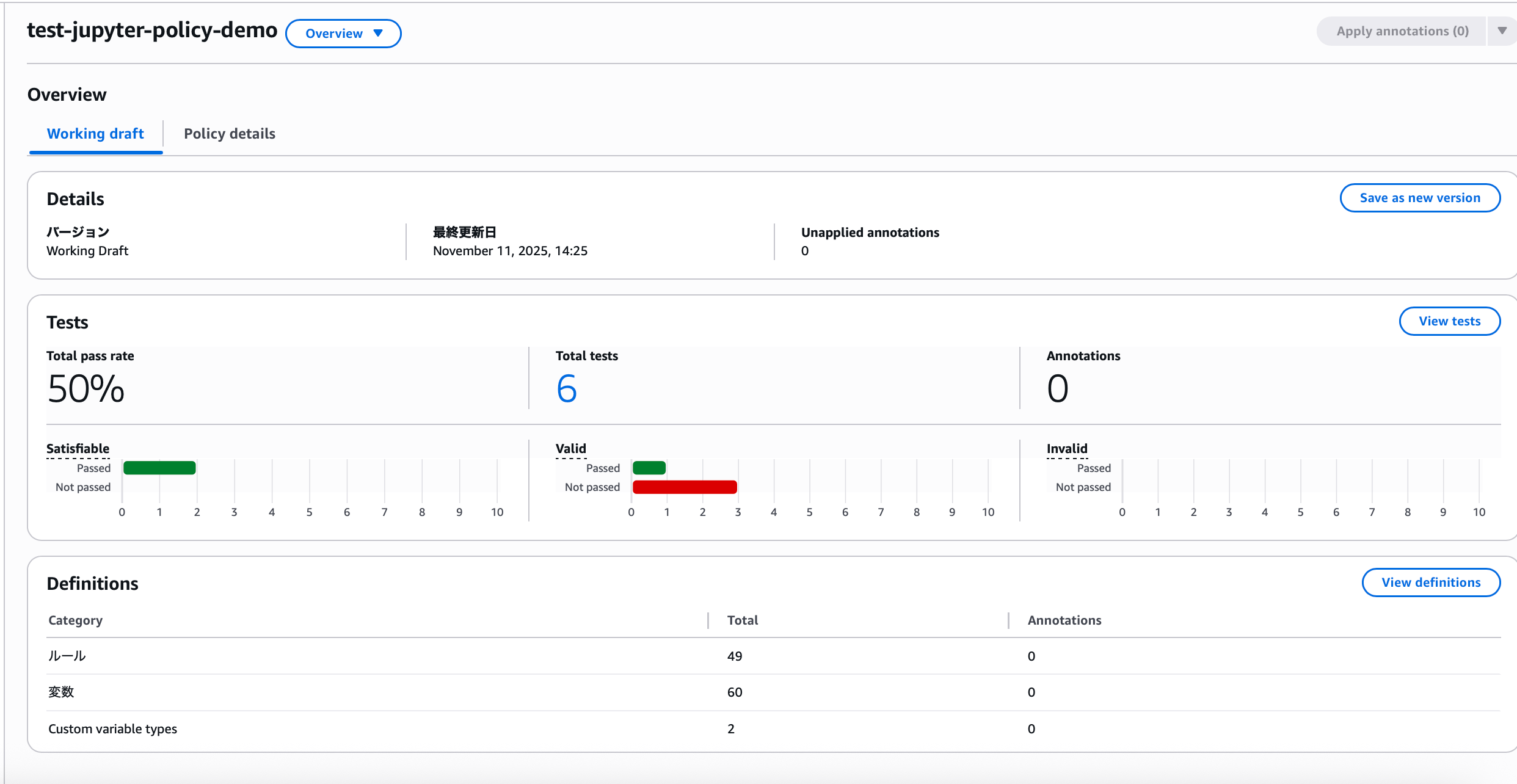
When you check the created policy, the following screen appears:
4. Definitions
The focus here is on the Definitions at the bottom. When you navigate from this overview screen to the definitions screen, you can confirm that rules, variables, and types are defined.
Types

In addition to types pre-defined by AWS, if there are items in user-provided documents that can be classified as types, they are auto-generated. Creating variables with types and correctly defining rules is fundamental to Automated Reasoning. Explaining each item:
- Name: The name defining the type, a key used in variables
- Description: Content written so Automated Reasoning can make judgments
- Values: Individual values to be categorized
- Issues: Indicates problems occurring with the type
- Annotations: Displays modification content before application
- Actions: Three operations available—update, delete, revert
When a type is not used in any variable, a warning appears as shown in the image indicating an unused type. At this point, users can decide whether to define a variable using this type or delete it. Types that aren't used don't affect operation, so they don't need to be resolved immediately.
Here, I'll continue the explanation using RiskCategory, which is used somewhere.
- Name:
RiskCategory - Description: Risk category assigned to a patient based on total risk score, indicating estimated risk of 30-day readmission
- Values:
LOW_RISK,INTERMEDIATE_RISK,HIGH_RISK
Variables
Variables represent concepts in an Automated Reasoning policy that can be assigned values when translating natural language to formal logic. Policy rules define constraints on valid or invalid values for these variables.
60 variables are defined, and searching for RiskCategory reveals the variables using this type.

- Name:
riskCategory - Custom variable type:
RiskCategory - Description: Risk category assigned to a patient based on total risk score
Since Automated Reasoning translates from natural language to formal logic, its accuracy heavily depends on the quality of variable descriptions. Therefore, the best practices include writing comprehensive variable descriptions. Without comprehensive variable descriptions, Automated Reasoning may return NO_DATA because it cannot convert the input natural language to formal logic expressions.
Rules
Rules are the logic that Automated Reasoning extracts from source documents.
Automated Reasoning logic is created in SMT-LIB. Satisfiability Modulo Theories (SMT) is a field studying methods to check the satisfiability of first-order formulas, and as part of this, SMT-LIB—a common input and output language for SMT users—was developed. In Automated Reasoning, you can modify formulas just by changing rule descriptions, but you can also modify them in SMT-LIB format for reference.
There are 21 rules using riskCategory, mainly creating scenarios with riskCategory plus other variable conditions.
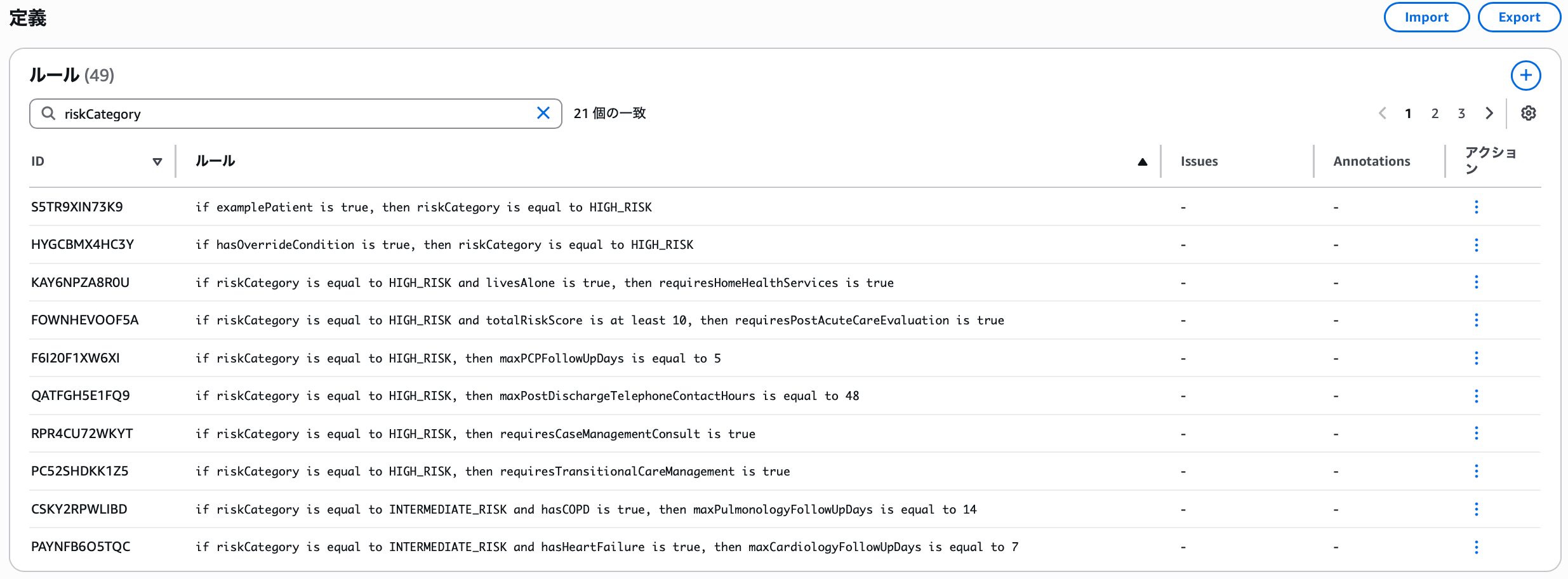
Explaining the rule at the top: since the variable examplePatient has the following definition:
- Name:
examplePatient - Custom variable type: Boolean
- Description: Whether this is an example of a patient from guidance with specific characteristics
- if
examplePatientis true, thenriskCategoryis equal toHIGH_RISK
→ If it matches an example of a patient with specific characteristics from guidance, the risk category is high risk
This is the rule that represents this scenario. Now let's test this rule.
5. Tests
There are two ways to run tests.
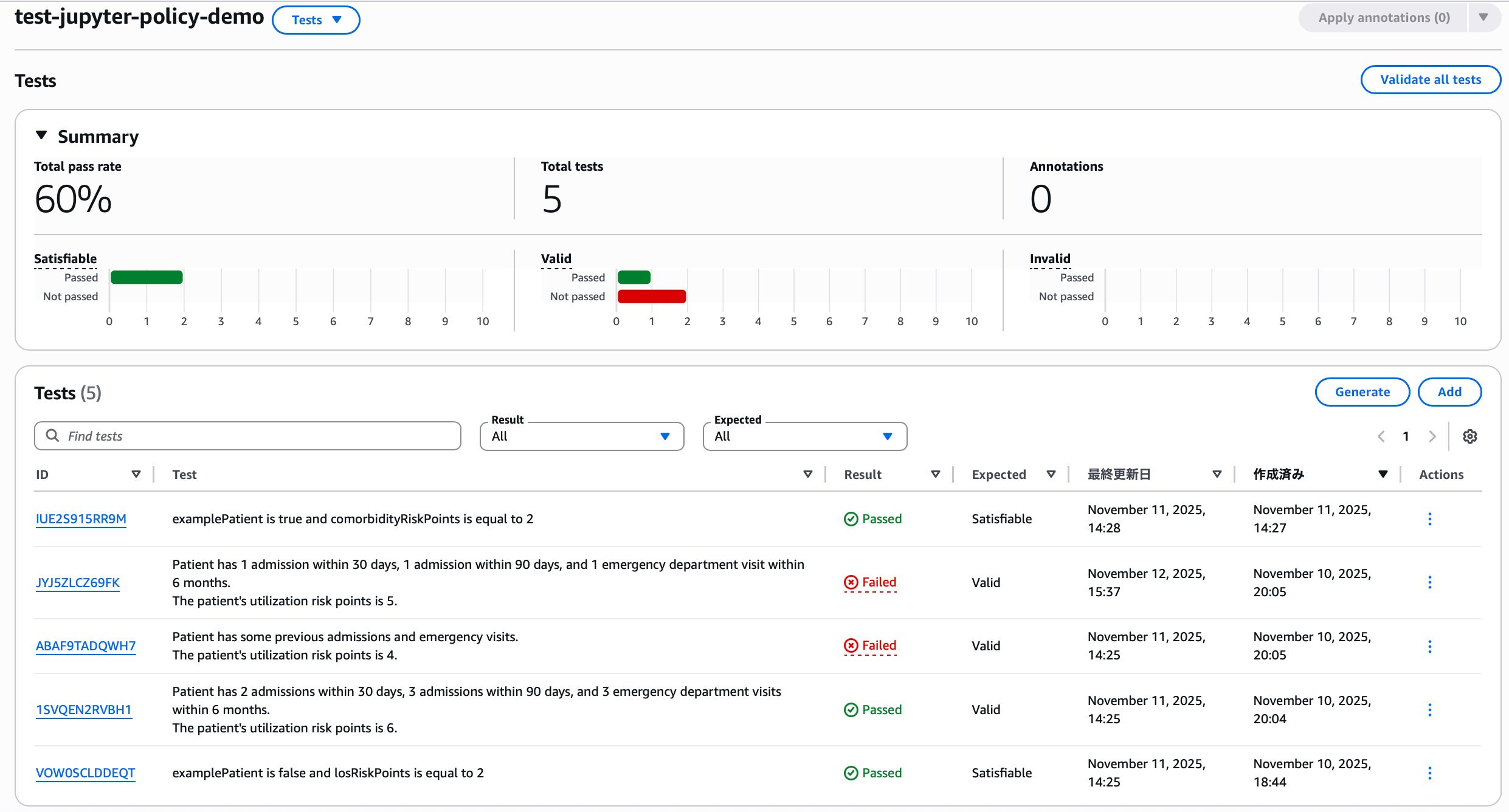
- Manually define question-and-answer (QnA) pairs
- Automatically generate test scenarios
This article uses console operations with manual definition as an example for intuitive understanding, but for running many tests mechanically, using automatic generation via CLI or SDK is easier. Before verifying rules with manual definition, let's try testing with automatic generation.
Automatic Generation Tests
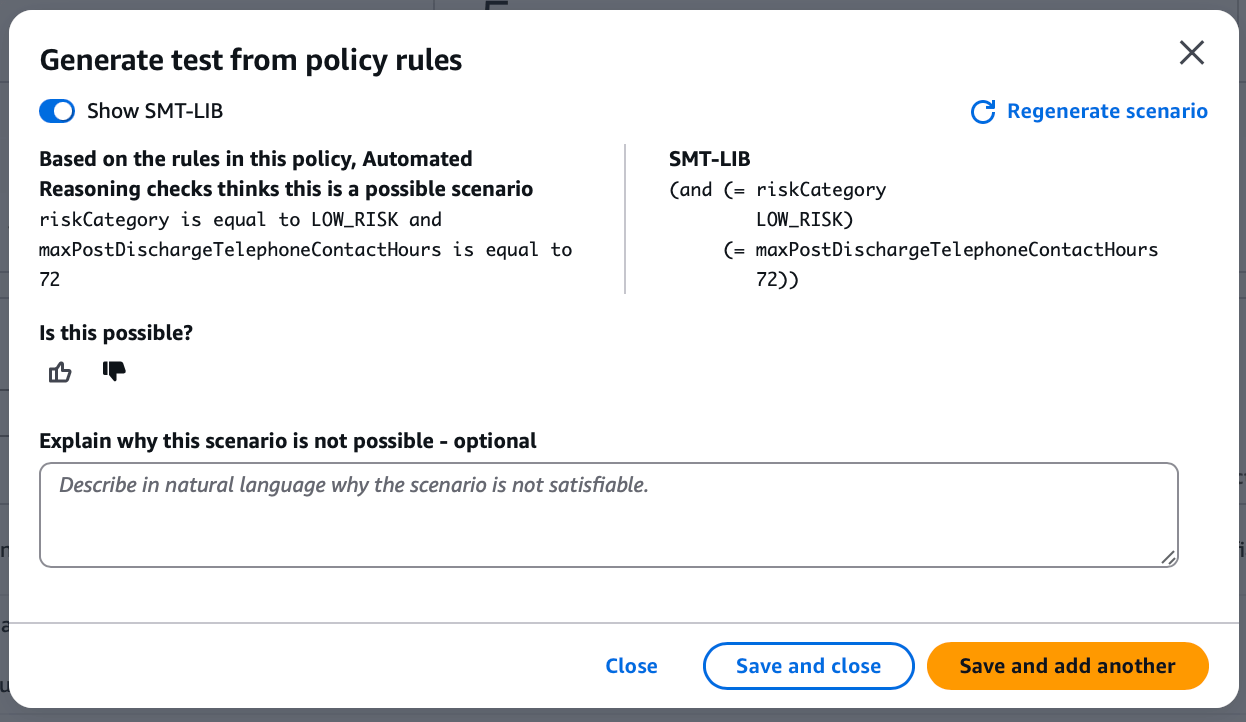
On the console, clicking the generate button creates test scenarios in this format.
Since riskCategory and maxPostDischargeTelephoneContactHours were in the conditions, let's search for LOW_RISK from the definitions screen.

However, there's no rule with the maxPostDischargeTelephoneContactHours variable. Since this variable's description is "maximum hours after discharge when post-discharge telephone contact occurs," users who know this scenario's requirements can judge its validity. If you determine the scenario is incorrect, you can have the test scenario modified by writing a description, but for now, let's create a test scenario as suggested.
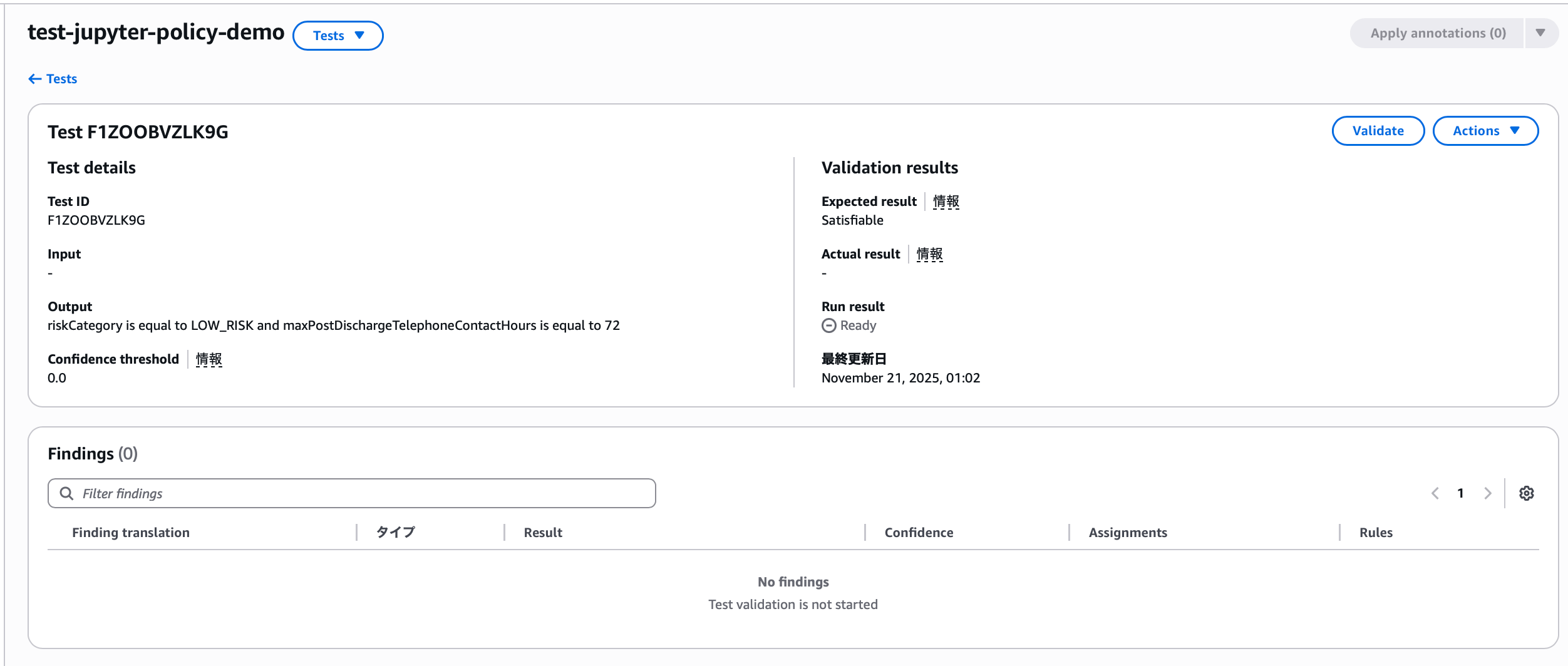
Then, entering the created test case shows this screen, where you can run the test. When executed:
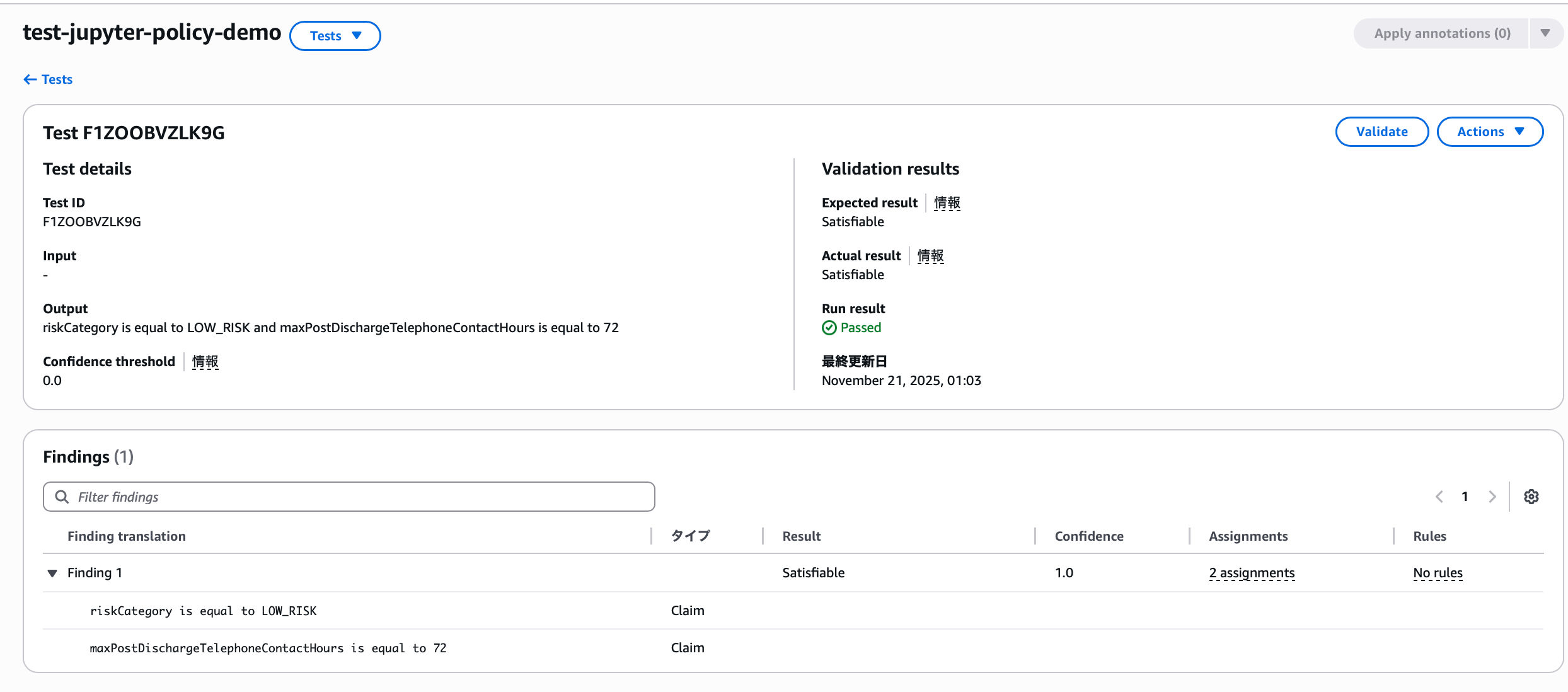
It succeeded even though there's no matching rule for the conditions. Why is that?
Because the expected result anticipated by the auto-generated test scenario matched the actual result. There are 7 criteria for judging test results in Automated Reasoning.
VALID: Claim logically matches rulesINVALID: Claim logically contradicts or violates rulesSATISFIABLE: Claim is consistent with at least one rule condition, but doesn't match all relevant rulesIMPOSSIBLE: There may be conflicts within the Automated Reasoning policyTRANSLATION_AMBIGUOUS: Ambiguity detected in translation from natural language to logicTOO_COMPLEX: Input contains too much informationNO_TRANSLATIONS: Part or all of the input prompt was not converted to logic

riskCategoryis equal toLOW_RISKmaxPostDischargeTelephoneContactHoursis equal to 72
Since each claim existed as one of the conditions in some rule, it produced a SATISFIABLE actual result, and the test scenario set this as the expected result accordingly.
Annotations
Now, let's assume the requirement is "if the maximum hours for post-discharge telephone contact is 120 hours, the risk category is low risk." In that case, we need to add a new rule.
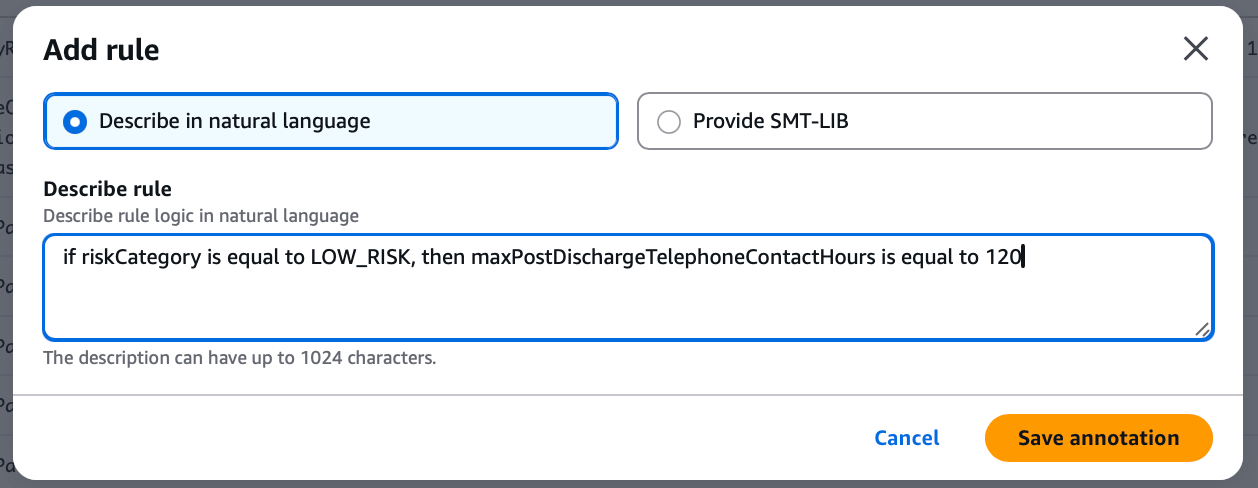
At this point, you can add annotations for additions/modifications and apply them.
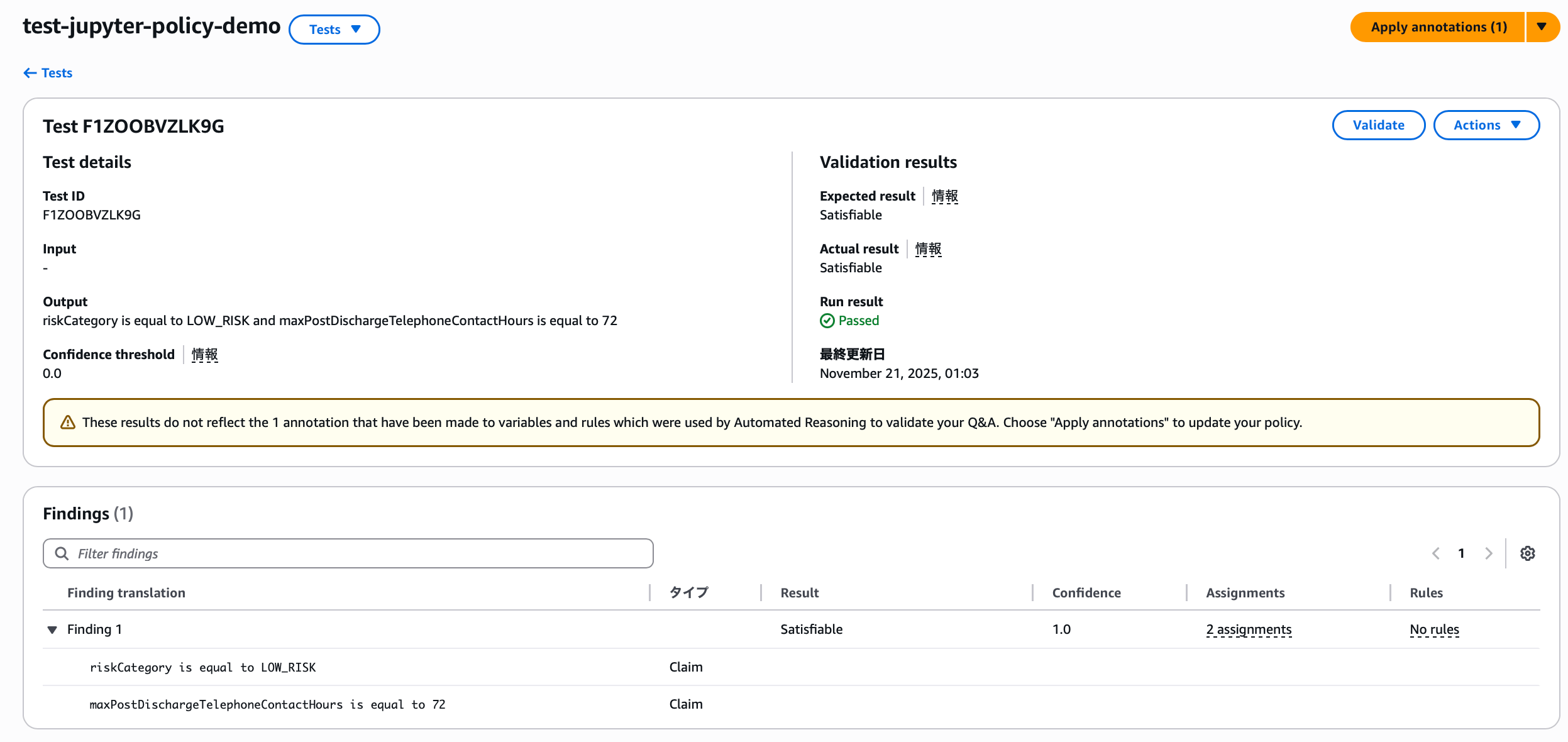
Proceeding here:
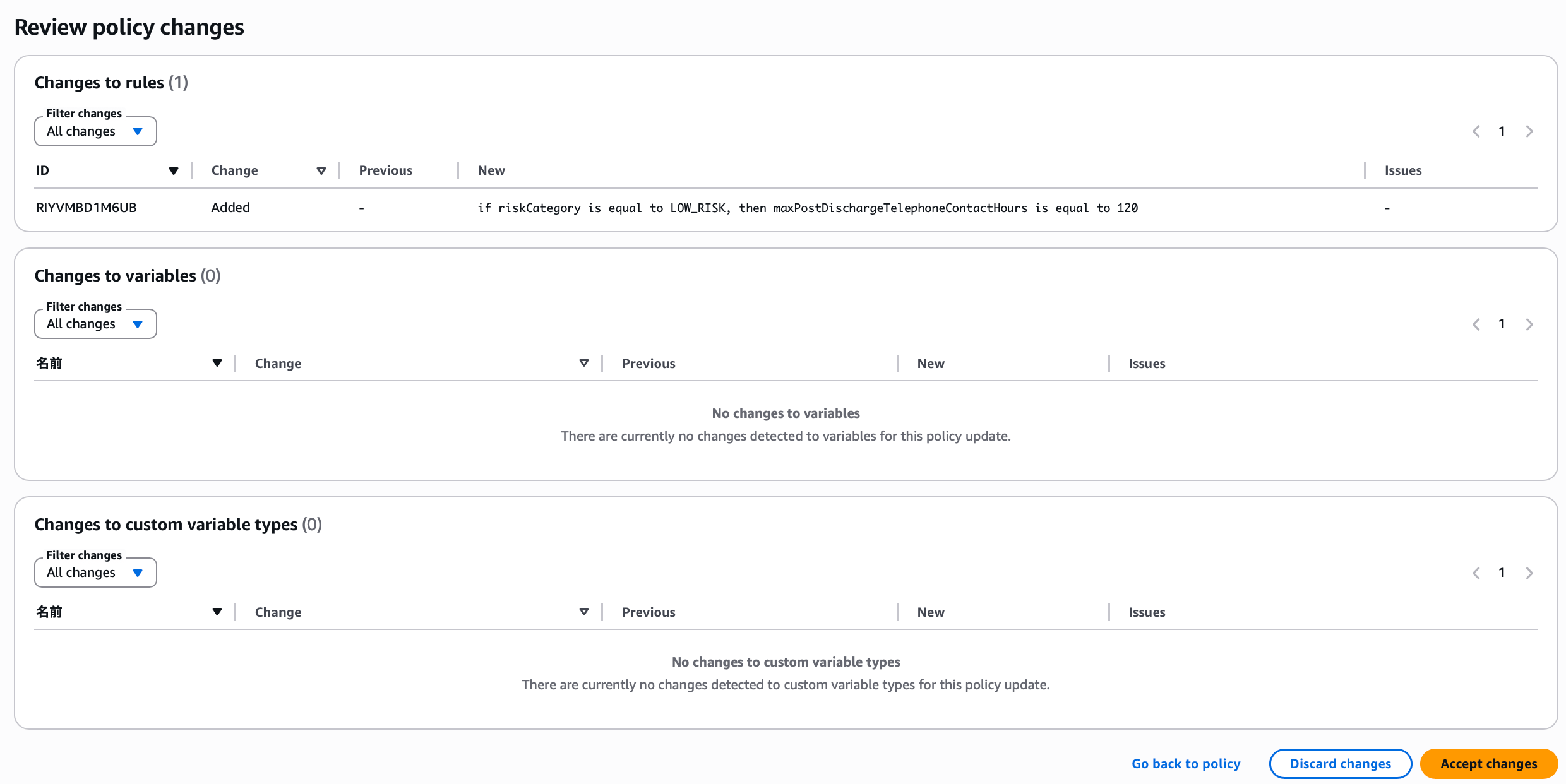
You can review changes and discard, approve, or return to the policy for reconsideration. The rule was generated as expected, so it is approved.
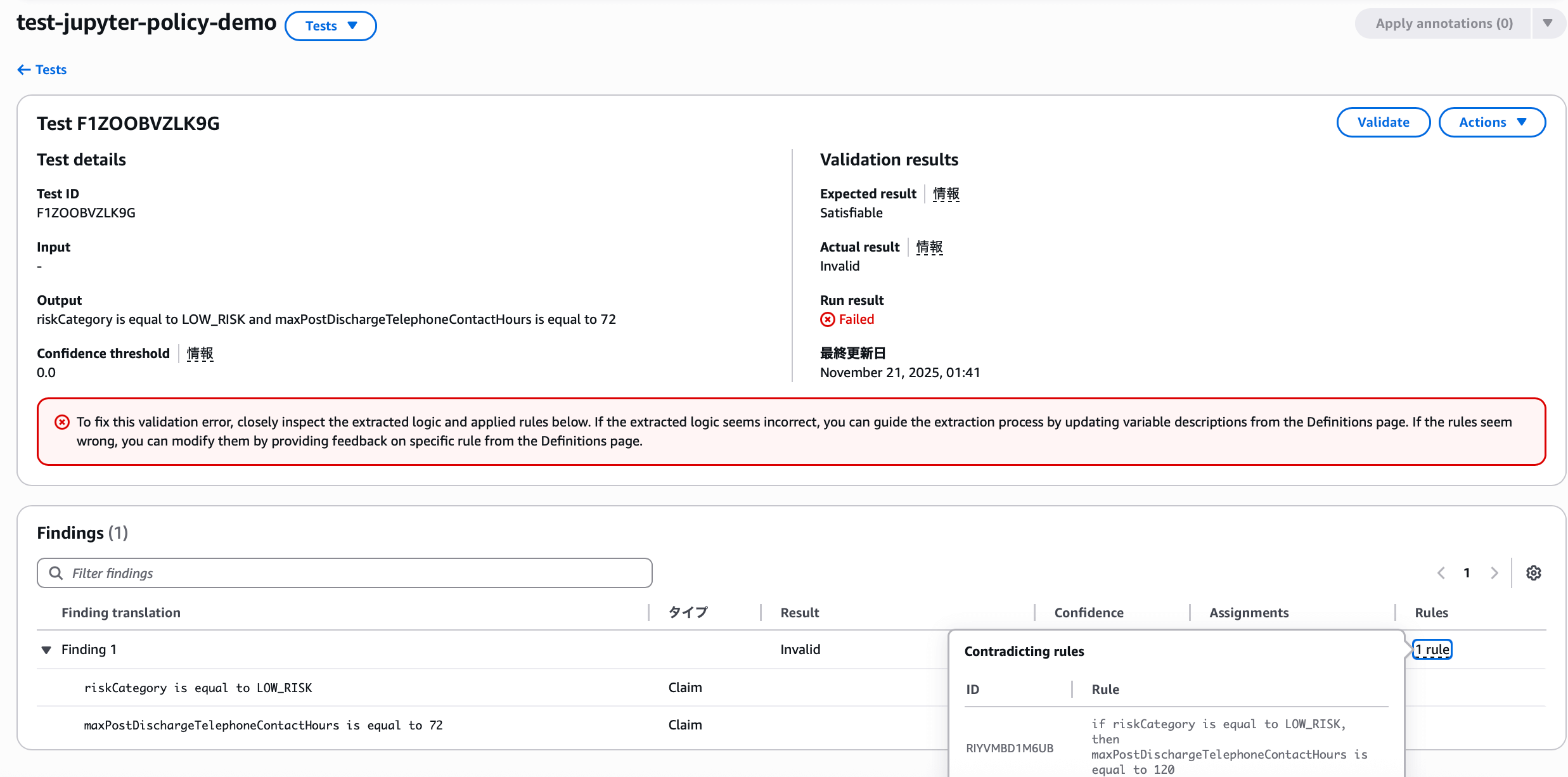
Once the rule is reflected, the actual result changes to INVALID and shows as failed. Since the new rule was applied, it now clearly judges as INVALID, so we need to change the test scenario expectation.
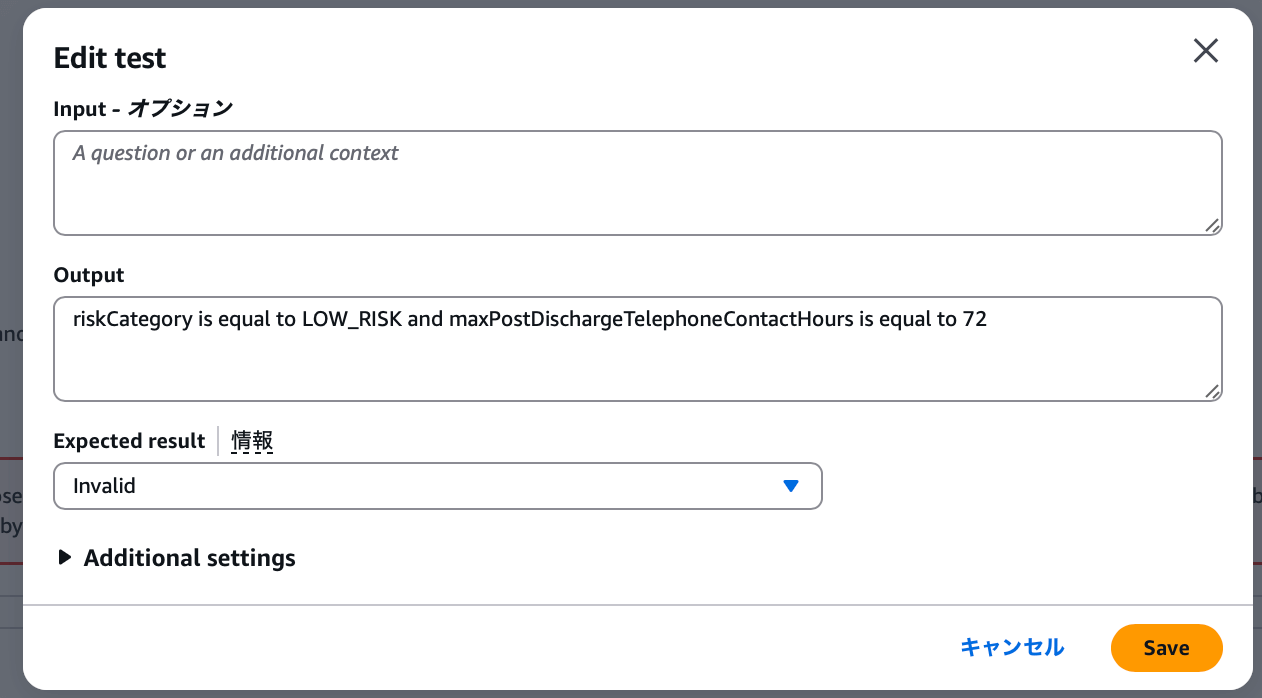
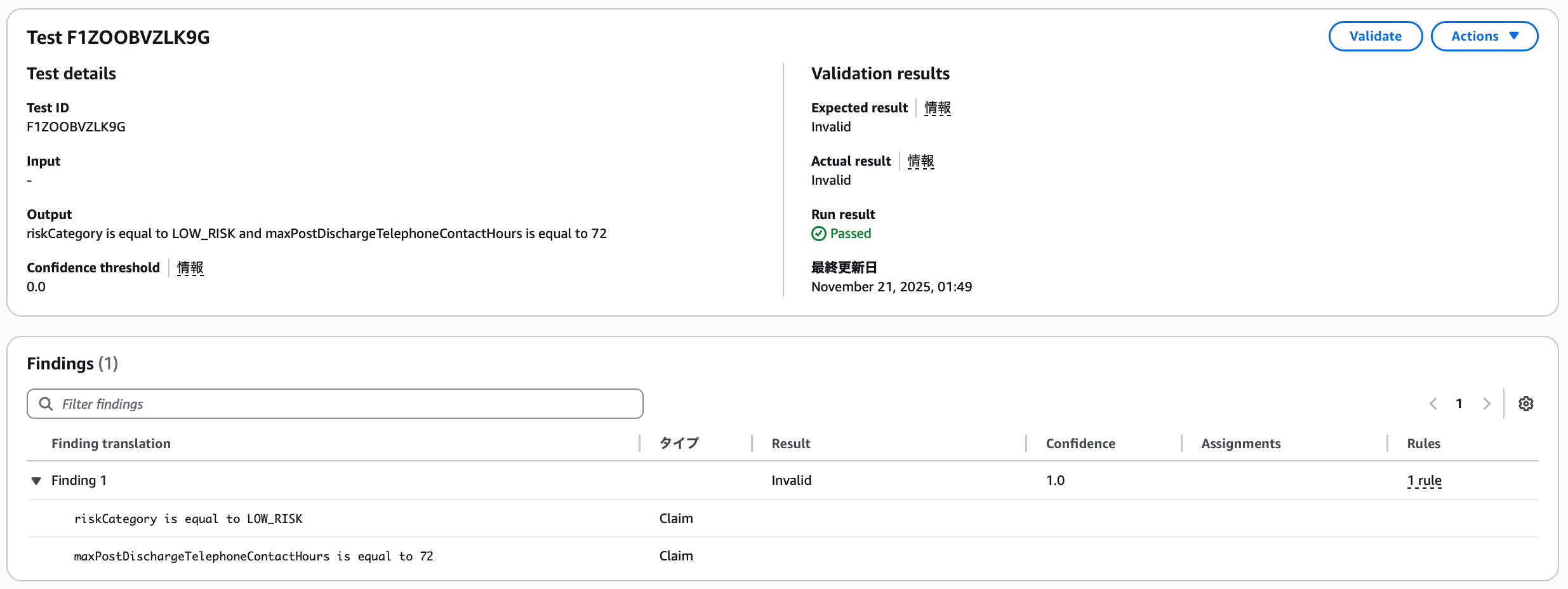
Changing the expected result to INVALID makes it succeed.
Manual Definition Tests
The flow of reviewing results and making corrections with annotations isn't much different when done manually. Let's add a test with the following content. For manual input, enter content mimicking actual LLM application responses.
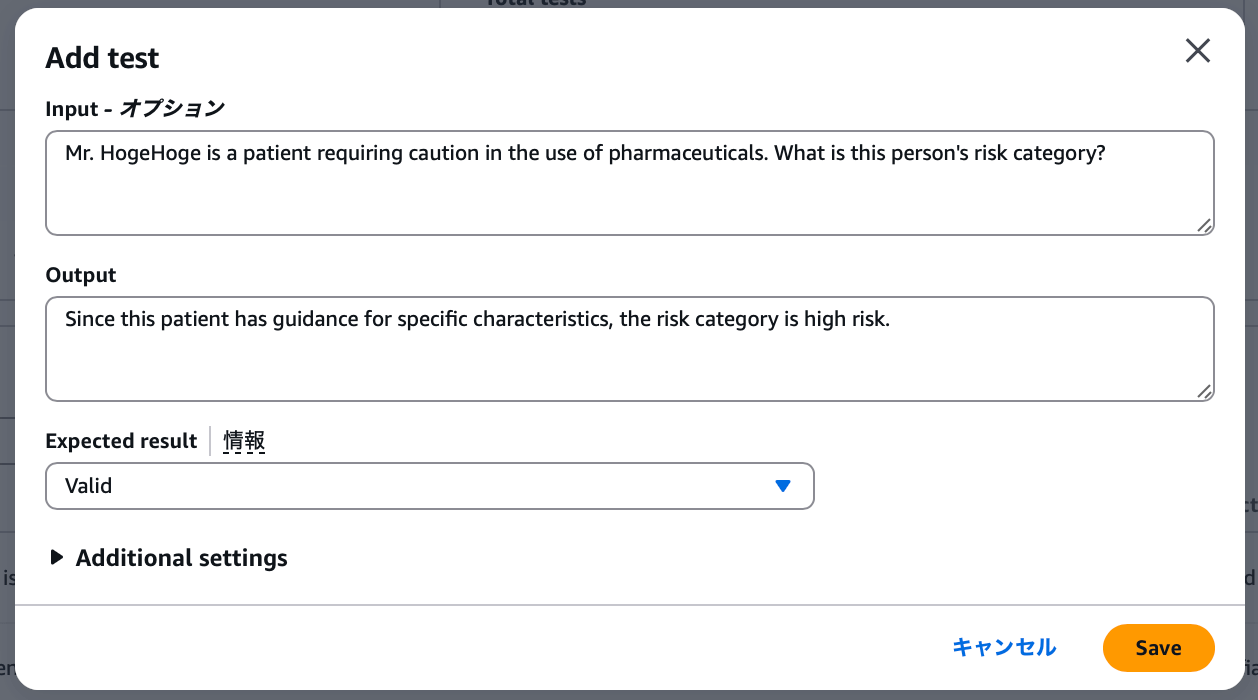
- Input: Mr. Foo is a patient who requires caution with medication use. What is this person's risk category?
- Output: Since this is a patient with specific characteristics from guidance, the risk category is high risk
- Expected result:
VALID
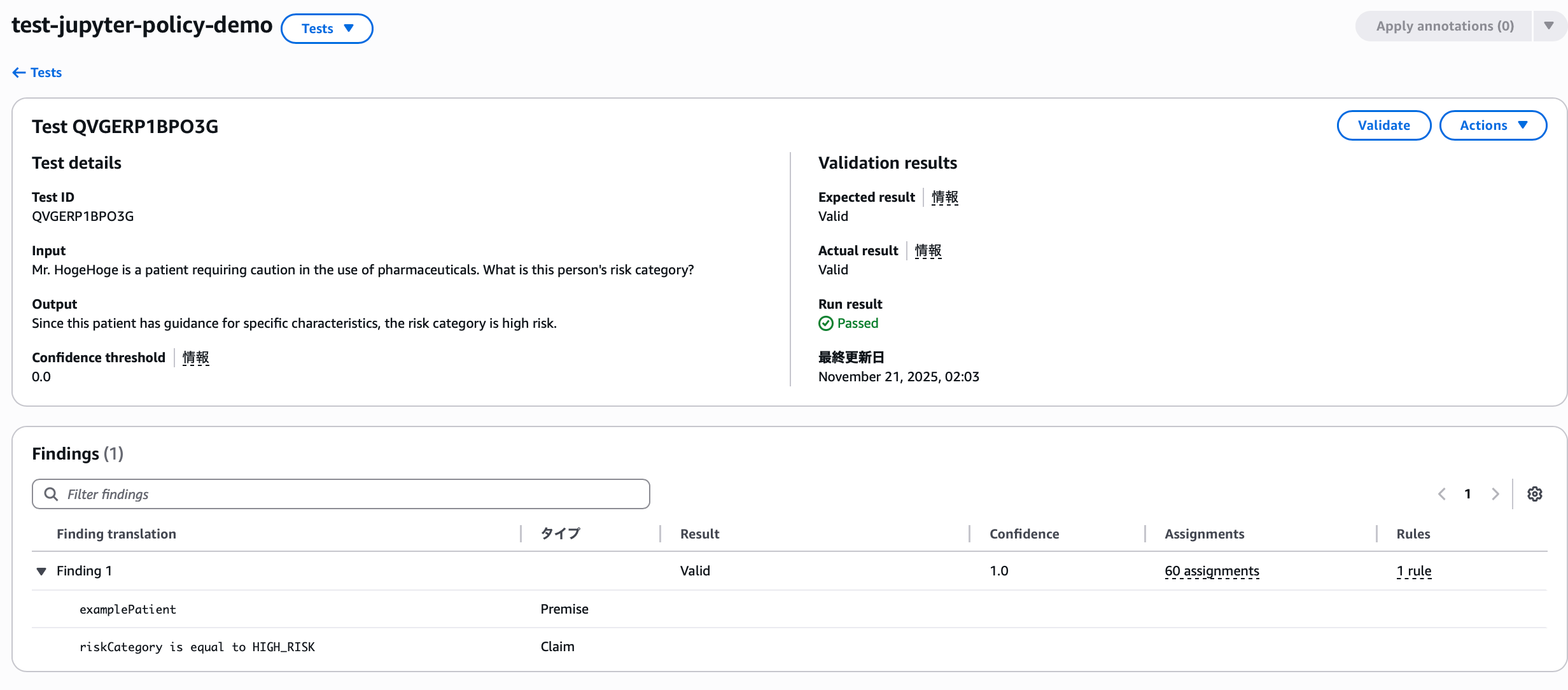
The result is, of course, successful.
You can see an added type here—it becomes a Premise that appears in QnA tests. Just as this question assumed the patient has characteristics, it's a type that provides context, preconditions, or conditions that affect how claims are evaluated.
Additionally, you can check whether Automated Reasoning is translating accurately by anticipating the confidence threshold for translation from natural language to formal logic.
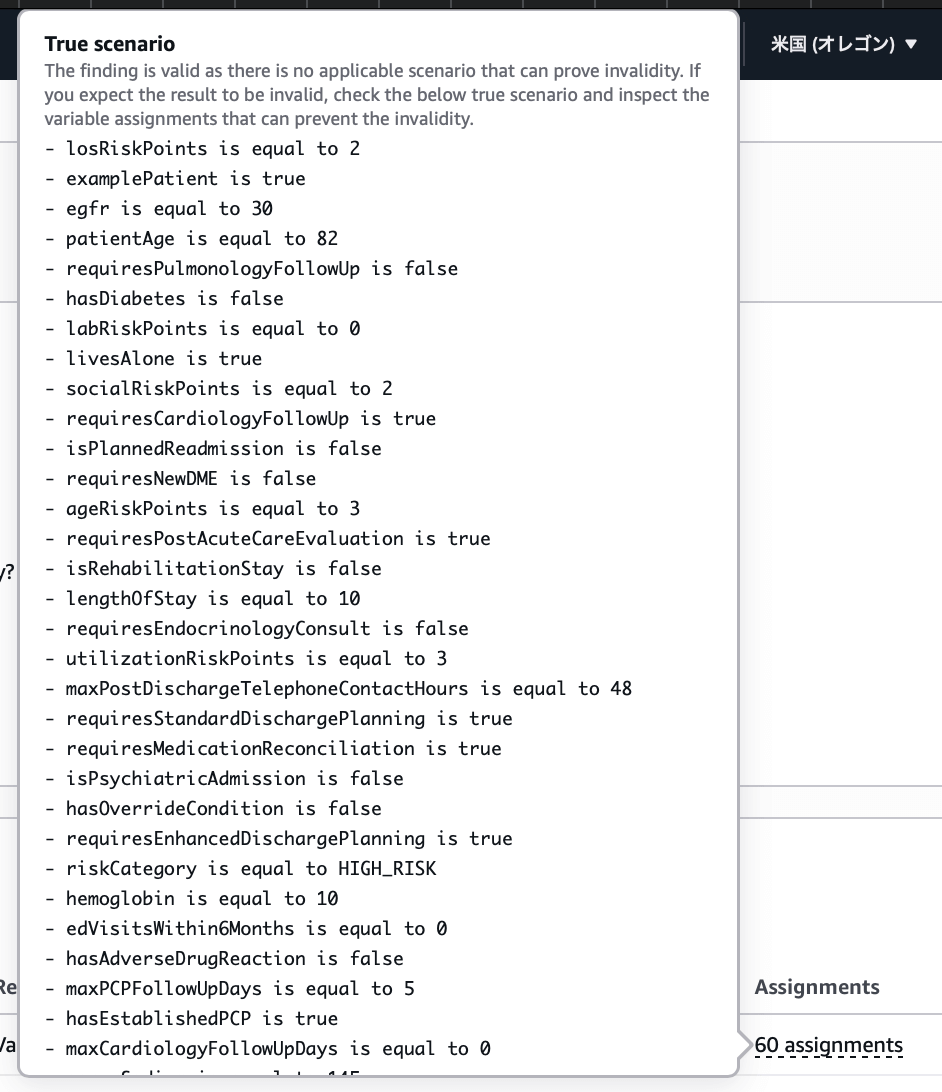
You can also view variable Assignments that prove whether findings are valid, allowing you to quickly check examples of correct and incorrect scenarios.
Tests repeat this process to provide correct policies to LLM applications. To apply this policy to an LLM application, you must attach it to AWS Bedrock Guardrails and use the Guardrail.
6. Conclusion
From here, the discussion moves to practical operations of how to perform Automated Reasoning by attaching the created policy to a Guardrail. However, since Automated Reasoning Checks applied to actual applications exist as one feature of Bedrock Guardrails, I think it's better to explain together with Guardrails. I'll introduce this along with new Bedrock Guardrails features in the future.
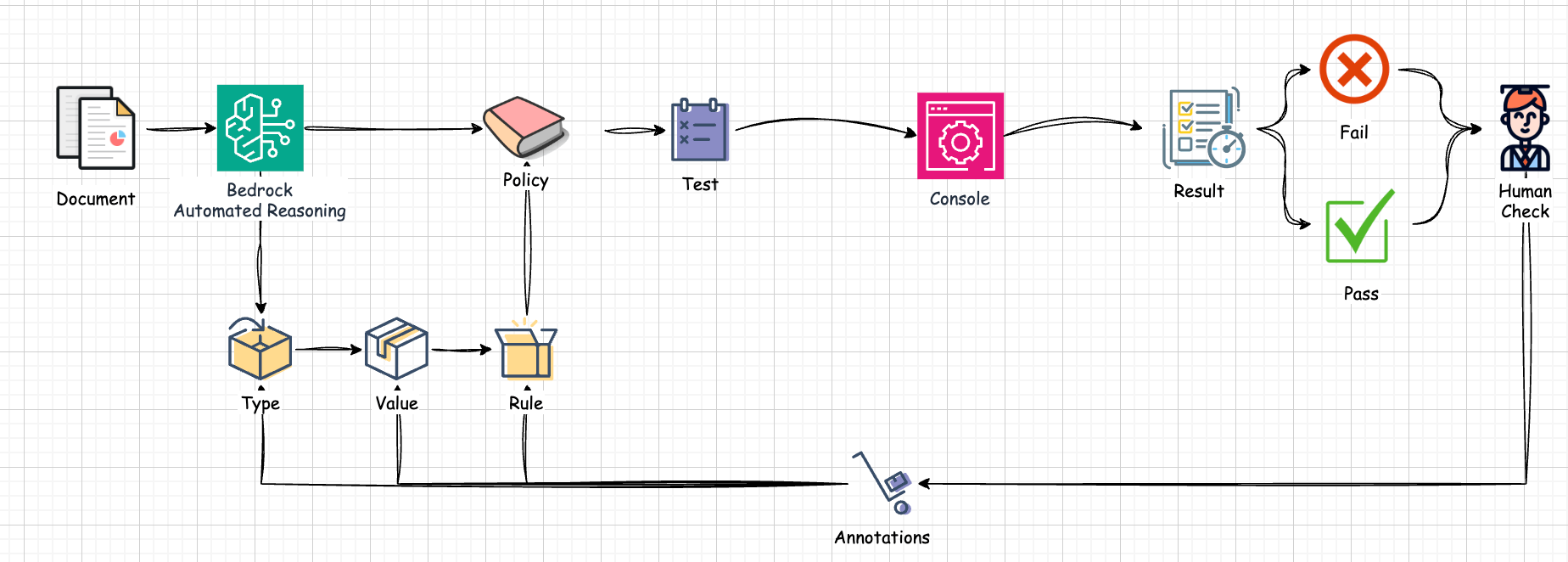
This article explained the concepts and mechanisms provided by AWS within the overall picture of Automated Reasoning, as well as the flow for designing and completing policies.
Automated Reasoning Checks are a generative AI feature provided by AWS—a tool for verifying the accuracy of AI-generated content. This prevents factual errors caused by AI hallucinations and uses mathematical logic and formal verification techniques to confirm accuracy. Specifically, through the process of policy creation, definition, testing, and annotation, it evaluates generative AI output and can prevent hallucinations. In other words, policies are auto-generated based on user-provided documents, and their accuracy is confirmed through testing. Policies built this way can achieve high accuracy in generative AI implementations through integration with AWS Bedrock Guardrails.
I hope this article has, in some way, deepened your understanding of Automated Reasoning.
https://www.linkedin.com/pulse/aws-introduces-automated-reasoning-checks-mathematical-certainty-lqvmc ↩︎
When released in 2024, it was introduced as Automated Reasoning Checks since integration with Guardrails was fundamental. However, in the August GA this year, Automated Reasoning emerged as an independent Bedrock feature. Therefore, this article uses Automated Reasoning Checks when functioning from Guardrails and Automated Reasoning when functioning independently. ↩︎

関連記事 | Related Posts



We are hiring!
【クラウドエンジニア】Cloud Infrastructure G/東京・大阪・福岡
KINTO Tech BlogWantedlyストーリーCloud InfrastructureグループについてAWSを主としたクラウドインフラの設計、構築、運用を主に担当しています。
【クラウドプラットフォームエンジニア】プラットフォームG/東京・大阪・福岡
プラットフォームグループについてAWS を中心とするインフラ上で稼働するアプリケーション運用改善のサポートを担当しています。