Building an AI Agent with GitHub Copilot

Introduction
Hello. I'm Yamada, and I work on developing and operating internal tools at the Platform Engineering Team, Platform Group of KINTO Technologies.
Please also check out my previous articles on Spring AI and Text-to-SQL!
In this article, I'd like to share how I built an AI Agent that automatically analyzes and gathers AWS resource dependencies for products built on AWS, using GitHub Copilot.
Background and Issues
The Platform Engineering Team develops and operates two internal tools: Configuration Management Database (CMDB) and an incident management tool (Incident Manager).
CMDB is a configuration management database system that centrally manages configuration information for internal products. It has various features including managing product owners and teams, vulnerability information management. One of these particular features is managing ARN information for AWS resources (ECS, RDS, ALB, CloudFront, etc.) associated with products.
For Incident Manager, there was a requirement to visualize the topology information (system architecture diagram) of the product where an incident occurred and highlight the root cause to help us promptly identify it and recover the system after the incident.
However, simply having AWS resource ARN information was insufficient to visualize topology information—we needed to understand the dependencies between resources (e.g., CloudFront -> ALB -> ECS -> RDS).
Previously, we needed to manually configure this dependency information, which led to the following issues:
- Manual updates to dependencies were required every time when new resources were added
- Complex system architectures causes the difficulty in understanding dependencies
- Human errors led to missing or incorrect dependency configurations
Solution Approach
To solve these issues, I decided to build an AI Agent that automatically analyzes and gathers AWS resource dependencies using the ARN information managed by CMDB.
After interactions with GitHub Copilot to proceed with the implementation on a trial-and-error basis, I completed an AI Agent with the following capabilities:
- Automatically analyzes dependencies between AWS resources, based on ARN information retrieved from CMDB
- Calls multiple AWS APIs to infer connection relationships from security groups and network configurations
- Saves gathered node (AWS resource) and edge (dependency) information to the database
- Used for showing a topology diagram when an incident occurs in Incident Manager
Technology Stack
- Development support tool: GitHub Copilot (Agent mode - Claude Sonnet 4.5)
- AI Agent Framework: LangGraph
- LLM: Amazon Bedrock (Claude Sonnet 4.5)
- Language: Python 3.12
- Key Libraries:
- LangChain, LangChain-AWS
- boto3 (AWS SDK for Python)
AI Agent Development Process
1. Initial Prompt
First, I asked GitHub Copilot to design the AI Agent with the following prompt, which is partially abbreviated and edited.
Using the AWS resource ARN information retrieved from CMDB's ARN management table,
implement an AI Agent that automatically analyzes and gathers dependencies between resources.

Technology Stack:
- LangGraph, LangChain
- Amazon Bedrock (Claude Sonnet 4.5)
- AWS SDK (boto3)
- Python 3.12

Functional Requirements:
- API Endpoint: POST /service_configurations
  - Parameters: sid, environment (both required)
- Search for ARNs in the ARN management table using sid and environment as conditions
- Using the retrieved CloudFront, S3, WAF, ALB, TargetGroup, ECS, RDS, ElastiCache ARN information, shape Nodes and Edges information with LLM and Agent (LangGraph)
- Save gathered information to DB

How to Retrieve Dependencies (Few-shot Examples):

### CloudFront -> S3/ALB Edge Determination Method
1. Get domain name using CloudFront API
   aws cloudfront get-distribution --id {distribution-id}
2. Get Origin from behavior information to determine Edge (relationship)
   - If DomainName contains s3: CloudFront -> S3
   - If DomainName contains ALB: CloudFront -> ALB

### TargetGroup -> ECS Edge Determination Method
1. Get target IP address using elbv2 API
   aws elbv2 describe-target-health --target-group-arn {arn}
2. Match with ECS task IP addresses to create Edge

### ECS -> RDS Edge Determination Method (determined by security permissions, not actual access)
1. Get ENI (Elastic Network Interface) ID from ECS task
   aws ecs describe-tasks --cluster {cluster} --tasks {task-arn}
2. Get ECS task security group ID from ENI
   aws ec2 describe-network-interfaces --network-interface-ids {eni-id}
3. Get RDS security group
   aws rds describe-db-instances --db-instance-identifier {instance-id}
4. Get inbound rules for RDS security group
   aws ec2 describe-security-groups --group-ids {sg-id}
5. Create Edge if ECS security group is included in RDS inbound rules

AWS APIs to be used:
- cloudfront:get_distribution
- cloudfront:list_distributions
- wafv2:list_web_acls
- wafv2:get_web_acl
- wafv2:get_web_acl_for_resource
- elbv2:describe_target_groups
- elbv2:describe_target_health
- elbv2:describe_load_balancers
- elbv2:describe_load_balancer_attributes
- ecs:list_clusters
- ecs:describe_tasks
- ecs:describe_task_definition
- ecs:list_tasks
- ecs:describe_services
- ec2:describe_network_interfaces
- ec2:describe_security_groups
- rds:describe_db_clusters
- rds:describe_db_instances
- elasticache:describe_replication_groups
- elasticache:describe_cache_clusters

Related DDL:
{ARN management table DDL}
{Node information table DDL}
{Edge information table DDL}

Important:
- First understand the current repository structure
- Organize and confirm the plan for the implementation before its start
- Consider extensibility as AWS APIs and Nodes to retrieve may increase
- Keep code simple and straightforward
Following this prompt, GitHub Copilot first analyzed the entire repository, understood the existing code, and then proposed the following implementation plan, which is partially abbreviated and edited.
(Read files...)

I have understood the repository, so I will summarize the design approach.

Understanding the Repository Structure
The existing project has the following structure:

・FastAPI-based API server
・LLM functionality using **Bedrock (Claude)**
・MySQL database connection functionality (implemented in text_to_sql.py)
・Functionality to call AWS APIs with boto3 (implemented in aws_diagram.py)
・LangChain dependencies (listed in pyproject.toml)

Implementation Approach
1. Architecture Design
Retrieve ARN information from ARN management table (DB)
    ↓
Gather Edges information by calling AWS APIs with LangGraph Agent
    ↓
Save Nodes/Edges information to tables (DB)
    ↓
Return response

2. Module Structure (Newly created files)
・`service_config_router.py`: FastAPI endpoint
・`service_config_agent.py`: Agent implementation using LangGraph
・`aws_tools.py`: AWS API call tool collection
・`service_config_db.py`: DB operations (ARN retrieval, Node/Edge saving)

3. Implementation Phases
・Phase 1 (DB layer): Implement ARN retrieval and Node/Edge saving functions
・Phase 2 (AWS tools layer): Implement CloudFront, ELB, ECS, RDS, etc. API call functions in LangChain Tool format
・Phase 3 (Agent layer): Build LangGraph StateGraph, pass tools to LLM to infer Edge information
・Phase 4 (Router layer): FastAPI endpoint, request validation, and response formatting

4. Key Design Points
・Extensibility: Whitelist approach makes it easy to add new AWS APIs
・Simplicity: Clearer state management with StateGraph and calling each tool using one function per API
・Data flow: Clear flow from API, Agent, AWS APIs, to data save to DB

5. Implementation Code Structure (Pseudocode)
(Code samples)

Is it okay to proceed with implementation based on the above design approach?
Once confirmed, I will start implementation in sequence.
Since the design approach was not significantly misaligned with what was in my head at this point, I had GitHub Copilot proceed with the implementation.
2. Iterative Correction Requests
Due to various factors including basic design I forgot to include in the prompt, detailed design I couldn't fully communicate, and prompt issues, the generated code didn't work perfectly on my first implementation attempt. I had to go back and forth with GitHub Copilot multiple times to repeatedly correct the code.
Since I forgot to include the architecture layer separation in the prompt, a large amount of business logic was implemented in the Controller layer.
There were calls to non-existent functions in the Bedrock model invocation process (it was using functions from a different version).
Error handling was insufficient.
Just while I thought it was working, part of Node and Edge information wasn't being retrieved.
I had to improve the Agent's prompts...
There were so many issues, but within a few hours, it started working as expected.
3. Final Completed Code
GitHub Copilot handled over 90% of the coding. Let me share some key excerpts of what the final code looked like.
Agent Implementation with LangGraph
This is the core part of the AI Agent. It defines the processing flow using LangGraph. The definition is partially abbreviated and edited.
def create_service_config_agent() -> StateGraph:
    """Create system configuration collection Agent"""
    workflow = StateGraph(AgentState)

    # Add nodes
    workflow.add_node("initialize_nodes", initialize_nodes)
    workflow.add_node("collect_edges", collect_edges_with_llm)

    # Set entry point
    workflow.set_entry_point("initialize_nodes")

    # Conditional branching: collect edges if nodes exist, otherwise end
    workflow.add_conditional_edges(
        "initialize_nodes",
        should_collect_edges,
        {
            "collect_edges": "collect_edges",
            "end": END
        }
    )

    workflow.add_edge("collect_edges", END)

    return workflow.compile()

def collect_edges_with_llm(state: AgentState) -> AgentState:
    """Collect edge information using LLM and tools"""
    llm = get_llm_for_agent()
    llm_with_tools = llm.bind_tools(AWS_TOOLS)

    prompt = f"""
    You are an expert in analyzing AWS resource dependencies.

    # Task
    From ARN information of the following AWS resources (Nodes), identify and infer the connection relationships (Edges) between resources.
    Understand the characteristics of each AWS service and common architecture patterns, and call appropriate AWS APIs to verify connections.

    # Available Nodes
    {nodes_summary}

    # Available Tools
    1. **call_aws_api**: A tool that can call permitted AWS APIs
      - Can retrieve resource details, configurations, and related resources

    2. **extract_resource_id_from_arn**: Extract resource ID and other information from ARN
      - Can retrieve parameters (ID, name, etc.) needed for API calls

    # Available AWS APIs (no others can be used)
    - cloudfront:get_distribution
    - wafv2:get_web_acl_for_resource
    - elbv2:describe_target_groups
    ...

    # Edge Detection Methods
    Infer and investigate connections between resources from the following perspectives:

    ## Common Connection Patterns
    1. **Frontend layer**: CloudFront -> S3/ALB, WAF -> CloudFront/ALB, Route53 domain -> CloudFront
    2. **Load balancer layer**: ALB -> Target Group -> ECS/EC2
    3. **API layer**: API Gateway -> Lambda
    4. **Application layer**: ECS -> RDS/ElastiCache (via security groups), Lambda -> RDS (via security groups)
    5. **Data layer**: RDS, ElastiCache

    ## Connection Detection Approach
    - **Configuration-based**: When resource configuration contains ARNs or IDs of other resources (e.g., CloudFront Origins settings)
    - **Network-based**: When permitted by security group inbound rules (e.g., ECS -> RDS)
    - **Service characteristics**: Connections that can be logically inferred from each AWS service's role (e.g., TargetGroup -> ECS)

    ## Important Investigation Points
    - **ARN analysis**: First analyze ARN with extract_resource_id_from_arn to identify resource type and required parameters
    - **Incremental investigation**: Don't call all APIs at once; determine the next needed API based on results
    - **Security groups**: Verify ECS/RDS/ElastiCache connections through security group inbound rules
    - Check if ECS ENI -> Security Group ID -> is included in RDS/ElastiCache SG inbound rules
    - **Error handling**: Continue investigation even if unauthorized APIs or errors are returned

    # Few-shot Examples (must be referenced)
    ## Example 1: ECS -> RDS Investigation
    1. Get ECS task ENI: call_aws_api("ecs", "describe_tasks", ...)
    2. Get SG from ENI: call_aws_api("ec2", "describe_network_interfaces", ...)
    3. Get RDS SG: call_aws_api("rds", "describe_db_instances", ...)
    4. Verify SG match -> Create Edge
    ...

    # Important Notes
    - Check all resource combinations
    - Continue investigation even if API errors occur
    - Ignore RDS snapshot, parameter group, subnet group, etc.
    - Determine connectivity by security groups

    # Output Format
    When investigation is complete, return results in the following JSON format:
    ```json
    {{
    "nodes": [
        {{
        "service_name": "cloudfront",
        "arn": "xxx",
        "resource": ""
        }}
    ],
    "edges": [
        {{
        "from_arn": "xxx",
        "to_arn": "xxx",
        "details": "xxx"
        }}
    ]
    }}
    ```
    """

    messages = [HumanMessage(content=prompt)]

    try:
        max_iterations = 30  # Maximum iteration count
        edges = []

        for iteration in range(max_iterations):
            response = llm_with_tools.invoke(messages)
            messages.append(response)

            # Check if there are tool calls
            if hasattr(response, 'tool_calls') and response.tool_calls:
                # Execute tools
                tool_node = ToolNode(AWS_TOOLS)
                tool_results = tool_node.invoke({"messages": messages})

                # Add tool results to messages
                messages.extend(tool_results["messages"])

            else:
                # If no tool calls, process as final response
                try:
                    # Create LLM for structured response
                    structured_llm = llm.with_structured_output(GraphResult)

                    # Add final result summary prompt
                    final_prompt = """
                        Investigation complete. Return all discovered edges and new nodes (such as domain names)
                        in JSON format.
                    """
                    messages.append(HumanMessage(content=final_prompt))

                    # Get structured response
                    result = structured_llm.invoke(messages)

                    edges = [edge.model_dump() for edge in result.edges]
                    new_nodes = [node.model_dump() for node in result.nodes]

                    # Add new nodes returned by LLM (such as domain names) to existing node list
                    if new_nodes:
                        state["nodes"].extend(new_nodes)

                except Exception as e:
                    # Fallback processing on error
                    ...

                break

        state["edges"] = edges
        state["current_step"] = "edges_collected"
        state["messages"] = messages

    except Exception as e:
        ...
        state["edges"] = []

    return state
AWS API Call Tools
These are the tools used by the Agent. A whitelist approach ensures the safety of executable AWS APIs. The tools are partially abbreviated and edited.
# Whitelist of allowed AWS APIs
ALLOWED_AWS_APIS: Set[str] = {
    # CloudFront
    "cloudfront:get_distribution",
    "cloudfront:list_distributions",

    # WAF
    "wafv2:list_web_acls",
    "wafv2:get_web_acl",
    "wafv2:get_web_acl_for_resource",
    ...
}


@tool
def call_aws_api(
    service_name: str,
    method_name: str,
    parameters: Dict[str, Any],
    region: str = "ap-northeast-1"
) -> Dict[str, Any]:
    """General AWS API call tool

    This tool can only call permitted AWS APIs.
    Call the AWS APIs needed to retrieve Edge information.

    Args:
        service_name: AWS service name (lowercase)
            Permitted: 'cloudfront', 'wafv2', 'elbv2', 'ecs', 'ec2', 'rds', 'elasticache', 'apigateway', 'lambda'
        method_name: Method name to call (boto3 method name, snake_case)
            Examples: 'get_distribution', 'describe_target_health', 'describe_security_groups'
        parameters: Dictionary of parameters to pass to the method
            Examples: {"Id": "ABC123"} or {"GroupIds": ["sg-12345"]}
        region: AWS region (default: ap-northeast-1)

    Returns:
        Dictionary of API call results
        Returns {"error": "error message"} in case of error

    List of permitted APIs:
        - cloudfront:get_distribution
        - cloudfront:list_distributions
        - wafv2:list_web_acls
        - wafv2:get_web_acl
        - wafv2:get_web_acl_for_resource
        - ...

    Examples:
        # Get CloudFront Distribution information
        call_aws_api(
            service_name="cloudfront",
            method_name="get_distribution",
            parameters={"Id": "ABC123"}
        )

        # Get target group health information
        call_aws_api(
            service_name="elbv2",
            method_name="describe_target_health",
            parameters={"TargetGroupArn": "arn:aws:elasticloadbalancing:..."}
        )

        # Get security group information
        call_aws_api(
            service_name="ec2",
            method_name="describe_security_groups",
            parameters={"GroupIds": ["sg-12345"]}
        )

        # Get ECS task information
        call_aws_api(
            service_name="ecs",
            method_name="describe_tasks",
            parameters={"cluster": "my-cluster", "tasks": ["arn:aws:ecs:..."]}
        )
    """
    try:
        # Step 1: Validate if API is in whitelist
        is_valid, error_message = validate_aws_api(service_name, method_name)

        if not is_valid:
            return {
                "error": error_message,
                "error_type": "unauthorized_api",
                "allowed_apis": get_allowed_apis_list()
            }

        # Step 2: Get client
        client = get_aws_client(service_name, region)

        # Step 3: Check if method exists
        if not hasattr(client, method_name):
            return {"error": error_msg, "available_methods": dir(client)}

        # Step 4: Get method and execute
        method = getattr(client, method_name)
        response = method(**parameters)

        return response

    except Exception as e:
        ...
Here are the key points I focused on in this implementation:
- Whitelist approach: Prevents LLM from calling arbitrary AWS APIs, ensuring safety
- Dynamic API calls: Dynamically executes boto3 methods using Python's
getattr() - Detailed docstrings: Includes argument descriptions, usage examples, and permitted API list to allow LLM to understand how to use the tools
- Extensibility: Adding new APIs only requires adding them to
ALLOWED_AWS_APIS
Topology Rendering in Incident Manager
I created a system topology diagram in Incident Manager using the Node and Edge information gathered by the AI Agent. Here is how it finally looked like:
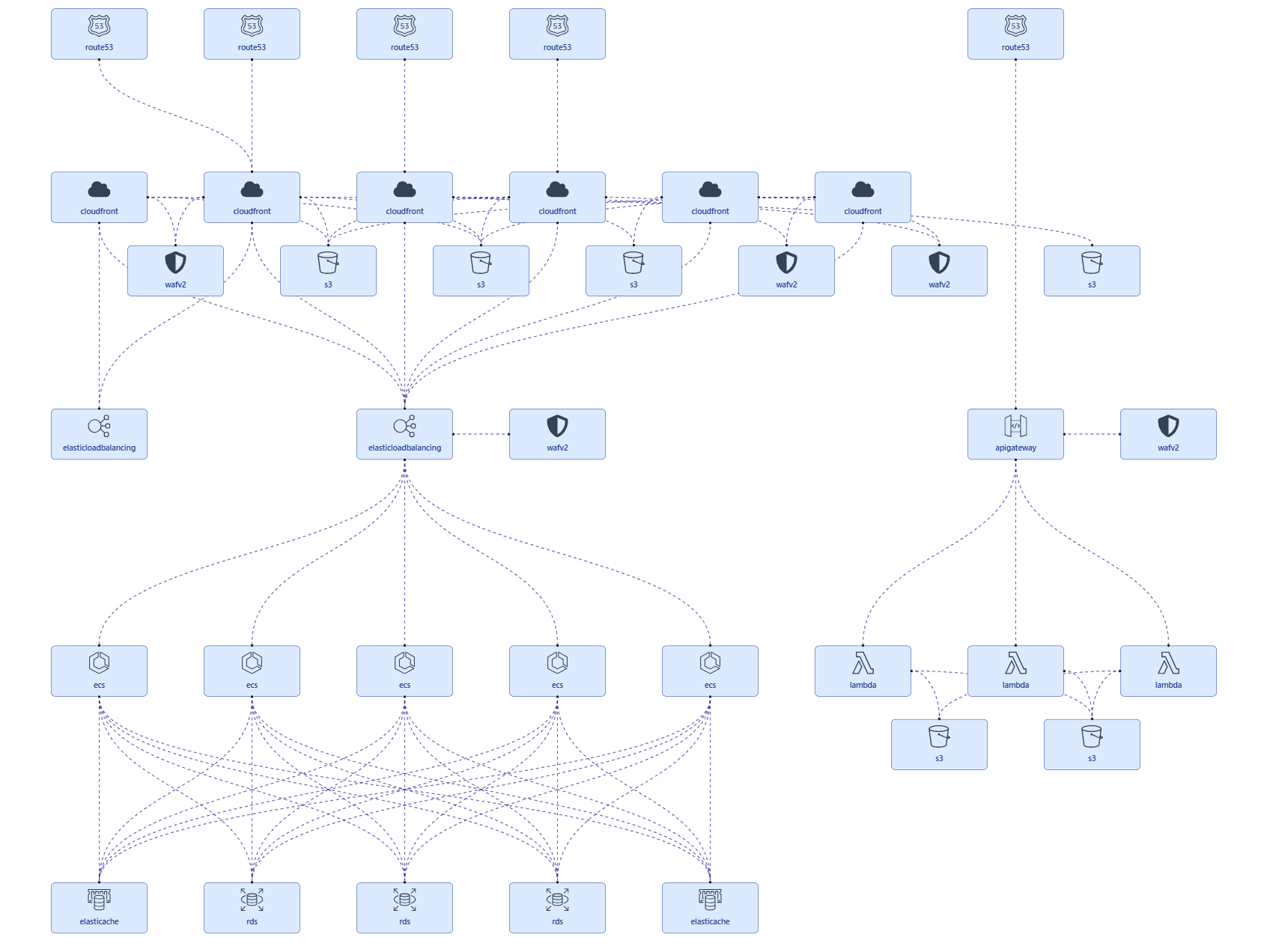
When a system failure occurs, the affected area turns red, helping us to intuitively understand the system architecture and failure location at a glance!
Thoughts on Implementing with GitHub Copilot
Positive Aspects
-
Significant reduction in development time
- This implementation was completed in about a day. Without GitHub Copilot, I would have needed to start by learning LangGraph, which would have taken at least several weeks.
-
High-quality implementation plan proposals
- While there's still room for improvement, following detailed information about what I wanted to achieve and the design in the initial prompt, GitHub Copilot generated the following high-quality implementation plan:
- Proposed a consistent design based on the understanding of the existing repository structure
- Proposed a design with both extensibility and simplicity
- While there's still room for improvement, following detailed information about what I wanted to achieve and the design in the initial prompt, GitHub Copilot generated the following high-quality implementation plan:
-
Interactive quality improvement
- When I pointed out concerns during implementation, corrections were made immediately:
- Architecture improvements
- Library version issues
- Adding error handling
- And more
- When I pointed out concerns during implementation, corrections were made immediately:
Challenging Aspects
Validation of generated code is essential
Code generated by generative AI, not just by GitHub Copilot, requires the person who gave the instructions to take responsibility for reviewing it. In AI-assisted coding, review takes the most time.
I reviewed the code from the following perspectives:
- Compliance with existing code conventions: Does it follow the repository's naming conventions and coding style?
- Requirements coverage: Are all specified functional requirements implemented without omissions?
- Architecture patterns: Is there appropriate layer separation? Are responsibilities clear?
- Implementation appropriateness: Are there more common or simpler implementation methods? Is it unnecessarily complex?
- Error handling: Is exception handling properly implemented? Are error messages appropriate?
- Operational verification: Does it work as intended when the app is actually started?
Future Plans
Adding more Nodes and Edges to gather
Currently, as an initial trial, I limited the Nodes and Edges retrieval to specific AWS services.
The prompt allows for easy extension as retrieved AWS resources were added, and then the whitelist used for the AWS API call tools includes permitted APIs to retrieve Edge information. Therefore, I plan to gradually increase the number of gathered resources going forward.
Creating prompt templates
Since there were oversights in the initial instructions this time, I created a prompt template, which is reusable and helpful to implement new features. By including the following content, I aim to generate higher-quality code from the initial instructions:
- Feature overview
- Technology stack (framework, libraries, language version)
- Functional requirements
- Architecture requirements (layer structure, error handling, etc.)
- Non-functional requirements (extensibility, performance, security)
- Confirmation items before implementation (understanding repository structure, checking consistency with existing code, etc.)
- Important notes (placed at the end of the prompt with clearly specific rules that must be followed)
Summary
This time, I implemented an AI Agent that gathers system topology information for about one day using GitHub Copilot.
With the implemented AI Agent, AWS resource dependencies that previously required manual configuration are now automatically gathered, enabling topology visualization when an incident arises in Incident Manager.
I plan to continue actively utilizing generative AI, including GitHub Copilot, to increase development productivity.

関連記事 | Related Posts



We are hiring!
シニア/フルスタックエンジニア(JavaScript・Python・SQL)/契約管理システム開発G/東京
契約管理システム開発グループについて◉KINTO開発部 :66名・契約管理開発G :9名★←こちらの配属になります・KINTO中古車開発G:9名・KINTOプロダクトマネジメントG:3名・KINTOバックエンド開発G:16名・KINTO開発推進G:8名・KINTOフロントエンド...
【クラウドエンジニア】Cloud Infrastructure G/東京・大阪・福岡
KINTO Tech BlogWantedlyストーリーCloud InfrastructureグループについてAWSを主としたクラウドインフラの設計、構築、運用を主に担当しています。