Stop Console Clicking: Managing Multi-Environment AWS Parameter Store with YAML and GitHub Actions
Note: This article was translated from Japanese with the assistance of AI.
This article is the Day 10 entry of the KINTO Technologies Advent Calendar 2025🎅🎄
Table of Contents
Introduction
Summary
What We Built
Features
Prerequisites
Operational Best Practices
Architecture
Implementation Details
Usage
Results
Conclusion
Introduction
Hi, I'm Miyashita, an engineer in the Common Services Development Group at KINTO Technologies.
Modern development environments using AWS and similar platforms are easy to scale up and down, but this flexibility often leads to environment sprawl. Our development setup has grown to include dev, dev2, stg, stg2...stg5, ins, prod, and more.
As a result, the values managed in AWS Systems Manager Parameter Store have multiplied (number of environments × number of parameters), leading to frequent mistakes.
Here are some examples of errors we encountered:
- Updated Parameter Store for dev but forgot to update stg
- KEY and VALUE were correct, but forgot to add tags
- Deployment failed because we forgot to register a newly required parameter
- When manually copying from dev to stg, accidentally copied values that should have been environment-specific
Additionally, it was difficult to know the current state of Parameter Store values. Checking each environment through the browser was tedious and often got postponed, creating a vicious cycle of more careless mistakes.
To solve this, we built an automation system based on the principle of "consolidating all environment parameters in a local YAML file and syncing that file with AWS." This article introduces that approach.
Summary
- Automated AWS Parameter Store management for 10+ environments × 50+ parameters because manual management was too cumbersome
- Visualize all parameters in YAML + one-click sync with GitHub Actions
- Eliminated update oversights, careless mistakes, and tedious manual copy-paste work
What We Built
We built this system combining these three components:
- YAML file - Centralized management of Parameter Store values for all environments
- Python scripts - Sync processing between YAML and AWS
- GitHub Actions - One-click deployment to all environments
Features
1. YAML Visualization
Previously, checking Parameter Store values for each environment required logging into the AWS console multiple times, switching accounts for each environment.
Now, opening a single YAML file in the repository shows all parameters for all environments at a glance.
parameters:
  # Parameters with different values per environment
  - key: api/endpoint
    description: "API endpoint"
    environment_values:
      dev:  "https://dev-api.example.com"
      stg:  "https://stg-api.example.com"
      prod: "https://prod-api.example.com"

  # Common value across all environments
  - key: app/timeout
    description: "Timeout setting (seconds)"
    default_value: "30"

  # Sensitive information (SecureString)
  # Value retrieved from GitHub Secrets via environment variables (e.g., SSM__DB__PASSWORD)
  - key: db/password
    description: "Database password"
    type: "SecureString"
Benefits:
- See at a glance which value is used in which environment
- Git-managed, so change history is trackable
- PR reviews can catch value errors before deployment
2. One-Click Sync
Simply manually trigger the GitHub Actions workflow, and all environments' Parameter Stores automatically sync with the YAML contents.
Using matrix strategy, multiple environments (dev, stg, prod) run in parallel, so execution time stays nearly constant even as environments increase.
No more clicking around the AWS console switching between environments.
Prerequisites
This system works under the following conditions:
- AWS CLI available on GitHub Actions runners
- Permissions for Parameter Store:
ssm:GetParametersByPath,ssm:PutParameter,ssm:AddTagsToResource - GitHub Actions can access AWS (via Access Key or OIDC)
- Python 3.11 +
pyyamlavailable
Operational Best Practices
While automation brings convenience, we must also consider the risk of mistakes. Our team implements these practices:
Restrict SecureString Operation Permissions
We limit who can edit GitHub Secrets, minimizing the number of people who can handle sensitive information.
Separate Workflow with Approval for Production
When updating Parameter Store for production, we use a dedicated production workflow that includes a Slack approval step. The approval request displays the list of parameters to be updated, so reviewers can confirm "what will change" before approving. This prevents accidental production updates.
Architecture
Implementation Details
Directory Structure
$ tree .github
.github
├── aws-params.yml
├── scripts
│   ├── aws_param_common.py
│   └── update_aws_params.py
└── workflows
    └── sync-parameters.yml
YAML Design
All environment parameters are consolidated in .github/aws-params.yml (see the "Features" section for YAML examples).
Handling SecureString
Hardcoding sensitive information like DB passwords in YAML is a security risk.
Instead, we separated responsibilities: "YAML contains only key definitions" while "actual values are in GitHub Secrets".
The Python script checks the YAML definition, and if type: SecureString, it reads from the corresponding environment variable.
Naming Convention:
YAML key: db/password
→ Environment variable: SSM__DB__PASSWORD
Separating SecureString Values by Environment
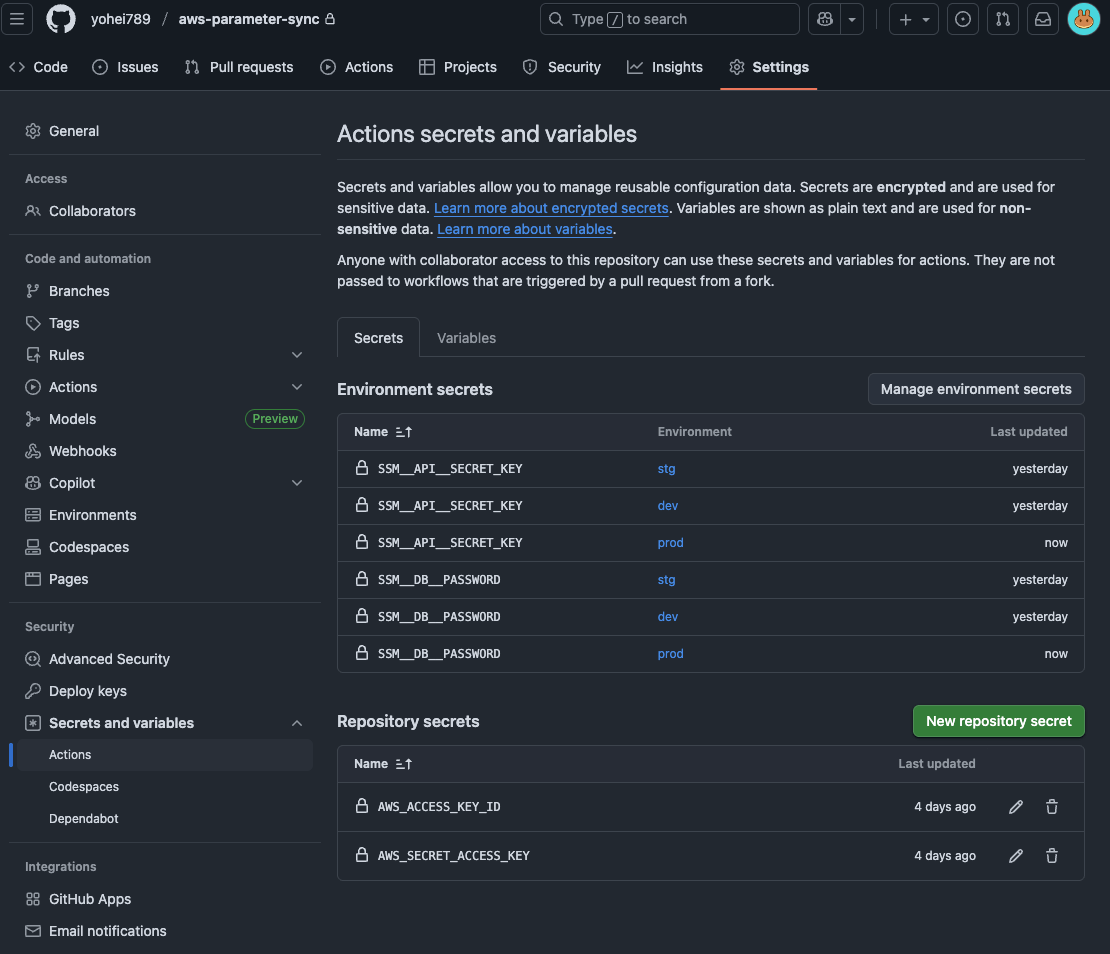
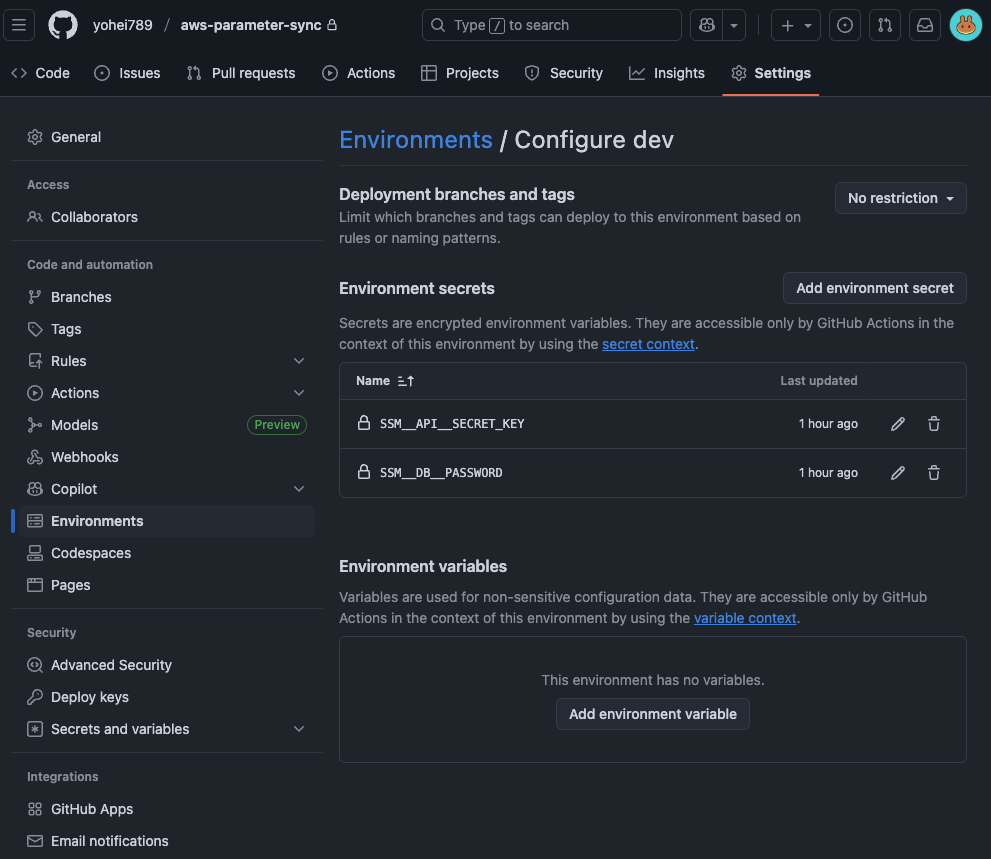
DB passwords often differ by environment. Using GitHub Actions Environments feature, you can set different Secrets for each environment.
Setup Steps:
- Create environments in GitHub repository Settings → Environments (
dev,stg,prod) - Register
SSM__DB__PASSWORDetc. in each environment's Secrets (different values per environment) - Specify
environment: ${{ matrix.env }}in the workflow
This way, the dev environment automatically uses dev's DB password, and stg uses stg's.
Note: Parameter Store vs Secrets Manager
You might think "Shouldn't sensitive information go in Secrets Manager?" Here's a comparison:
| Parameter Store (SecureString) | Secrets Manager | |
|---|---|---|
| Cost | Standard parameters are free | $0.40/secret/month |
| Rotation | Manual | Automatic rotation available |
| Best for | API keys with low update frequency | When automatic DB password rotation is needed |
In most cases, Parameter Store (SecureString) is sufficient. Consider Secrets Manager when you need "automatic RDS password rotation."
Python Script Structure
aws_param_common.py - Common Functions
#!/usr/bin/env python3
"""AWS Parameter Store Common Functions"""

import os
import sys
import json
import subprocess
from typing import Dict, Any, Tuple
import yaml


def get_env_name() -> str:
    """Get environment name"""
    env = os.environ.get("ENV_NAME")
    if not env:
        print("Error: ENV_NAME environment variable is not set")
        sys.exit(1)
    return env


def get_prefix(env: str) -> str:
    """Return prefix based on environment"""
    return f"/{env}/app/config/"


def load_yaml_config() -> Tuple[Dict[str, Any], set]:
    """Load YAML file"""
    yaml_path = os.path.join(os.path.dirname(__file__), "..", "aws-params.yml")
    with open(yaml_path, "r", encoding="utf-8") as f:
        config = yaml.safe_load(f)
    yaml_keys = {param["key"] for param in config.get("parameters", [])}
    return config, yaml_keys


def get_existing_params(env: str) -> Dict[str, Dict[str, Any]]:
    """Get existing parameters from AWS SSM (with pagination support)"""
    prefix = get_prefix(env)
    existing_params = {}
    next_token = None

    while True:
        cmd = [
            "aws", "ssm", "get-parameters-by-path",
            "--path", prefix,
            "--recursive",
            "--with-decryption",
            "--output", "json"
        ]
        if next_token:
            cmd.extend(["--next-token", next_token])

        try:
            result = subprocess.run(cmd, check=True, capture_output=True, text=True)
            data = json.loads(result.stdout)
            params_data = data.get("Parameters", [])
        except subprocess.CalledProcessError as e:
            print(f"Warning: Failed to get parameters: {e.stderr}")
            return {}

        for param in params_data:
            key = param["Name"].replace(prefix, "")
            existing_params[key] = {
                "value": param["Value"],
                "type": param["Type"],
                "version": param.get("Version", 1)
            }

        next_token = data.get("NextToken")
        if not next_token:
            break

    return existing_params


def get_param_value(param: Dict[str, Any], env: str) -> str | None:
    """Get parameter value (SecureString from env vars, others from YAML)"""
    # For SecureString, get from environment variable
    if param.get("type") == "SecureString":
        env_var_name = "SSM__" + param["key"].upper().replace("/", "__")
        value = os.environ.get(env_var_name)
        if not value:
            print(f"Warning: Environment variable {env_var_name} for SecureString {param['key']} is not set")
            return None
        return value

    # Environment-specific value
    env_values = param.get("environment_values", {})
    if env in env_values:
        return str(env_values[env])

    # Default value
    if "default_value" in param:
        return str(param["default_value"])
    return None


def validate_param(param: Dict[str, Any], env: str) -> Tuple[bool, str, Dict[str, Any] | None]:
    """Validate parameter"""
    key = param.get("key")
    if not key:
        return False, "key is not defined", None

    value = get_param_value(param, env)
    if value is None:
        return False, f"{key}: value for environment {env} is not defined", None

    param_info = {
        "key": key,
        "value": value,
        "type": param.get("type", "String"),
        "description": param.get("description", "")
    }
    return True, "", param_info


def update_parameter(param_info: Dict[str, Any], env: str) -> bool:
    """Update parameter"""
    prefix = get_prefix(env)
    full_name = prefix + param_info["key"]

    cmd = [
        "aws", "ssm", "put-parameter",
        "--name", full_name,
        "--value", param_info["value"],
        "--type", param_info["type"],
        "--overwrite"
    ]
    if param_info.get("description"):
        cmd.extend(["--description", param_info["description"]])

    try:
        subprocess.run(cmd, check=True, capture_output=True, text=True)
        add_tags(full_name, env)  # Add tags
        return True
    except subprocess.CalledProcessError as e:
        print(f"Error: Failed to update {param_info['key']}: {e.stderr}")
        return False


def add_tags(parameter_name: str, env: str) -> bool:
    """Add tags to parameter"""
    cmd = [
        "aws", "ssm", "add-tags-to-resource",
        "--resource-type", "Parameter",
        "--resource-id", parameter_name,
        "--tags",
        f"Key=Environment,Value={env}",
        "Key=SID,Value=backend-api"
    ]
    try:
        subprocess.run(cmd, check=True, capture_output=True, text=True)
        return True
    except subprocess.CalledProcessError as e:
        print(f"Warning: Failed to add tags: {e.stderr}")
        return False
Key Points:
get_existing_params: Pagination support for 50+ parametersget_param_value: SecureString from environment variables, regular parameters from YAMLupdate_parameter: Callsadd_tagsafter parameter update to apply tags
About Tags
Tags are automatically applied when creating parameters. Tags are useful for searching in the AWS console and cost management, and some systems require tags to read parameters.
| Tag | Value | Description |
|---|---|---|
Environment |
dev, stg, prod |
Environment name automatically set at runtime |
SID |
backend-api |
Service identifier (replace with your service name) |
update_aws_params.py - Update Script
#!/usr/bin/env python3
"""AWS Parameter Store Update Script"""

import sys
import aws_param_common as common


def update_parameters():
    """Update parameters and report results"""
    env = common.get_env_name()
    print(f"=== Environment: {env} ===")
    print(f"Prefix: {common.get_prefix(env)}")
    print()

    config, yaml_keys = common.load_yaml_config()
    existing_params = common.get_existing_params(env)
    print(f"Existing parameters: {len(existing_params)}")
    print()

    updated_params = []
    skipped_params = []
    failed_params = []

    for param in config.get("parameters", []):
        is_valid, error_msg, param_info = common.validate_param(param, env)

        if not is_valid:
            print(f"[Skip] {error_msg}")
            continue

        param_key = param_info["key"]
        value = param_info["value"]

        # Compare with existing value
        if param_key in existing_params:
            if existing_params[param_key]["value"] == value:
                print(f"[Skip] {param_key}: no change")
                skipped_params.append(param_key)
                continue
            print(f"[Update] {param_key}: updating value")
        else:
            print(f"[New] {param_key}: adding new parameter")

        # Update parameter
        success = common.update_parameter(param_info, env)
        if success:
            updated_params.append(param_key)
            print(f"  ✓ Done")
        else:
            failed_params.append(param_key)
            print(f"  ✗ Failed")

    # Result summary
    print()
    print("=== Summary ===")
    print(f"Updated: {len(updated_params)}")
    print(f"Skipped (no change): {len(skipped_params)}")
    print(f"Failed: {len(failed_params)}")

    if failed_params:
        print()
        print("Failed parameters:")
        for key in failed_params:
            print(f"  - {key}")
        sys.exit(1)

    print()
    print("✓ Completed successfully")


if __name__ == "__main__":
    update_parameters()
Key Points:
- Skip parameters with unchanged values (prevent unnecessary updates)
- Output statistics as summary
- Exit with code 1 on failure
GitHub Actions Workflow
name: Sync AWS Parameter Store

on:
  workflow_dispatch:  # Manual trigger

jobs:
  sync-parameters:
    runs-on: ubuntu-latest
    strategy:
      matrix:
        env: [dev, stg, prod]
    environment: ${{ matrix.env }}  # Use environment-specific Secrets

    steps:
      - name: Checkout repository
        uses: actions/checkout@v4

      - name: Setup Python
        uses: actions/setup-python@v5
        with:
          python-version: '3.11'

      - name: Install dependencies
        run: pip install pyyaml

      - name: Configure AWS Credentials
        uses: aws-actions/configure-aws-credentials@v4
        with:
          aws-access-key-id: ${{ secrets.AWS_ACCESS_KEY_ID }}
          aws-secret-access-key: ${{ secrets.AWS_SECRET_ACCESS_KEY }}
          aws-region: ap-northeast-1

      - name: Sync Parameters
        env:
          ENV_NAME: ${{ matrix.env }}
          # For SecureString (from environment-specific GitHub Secrets)
          SSM__DB__PASSWORD: ${{ secrets.SSM__DB__PASSWORD }}
          SSM__API__SECRET_KEY: ${{ secrets.SSM__API__SECRET_KEY }}
        run: |
          cd .github/scripts
          python update_aws_params.py
Key Points:
strategy.matrixruns multiple environments in parallelenvironment: ${{ matrix.env }}uses environment-specific Secrets (different DB passwords for dev and prod)- SecureString values passed to script via environment variables
- Parameters with unchanged values are automatically skipped
Usage
1. Adding/Changing Parameters
Just edit .github/aws-params.yml and submit a PR.
parameters:
  # Add new parameter
  - key: feature/enable_payment_v2
    description: "Enable new payment system"
    environment_values:
      dev:  "true"
      stg:  "false"
      prod:  "false"
2. Deploying to All Environments
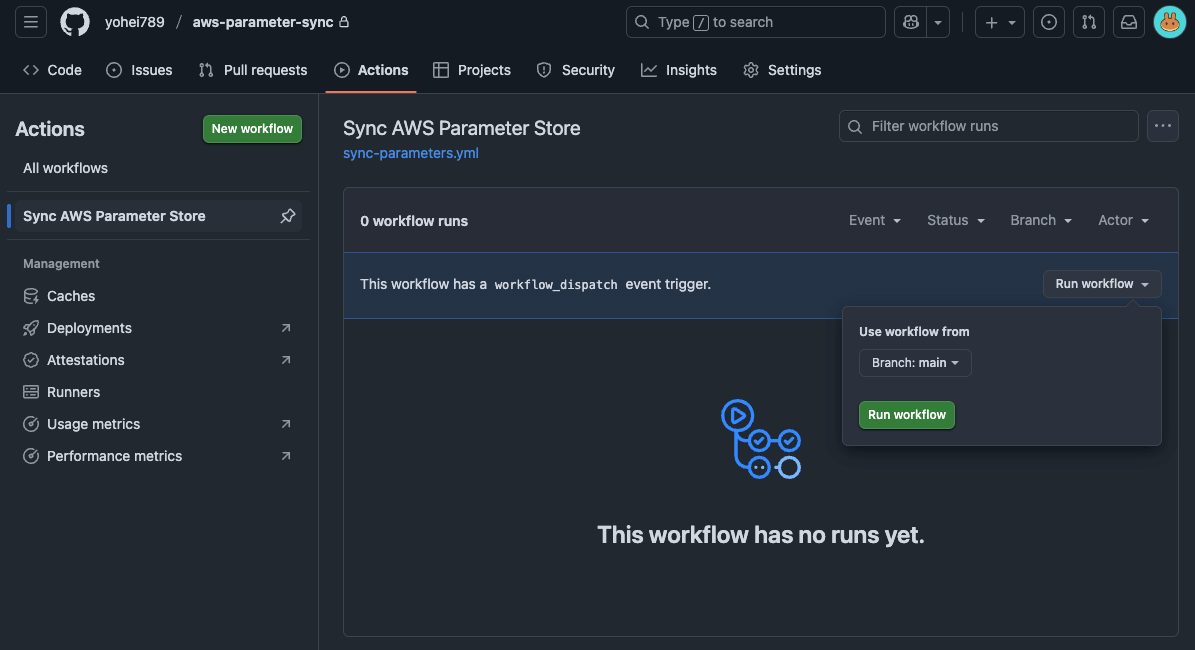
- Open GitHub Actions page
- Select
Sync AWS Parameter Store - Click
Run workflowbutton - Deploys to all environments in parallel
3. Adding SecureString Parameters
- Add definition to YAML:
- key: payment/api_key
  description: "Payment API key"
  type: "SecureString"
- Register value in GitHub Environments:
Settings → Environments → Register in each environment's Secrets (dev, stg, prod)
Secret name: SSM__PAYMENT__API_KEY
Value: (actual value, different per environment)
- Add to workflow file's environment variables section:
env:
  SSM__PAYMENT__API_KEY: ${{ secrets.SSM__PAYMENT__API_KEY }}
4. Demo
-
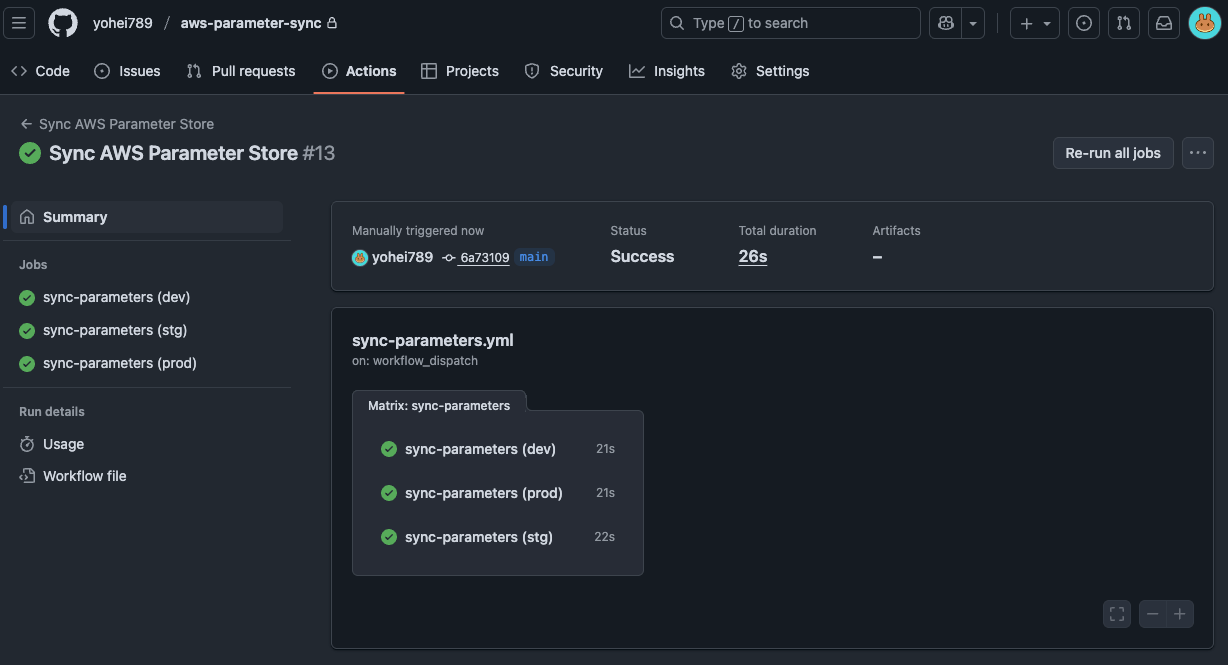
Select and run the action we created from the GitHub Actions page.
-
Confirm the action completed successfully. You can see each environment ran in parallel.
-
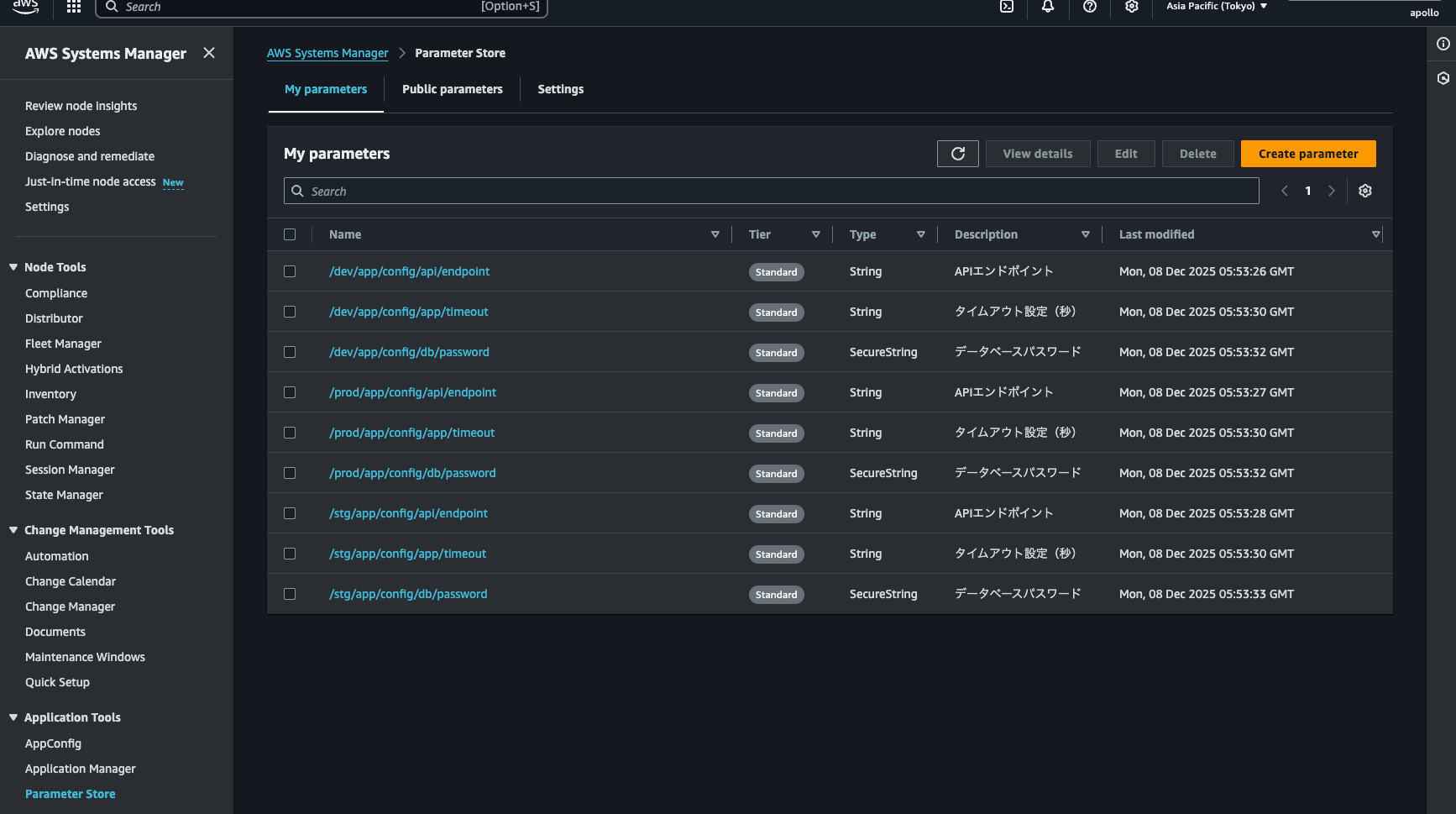
Open the AWS Parameter Store console to verify. The parameters are registered. Success!
Results
Concrete Results
- Work time: Environments × 5 min → One click (50 min saved for 10 environments)
- Update oversights: Several per month → Zero
- Verification: Open AWS console → Just look at YAML
Conclusion
The "too many environments" problem in the cloud era is a challenge many teams face.
The key points of this approach:
- YAML visualization - Manage all environment parameters in one file
- One-click sync - Auto-deploy with GitHub Actions
- SecureString support - Securely manage sensitive information
No special technology required—just GitHub Actions + Python + AWS CLI.
I hope this helps those struggling with Parameter Store management or dealing with environment sprawl.
Thank you for reading!

関連記事 | Related Posts
Stop Console Clicking: Managing Multi-Environment AWS Parameter Store with YAML and GitHub Actions

コードとブログの両方を効率的にレビューする仕組みについて:PR-Agent(Amazon Bedrock Claude3)の導入

GitHub Actionsだけで実現するKubernetesアプリケーションのContinuous Delivery

ミニマルから始めるEOL/SBOM管理のCICDPipeline

Flutter開発効率化:GitHub ActionsとFirebase Hostingを用いたWebプレビュー自動化の方法をstep-by-stepでご紹介
GitHub Copilot を使った AI Agent の構築
We are hiring!
【クラウドエンジニア】Cloud Infrastructure G/東京・大阪・福岡
KINTO Tech BlogWantedlyストーリーCloud InfrastructureグループについてAWSを主としたクラウドインフラの設計、構築、運用を主に担当しています。
シニア/フルスタックエンジニア(JavaScript・Python・SQL)/契約管理システム開発G/東京
契約管理システム開発グループについて◉KINTO開発部 :66名・契約管理開発G :9名★←こちらの配属になります・KINTO中古車開発G:9名・KINTOプロダクトマネジメントG:3名・KINTOバックエンド開発G:16名・KINTO開発推進G:8名・KINTOフロントエンド...