Reducing quota management workload with Service Quotas' automated management

Introduction
This article is Day 12 of the KINTO Technologies Advent Calendar 2025.
Hello. I'm Matsuo from the Cloud Infrastructure Group.
While this wasn't announced at AWS re:Invent,
there was an update that I personally found exciting, so I'd like to share it.
It's the automatic management feature for Service Quotas.
In October 2025, the automatic management settings feature became generally available,
enabling notifications when Service Quotas limits are approaching.
Then recently, the automatic adjustment mode that was announced at GA was added.
Previously, implementing quota monitoring required building a complex architecture yourself,
but with this feature, you can set up quota monitoring and automatic adjustment just by clicking through the console.
And it's free.
However, I should mention upfront that automatic adjustment doesn't support all quotas.
In this article, I'll share the specifications and constraints I discovered through actual testing!
Update Timeline
| Date | Content |
|---|---|
| October 2025 | Automatic management feature added. At launch, only Notify Only mode was GA. Automatic adjustment mode was announced |
| November 2025 | Notify and Adjust mode was added |
Official announcements:
- AWS Service Quotas の自動クォータ管理の一般提供を開始 - AWS
- AWS Service Quotas now supports automatic quota adjustment
What Makes This Great
Before (Traditional Method)
To implement quota monitoring, you needed an architecture like this:

Source: AWS Solutions Library
- Monitor metrics with CloudWatch Alarms
- Lambda functions to call Service Quotas API and send quota increase requests
- EventBridge trigger configuration
- SNS for notifications
- Amazon DynamoDB for managing monitored quotas
This resulted in quite a complex architecture that was difficult to build and maintain.
After (Automatic Management Feature)
- Setup complete with just a few clicks in the console
- Automatic notifications at 80%/95%
- Automatic Adjustment mode automatically sends quota increase requests
- No charges for resources that were previously needed for quota monitoring
Compared to the previous method, there's no complex configuration. It seems much easier to adopt.
| Before | After | |
|---|---|---|
| Setup effort | Required building Lambda/EventBridge/SNS/DynamoDB etc. | Just a few clicks in the console |
| Notification timing | Set thresholds yourself | Automatic notifications at 80%/95% (fixed) |
| Quota adjustment | Self-implemented with Lambda etc. | Handled by automatic adjustment mode |
| Cost | Charges for each resource | Free |
Feature Specifications
Notification Timing
According to the official documentation, notifications are sent at the following thresholds:
- When 80% utilization is reached
- When 95% utilization is reached
Important: These thresholds are fixed.
When configuring in the console, I thought "Hmm, where do I set the threshold?" but it turns out it's not configurable by design.
Customizations like "I want notifications at 70%" aren't possible, so you'd still need to use CloudWatch Alarms for that.
Automatic Management Modes
| Mode | Description |
|---|---|
| Notify Only (NotifyOnly) | Sends notifications at 80% / 95% |
| Notify and Adjust (NotifyAndAdjust) | In addition to notifications, automatically sends quota increase requests |
Notification Destinations
It's integrated with AWS User Notifications, and you can configure the following notification destinations:
- Email (via SES; events from unsupported regions are sent via Virginia)
- AWS Console Mobile Application (requires prior app installation and push notification enablement)
- Chat channels (delivered to Slack/Teams via Amazon Q Developer; requires prior chat client configuration)
Pricing
It's free to use.
There are no additional charges for the automatic management feature itself.
AWS User Notifications used for notifications is also free,
but if you use SES, mobile push, or Amazon Q Developer behind the scenes,
or if you set up custom monitoring with CloudWatch Alarms separately from the automatic management feature, additional charges may apply.
Configuration Method
Note: As of November 2025, this feature is not yet supported in Terraform
Console Configuration
- Open the Service Quotas console
- Select Automatic management from the left menu
- Click Start automatic management
- Select the automatic management mode (Notify Only or Notify and Adjust)
- Configure notification settings (optional)
- Configure exception settings (optional)
- Review and submit
Super easy.
CLI Configuration
Here's an example configuration for the us-west-2 (Oregon) region.
# When specifying User Notifications destination and automatic adjustment
aws service-quotas start-auto-management \
  --opt-in-level ACCOUNT \
  --opt-in-type NotifyAndAdjust \
  --notification-arn arn:aws:notifications::xxxxxxxxxxxx:configuration/xxxxx \
  --region us-west-2
Note: Configuration is required for each region. Setting it in the Oregon region doesn't apply to the Tokyo region.
If you want to configure all regions via CLI, you'll need to write a script or similar.
Internal Mechanism (Event Pattern)
When you configure automatic management, internally an event pattern like the following is set as a detailed filter in AWS User Notifications:
{
  "source": ["aws.health"],
  "detail-type": ["AWS Health Event"],
  "detail": {
    "service": ["SERVICEQUOTAS"],
    "eventTypeCode": [
      "AWS_SERVICEQUOTAS_THRESHOLD_BREACH",
      "AWS_SERVICEQUOTAS_INCREASE_REQUEST_FAILED",
      "AWS_SERVICEQUOTAS_APPROACHING_THRESHOLD"
    ],
    "eventTypeCategory": ["accountNotification"]
  }
}
Meaning of each event type (official documentation):
| eventTypeCode | Meaning |
|---|---|
AWS_SERVICEQUOTAS_APPROACHING_THRESHOLD |
An adjustable quota is approaching the threshold. In automatic adjustment mode, a quota increase request is sent here |
AWS_SERVICEQUOTAS_THRESHOLD_BREACH |
A non-adjustable quota has exceeded the threshold. Since the quota cannot be increased, you need to optimize usage |
AWS_SERVICEQUOTAS_INCREASE_REQUEST_FAILED |
The quota increase request failed |
Actual Testing
Test Environment
- Region: us-west-2 (Oregon)
- Automatic management mode: Notify and Adjust
Required Permissions
The permissions required to use the automatic management feature and view permissions are as follows.
-
Permissions required to use:
- ServiceQuotasFullAccess
- AWSHealthFullAccess
-
Permissions required to view:
- AWSHealthFullAccess
Checking Supported Quotas
I checked from View supported quotas in the console, but perhaps because it was just after release, the coverage was more limited than I expected.
I hope the supported resources will expand in the future.
Examples of supported services:
- AWS Systems Manager
- Amazon EC2
- WAF (Regional only)
- ELB
- Lambda
- Route53
- IAM
Examples of unsupported services:
- VPC
- API Gateway
- EventBridge
- Amazon Simple Email Service (SES)
For global services like Route53 and IAM, it seems only notifications are available and automatic adjustment is not supported
Verifying Automatic Adjustment Behavior
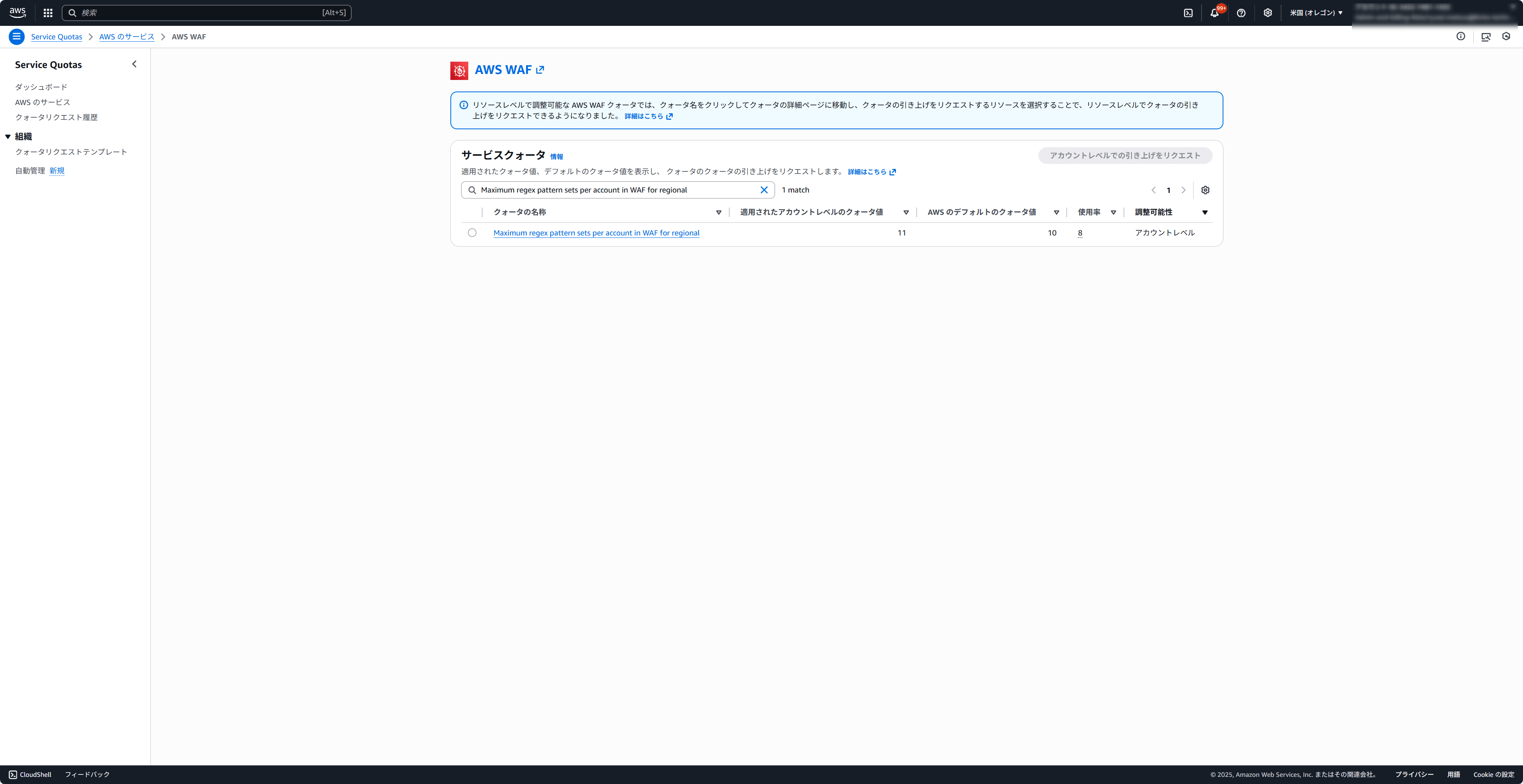
I tested with AWS WAF's Maximum regex pattern sets per account in WAF for regional.
This quota has a default value of 10, so creating 8 would reach 80%.
Test Procedure
1. Preparation
First, configure automatic management in Service Quotas.
- Enable automatic management in Service Quotas with Notify and Adjust mode
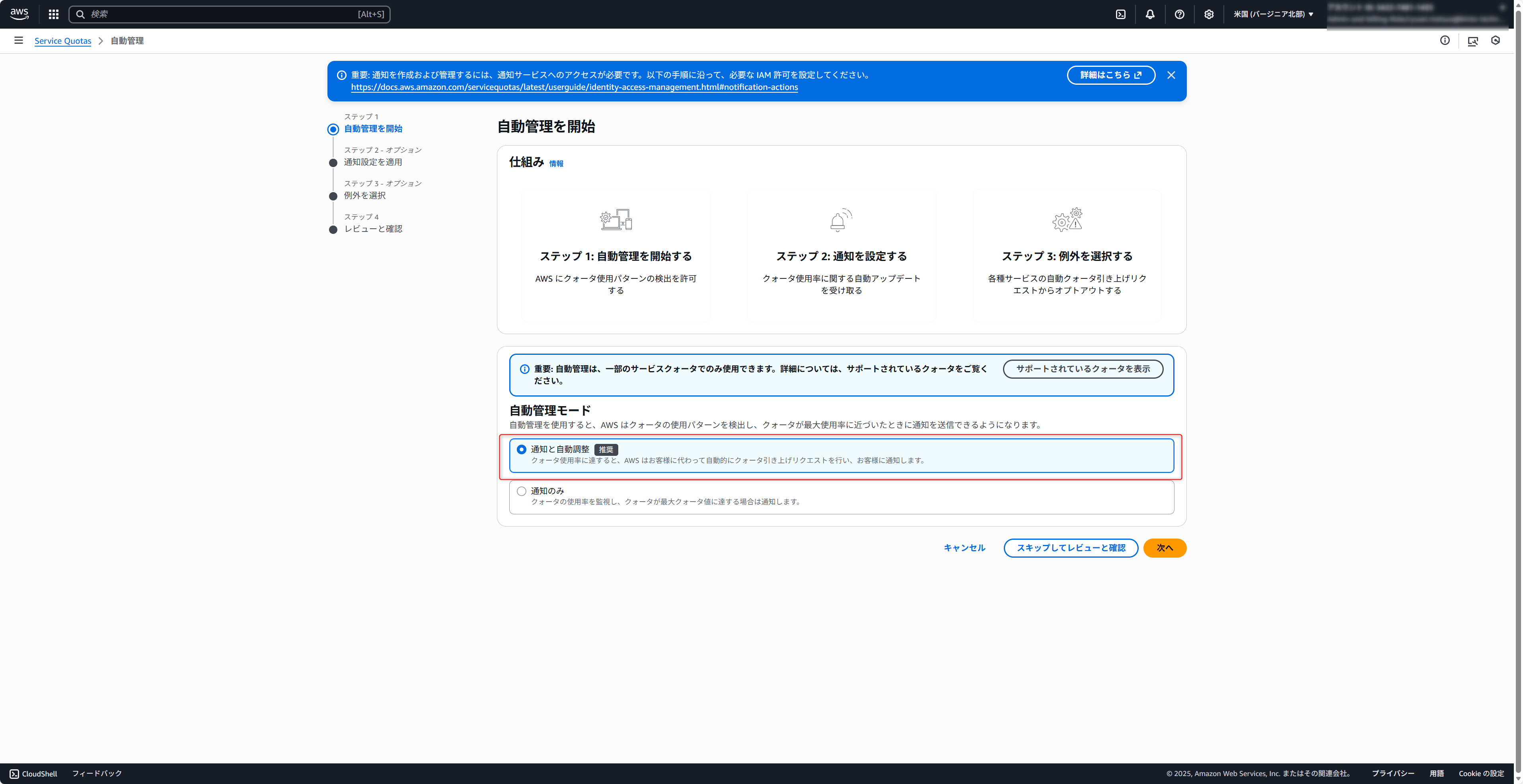
(I didn't capture the screen when setting up in the Oregon region, so this is the settings screen from the Virginia region) - Move to notification settings. Here you configure AWS User Notifications.
This time, I set up Amazon Q Developer to send notifications to a Slack channel.
Note: You can select the event source region, but since you can only receive events from regions where automatic management is enabled,
you need to configure automatic management for each region you want to monitor (it's a bit confusing because automatic management and AWS User Notifications are separate settings)
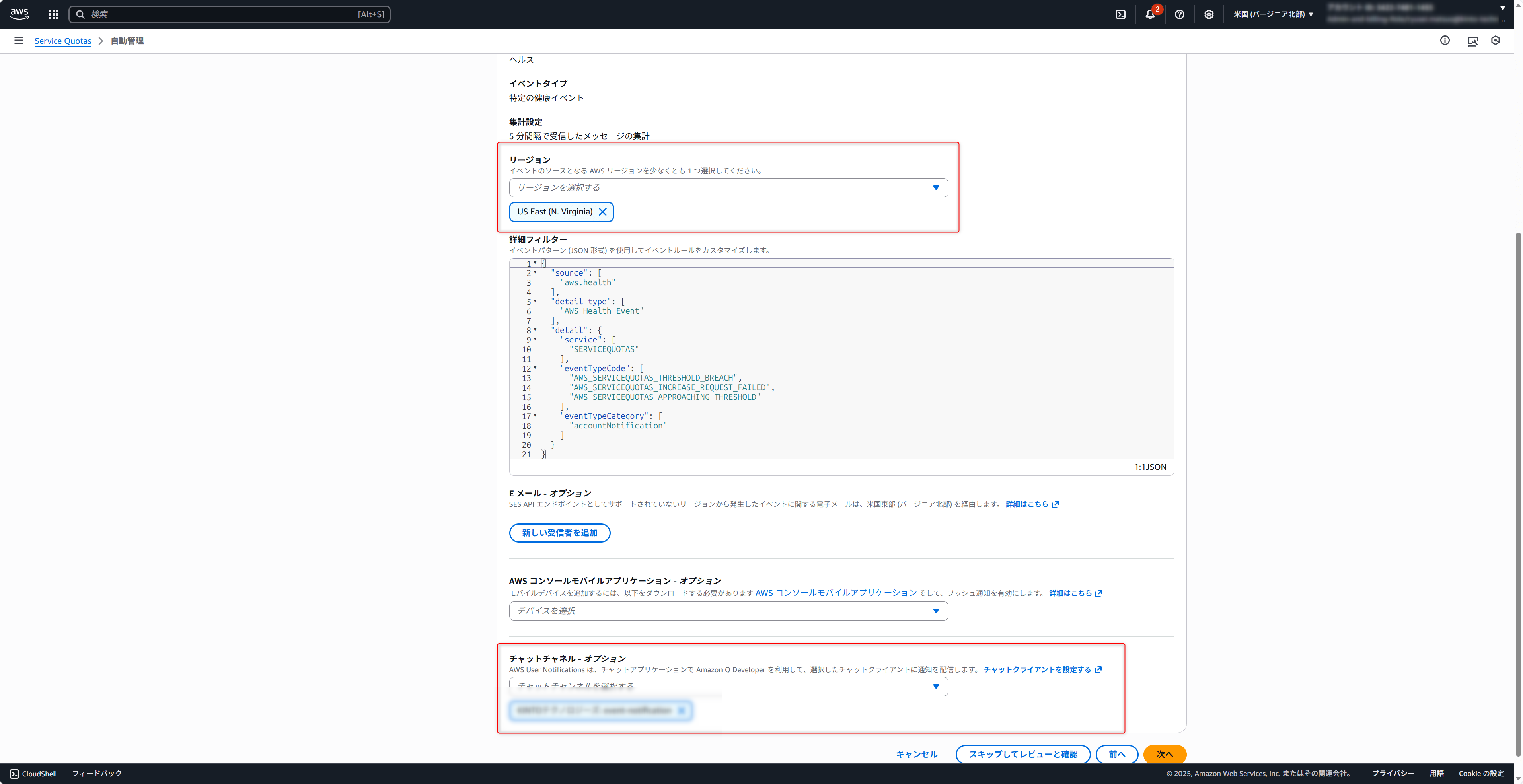
- You can select services to exclude from automatic management, but this time I created it without any settings

2. Create Regex Pattern Sets
Next, create regex pattern sets to trigger the threshold.
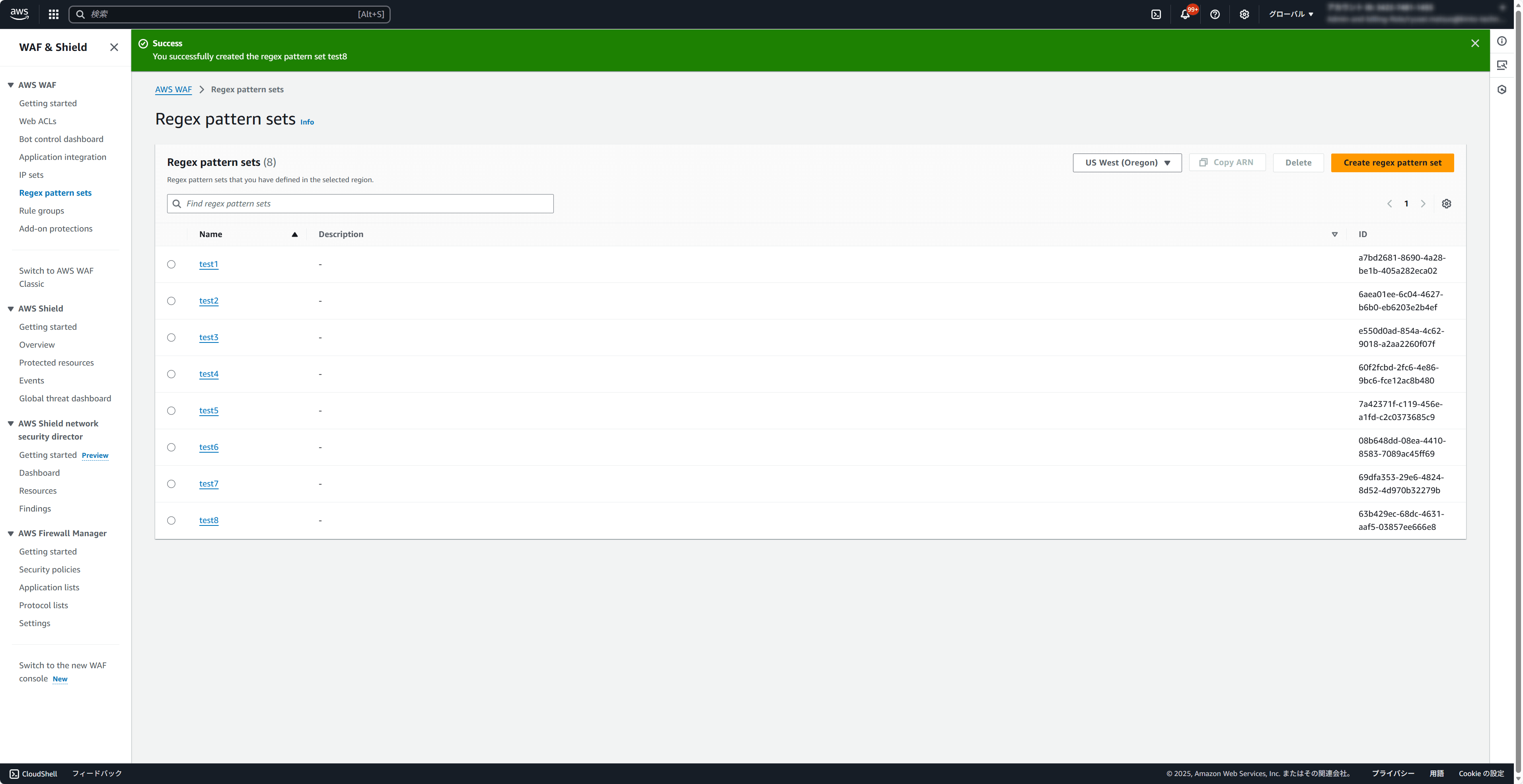
- WAF console -> Regex pattern sets -> Create regex pattern set
- Region: us-west-2 (Oregon) *Select Regional
- Create 8 with arbitrary names
3. Check Utilization
- Service Quotas -> AWS WAF -> Maximum regex pattern sets per account in WAF for regional
- Confirmed that utilization was at 80%
4. Wait for Notification/Automatic Adjustment
- Wait a few minutes...
Test Results
-
Time until notification/automatic adjustment: Not confirmed precisely, but completed in a few minutes
-
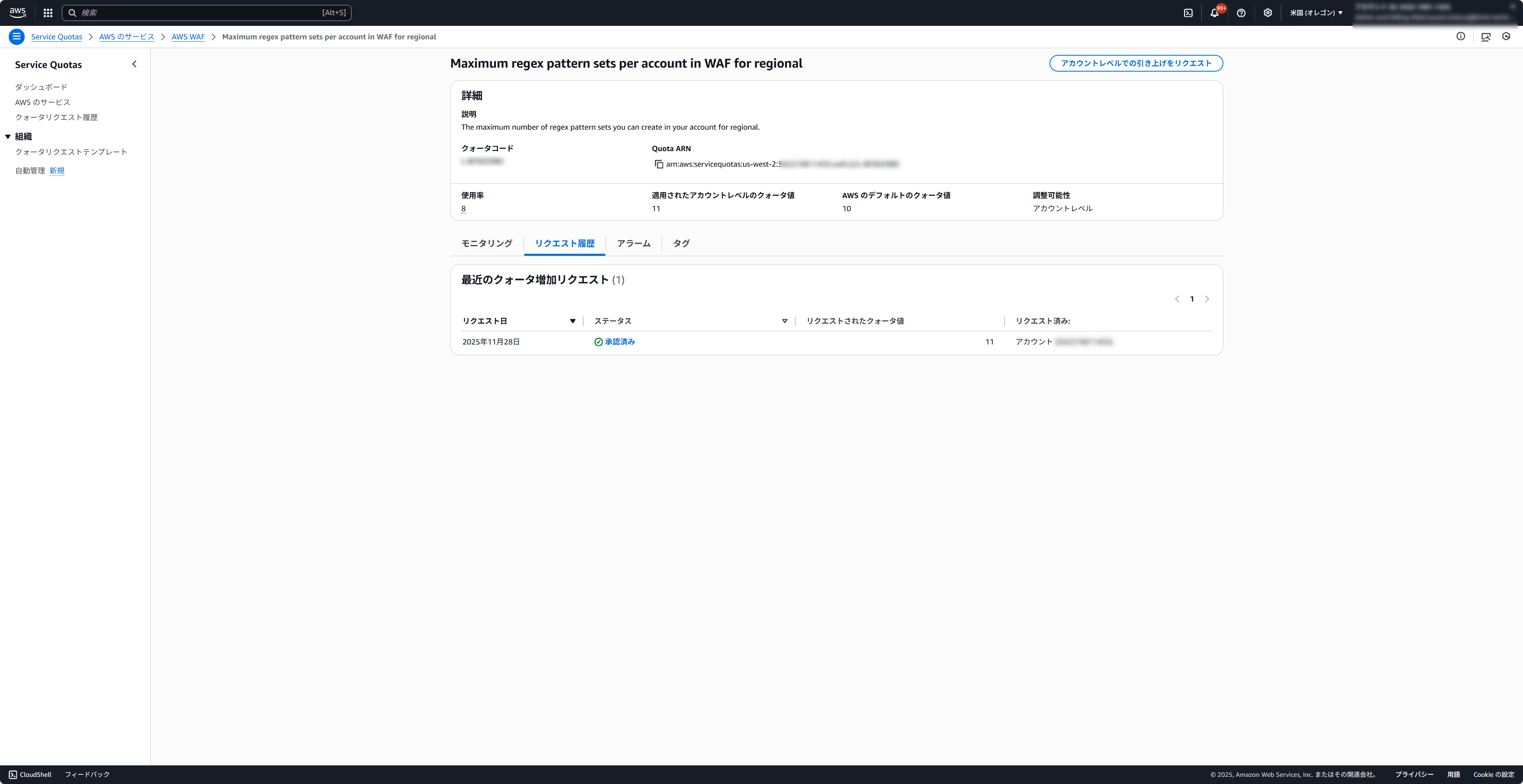
Quota value: Changed from 10 to 11. You can't specify the quota value after automatic adjustment, but it seems to update to a quota that falls below 80%.
-
Slack notifications are hard to read
Newline codes (\n) are displayed as-is, making long text appear as one block.
Also, the notification body doesn't include specific information about which quota is approaching the threshold,
so you need to check the Affected resources tab in the AWS Health Dashboard via the link attached to the notification.
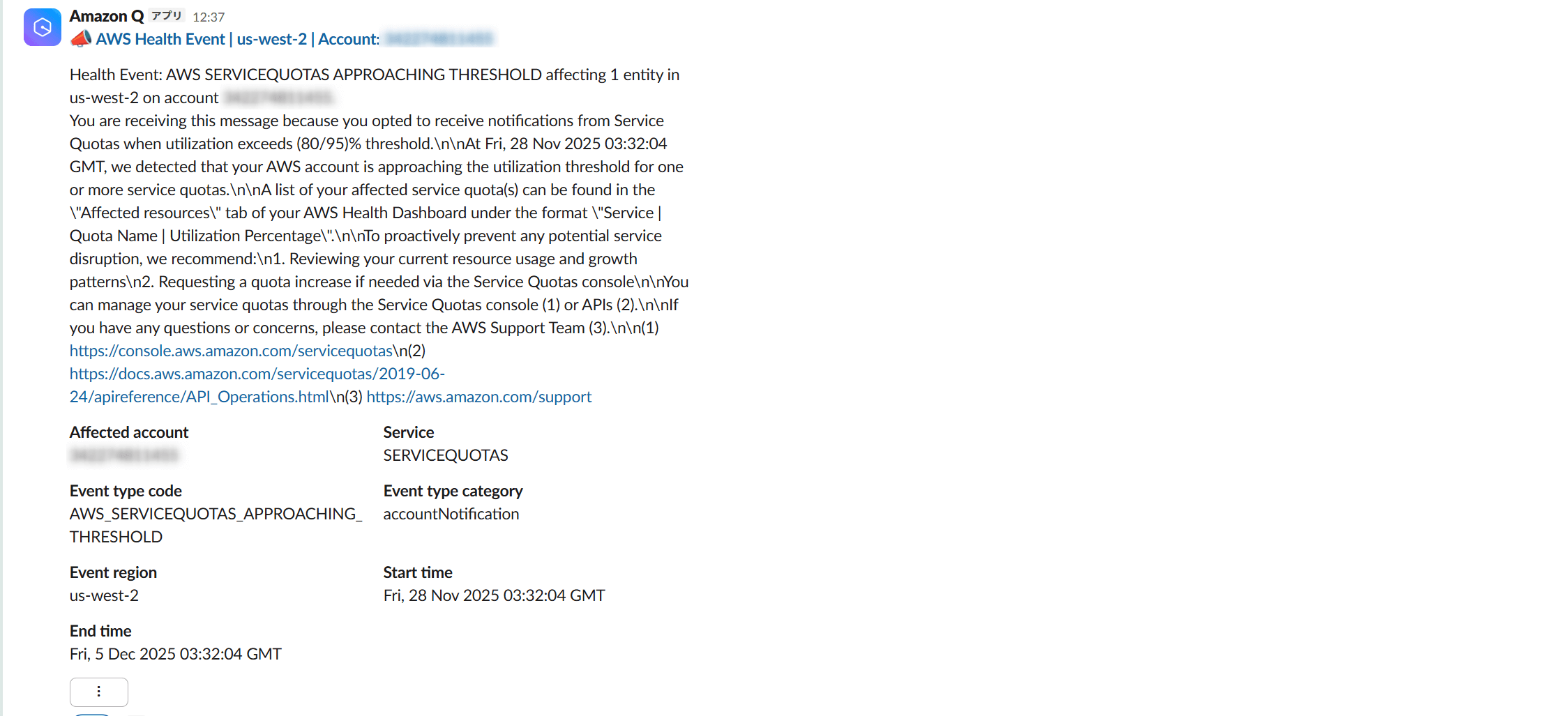
As a notification, you can tell something is approaching the threshold, but it takes extra effort to check the details.
Notes and Constraints
1. Limited Supported Quotas
Honestly, this is the biggest constraint I felt at the moment.
It's disappointing that quotas for basic services like VPC and SES aren't supported.
Currently, automatic management of Service Quotas alone won't handle all quota-related issues.
We'll have to wait for the supported quotas to expand.
2. Thresholds Cannot Be Customized
The 80%/95% thresholds are fixed. Requirements like "I want early notifications at 50%" or "No notifications needed until 100%" cannot be accommodated.
3. AWS Organizations Support Not Implemented
As of November 2025, bulk configuration at the Organizations level is not supported,
so you need to configure each account individually.
There's an --opt-in-level option in the CLI command, so I hope it will be supported eventually.
4. Automatic Adjustment Approval Is Not Guaranteed
Automatic adjustment is merely a feature that automatically sends quota increase requests.
Whether the request is approved by AWS is a separate matter, and it may be rejected.
5. Notifications/Automatic Increases May Take Time
Right after the quota was raised to 11, I added 3 more regex patterns for a total of 11, bringing utilization to 100%.
However, this time there was no notification and no automatic adjustment.
But several hours later, I confirmed that automatic adjustment had occurred,
so it seems that notifications and automatic adjustments may take time in some cases.
Conclusion
The automatic management feature for Service Quotas is personally a really great update that significantly lowers the barrier to quota monitoring.
It's free to start and can be configured with just a few clicks from the console.
There are still constraints like limited supported quotas and no IaC (Terraform) support,
but I found that for supported quotas, it can actually reduce the effort required for quota expansion work.
At our company, we also operate a custom-built quota management tool,
and we plan to continue using it for quotas that aren't supported by the automatic management feature.
I hope you found this article helpful.

関連記事 | Related Posts

We are hiring!
【クラウドエンジニア】Cloud Infrastructure G/東京・大阪・福岡
KINTO Tech BlogWantedlyストーリーCloud InfrastructureグループについてAWSを主としたクラウドインフラの設計、構築、運用を主に担当しています。
【クラウドプラットフォームエンジニア】プラットフォームG/東京・大阪・福岡
プラットフォームグループについてAWS を中心とするインフラ上で稼働するアプリケーション運用改善のサポートを担当しています。