
4 min read
AWS
Exploring Edge Functions Available in CloudFront


This summary was generated by AI. Please refer to the article for accurate details.
Read the summary
Edge functions let you run code directly at the edge of the network, right where users are. This means you can process requests faster and with less delay. CloudFront offers two main types: CloudFront Functions and Lambda@Edge. CloudFront Functions run close to the user, on edge locations. They’re great for simple tasks like redirecting URLs or adding headers. They cost less than one-sixth of Lambda@Edge and respond only to viewer requests and responses. They can’t access files or the request body, and they don’t support network access. The function runs in under 1ms with a 2MB memory limit and a 10KB code size. Lambda@Edge runs in regional edge caches near the origin server. It supports more complex operations using Node.js or Python. It can access files, the request body, and network services. It handles viewer, origin, and response events. But it has strict limits: only 10,000 requests per second per region, and execution times capped at 5 seconds for viewer and 30 seconds for origin. Memory goes up to 3,008MB. At KINTO Technologies, we use CloudFront Functions to cut costs and reduce Lambda usage in high-traffic cases. But we also use Lambda@Edge when we need file access or deeper processing. We balance cost savings with operational needs—sometimes it’s better to spend more on flexibility than on daily expenses. The key takeaway is that edge functions improve performance and user experience, but they come with strict limits. A single mistake can break the system. Choose CloudFront Functions for simple, low-cost tasks. Pick Lambda@Edge when you need more power. And always test thoroughly—because what works in one case might fail in another.
Introduction
Hello! This is Iki from the Cloud Infrastructure Team of the Platform Group (in the Osaka Tech Lab) at KINTO Technologies. I heard that a skilled young team member from Osaka will be writing about troubleshooting CloudFront Functions, so I’ll cover CloudFront edge functions as some foundational knowledge in advance!
Let's start with an overview of CloudFront
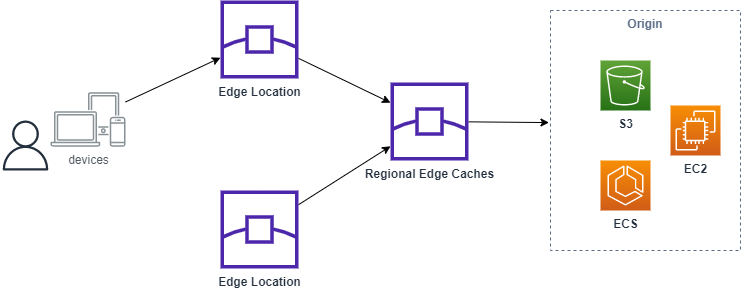
CloudFront is a content delivery network (CDN), designed to bring content closer to users by strategically placing CDN points worldwide and caching content at these locations. Users can enjoy low-latency access by connecting to the nearest CDN point. There are two types of edge locations: one closer to the user and a regional edge cache (regional edge location) situated closer to the origin server.
What is an Edge Function?
An edge function is a function that runs on an edge server, processing traffic at the location where it is received. By using edge functions, you can execute operations at the time of request or response, and in our company we mainly implement and operate the following functions:
- Redirect the URL of the response
- Add header
- Resize the image according to the request parameters
When to Run an Edge Function
An edge function can be run at the following four times.
- Viewer request
- Viewer response
- Origin request
- Origin response
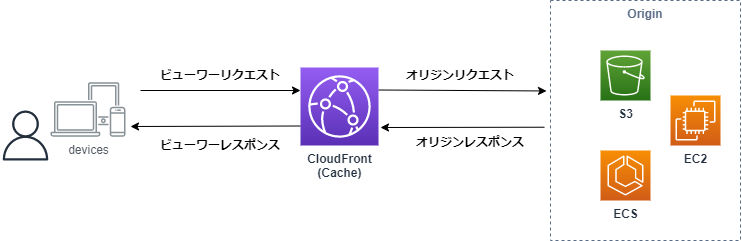
With CloudFront, the viewer manages all communication, so if there’s no cached content, the origin handles common processing. This setup is useful for controlling information sent to the origin, resizing cached data, and other optimizations.
Types of Edge Functions
There are two types of edge functions: CloudFront Function and Lambda@Edge.
CloudFront Function
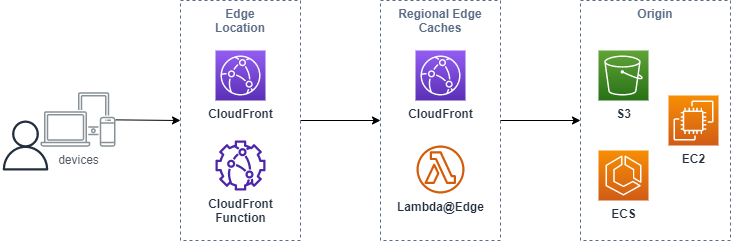
An edge function that runs at an edge location close to the user.
It performs large-scale latency-sensitive CDN customizations. CloudFront Functions are ideal for simple tasks like header manipulation and redirection, and they cost less than one-sixth of Lambda@Edge.
Since it runs at the edge location closest to the user, it responds to viewer requests and responses, but not origin requests and responses.
Lambda@Edge
Edge functions that run in the region edge cache close to the origin. For processing tasks that CloudFront Functions cannot handle, you can use other AWS services, including the AWS SDK, and access file systems by leveraging Lambda@Edge or similar AWS services.
Lambda@Edge is an extension of AWS Lambda, and although it appears the same on the console, it has some functional limitations—such as not allowing user-defined environment variables. Please keep these restrictions in mind.
While the Lambda@Edge function itself is stored in the Virginia region, it operates by creating replicas in various edge locations, allowing it to run within each regional edge cache.
As a result, the concurrent Lambda execution limit and access limits for each service apply in the specific region where the function runs (such as the Tokyo region in Japan). Be mindful of these limits to ensure smooth operation.
It supports viewer requests, viewer responses, origin requests, and origin responses.
The Differences between CloudFront Function and Lambda@Edge
| CloudFront Functions | Lambda@Edge | |
|---|---|---|
| Programming language | JavaScript | Node.js / Python |
| Event source | Viewer request Viewer response |
Viewer request Viewer response Origin request Origin response |
| Scale | Number of requests: More than 10,000,000 per second | Number of requests: Up to 10,000 per second per region |
| The duration of the function | Less than 1ms | Viewer: 5 seconds Origin: 30 seconds |
| Maximum memory | 2 MB | 128–3,008 MB |
| Maximum size of the function code and included libraries | 10KB | Viewer: 1MB Origin: 5MB |
| Network access | No | Yes |
| Access to file systems | No | Yes |
| Access to the request body | No | Yes |
| Access to location and device data | Yes | Viewer request: No Viewer response: Yes Origin request: Yes Origin response: Yes |
Usage of Edge Functions in KINTO Technologies
KINTO Technologies, though not yet fully utilizing it, recommends CloudFront Functions. They can help manage costs and reduce concurrent Lambda executions for viewer requests and responses, especially in high-traffic environments.
Besides, CloudFront Functions have more limitations compared to Lambda@Edge. Therefore, we prioritize reducing development and operational costs by using Lambda@Edge, rather than focusing solely on minimizing daily AWS expenses.
Conclusion
In this post, I discussed CloudFront edge functions (CloudFront Function and Lambda@Edge). By understanding and leveraging edge functions, you can enhance your system’s capabilities and improve the user experience. However, given their strict limitations, any mistakes can result in errors and unexpected outcomes. I hope this article has provided valuable insights and will be beneficial for your development work.
Stay tuned for an upcoming post on troubleshooting CloudFront Function!
We're also seeking new team members to join us at the Platform Group (Osaka Tech Lab), so don't hesitate to reach out!
KINTO Technologies Corporation Platform G Recruitment Top
wantedly

関連記事 | Related Posts





We are hiring!
Cloud Engineer(トヨタグループ内製化支援)/Cloud Solution G/東京・名古屋・大阪・福岡
トヨタグループのクラウド活用を、最前線で支える。1社にとどまらないスケールで、移行・生成AI・内製化まで幅広く挑戦できるポジションです。
【クラウドセキュリティエンジニア】CNAPP運用×AIセキュリティ。次世代のクラウドセキュリティに挑む(東京・名古屋・大阪・福岡)
AI Agent時代のクラウドセキュリティを、 ゼロから作る。KINTOテクノロジーズのCloud Engineering G/セキュリティチームは、2022年にCCoE(Cloud Center of Excellence)として立ち上がり、わずか2年で専門組織として独立しました。
Follow Us



KINTOテクノロジーズの最新情報をSNSで発信中!イベント・テックブログ更新情報もお届けします。