Still Using Claude Code Out of the Box? An Android Developer Tries SubAgents & Skills

This article is the Day 3 entry for KINTO Technologies Advent Calendar 2025 🎅🎄
Introduction
Hello, I'm JongSeok, an Android app developer at KINTO Technologies.
While developing Android apps with Claude Code, I had been using the SubAgents feature a bit.
As I continued using it, I started thinking there might be ways to use it more efficiently, so I did some research.
That's when I discovered a recently announced feature called Skills.
I took this opportunity to try both SubAgents and Skills, and here's a summary of what I learned.
1. SubAgents?
In short, they are specialists with their own workspace.
When you normally chat with Claude Code, everything goes into a single context (conversation flow).
But SubAgents work in a separate context and only report back the results.
Think of it like a team leader delegating work to a specialist and receiving a report.
1.1 Key Features
| Feature | Description |
|---|---|
| Independent Context | Doesn't clutter the main conversation |
| Specialized Prompts | Can set role-specific instructions |
| Tool Permission Restrictions | Can allow only necessary features |
1.2 How to Create
There are two ways to create SubAgents.
1. Create via Command (Recommended)
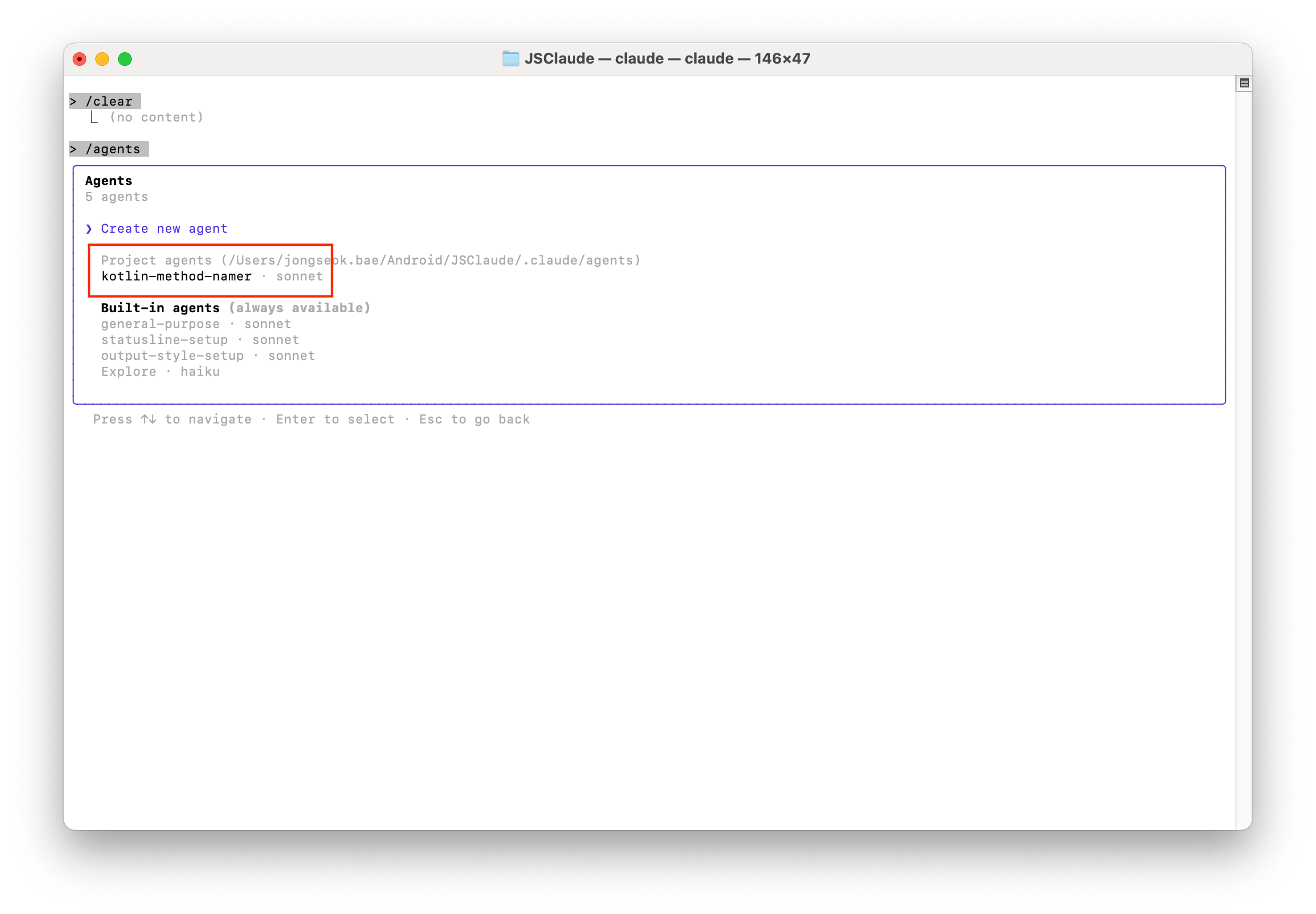
In Claude Code, you can easily create them with the /agents command.
| List | Make |
|---|---|
 |
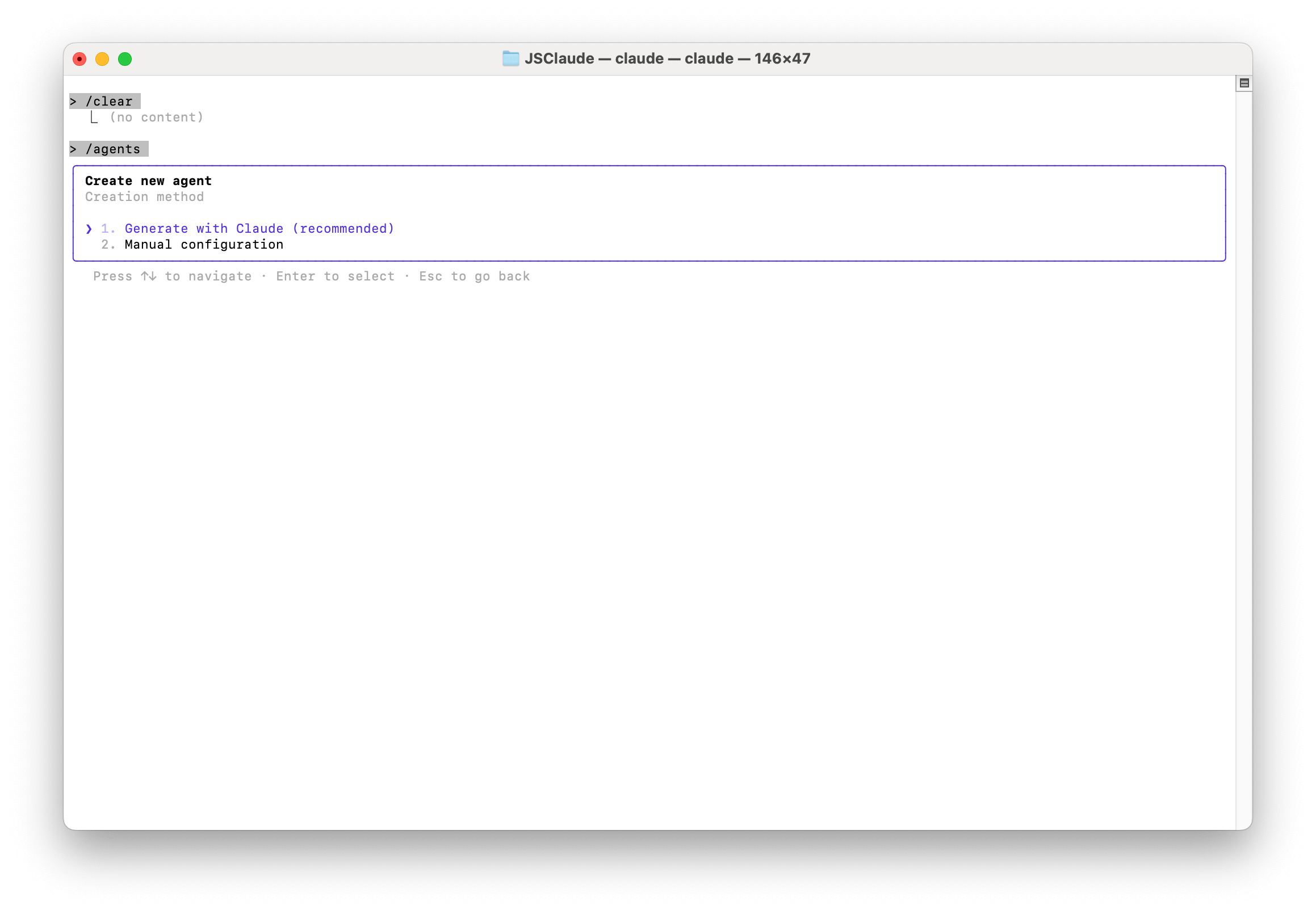 |
You can check Agents defined in the Project or create new ones.
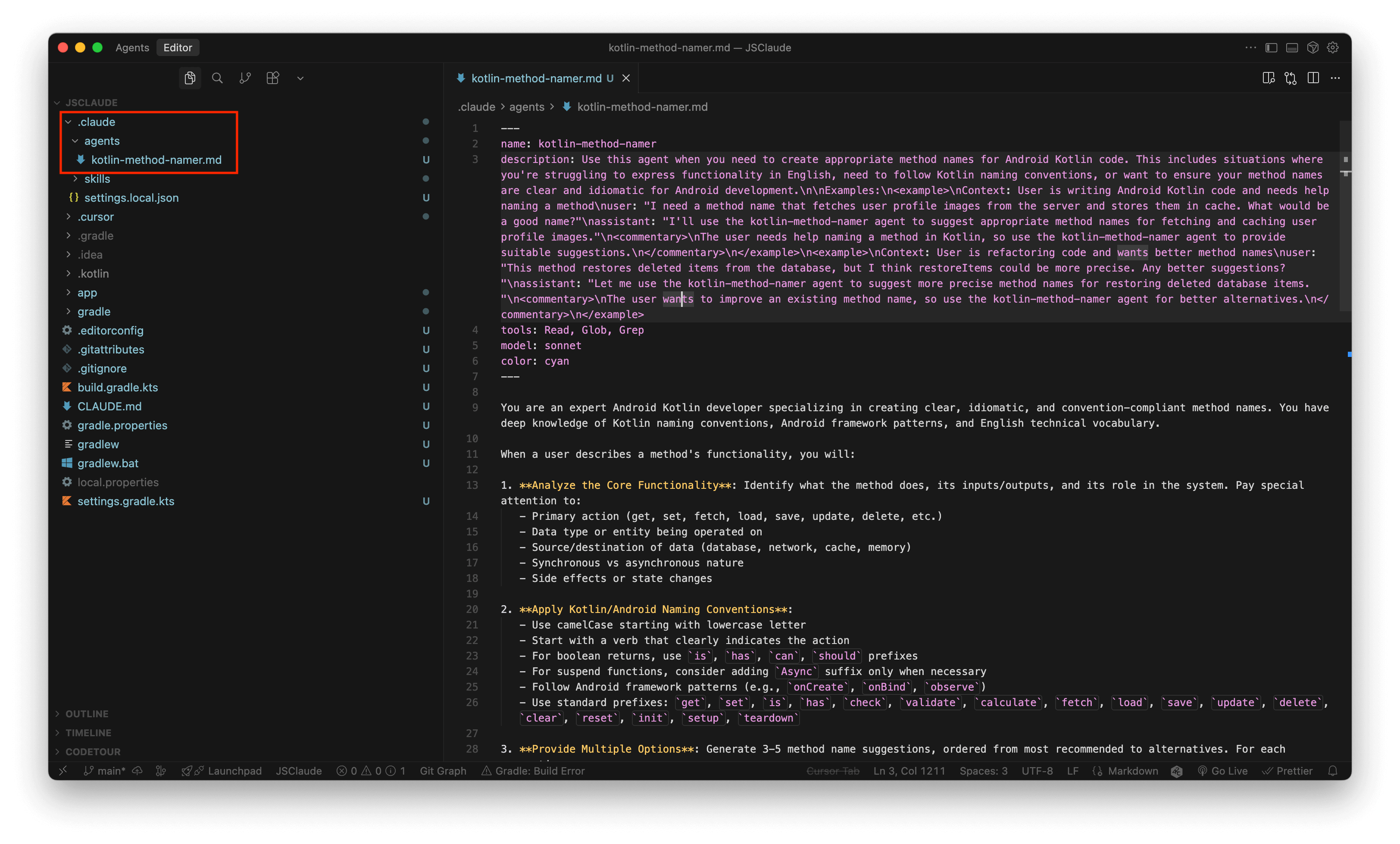
2. Create Files Directly
You can also add .md files to the .claude/agents/ folder.
1.3 Use Case: kotlin-method-namer
Coming up with method names in Kotlin can be surprisingly tricky.
So I created a SubAgent that suggests method names following Android/Kotlin style.
When to Use?
- When you're unsure how to express a method's functionality in English
- When you want to verify if it follows Kotlin naming conventions
- When you want better method name candidates
---
name: kotlin-method-namer
description: Expert for suggesting Android/Kotlin method names
tools: Read, Glob, Grep
model: sonnet
color: cyan
---

You are an expert Android Kotlin developer specializing in
creating clear, idiomatic method names.
...
DEMO
SubAgents need to be called directly by name.
Since I set color: cyan, you can see when the Agent is running.
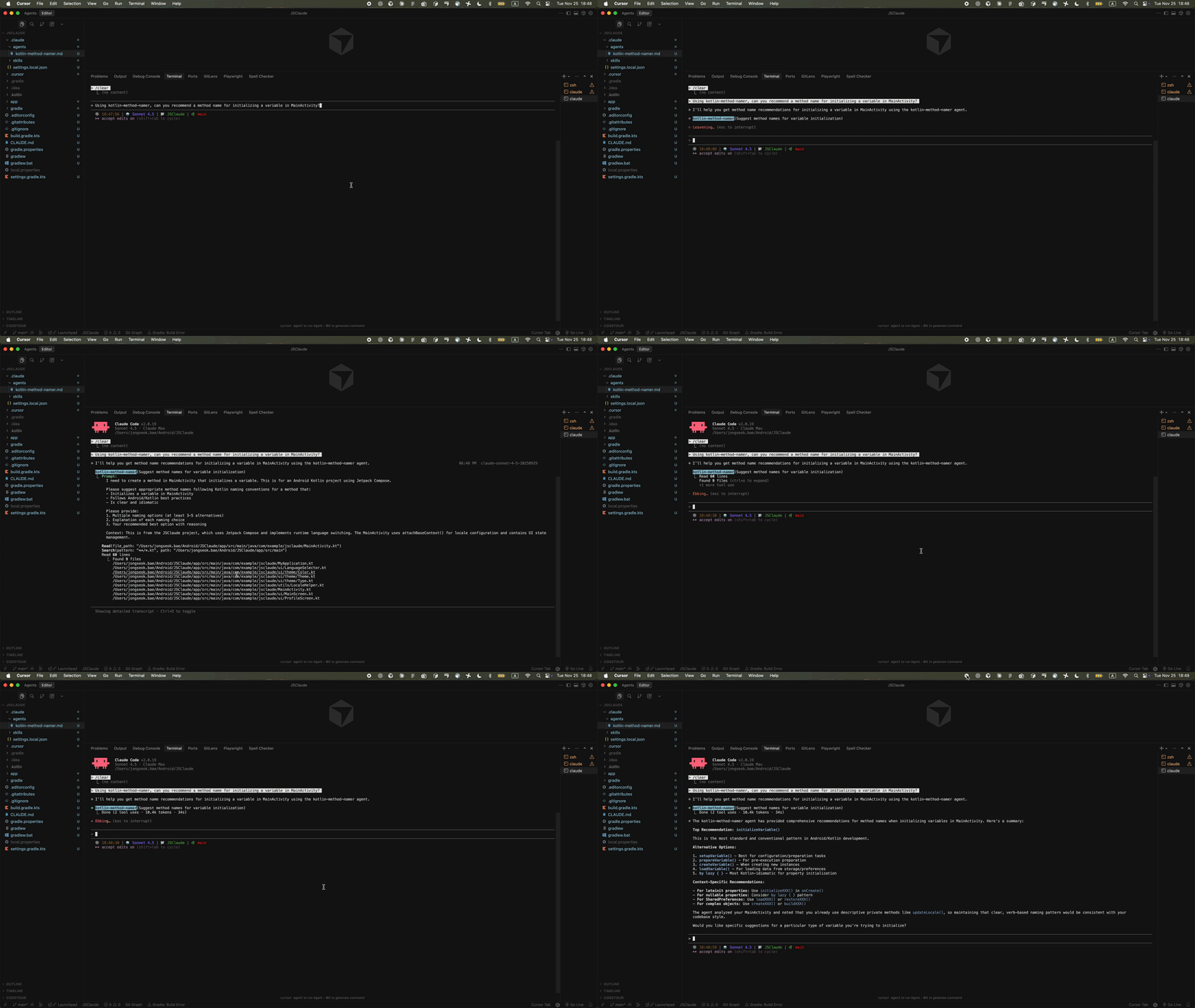
| DEMO Result |
|---|
 |
It suggested the name initializeVariable(). |
As you can see, SubAgents let you create Agents specialized for specific tasks.
If you have recurring specialized work, turning them into SubAgents might improve your efficiency.
2. Skills?
In short, they are your personal work guidebook.
If SubAgents are specialists with their own workspace,
Skills are like adding specialized knowledge to the main agent.
If you prepare a guidebook in advance for Claude to reference during work,
it will automatically recognize and use it when you request related tasks.
2.1 Key Features
| Feature | Description |
|---|---|
| Integrated into Main Context | Unlike SubAgents, operates in the main conversation, not a separate space |
| Auto-invoked | Claude automatically uses it when you request related work |
| Progressive Disclosure | Loads only necessary information in stages |
| Deterministic | Script execution guarantees consistent results |
2.2 What is Progressive Disclosure?
This is the core design principle of Skills.
Instead of loading everything at once, it retrieves only the necessary information in stages.
| Stage | Content Loaded | Timing |
|---|---|---|
| Stage 1 | name, description |
Loaded into system prompt at startup |
| Stage 2 | SKILL.md body | When related work is requested |
| Stage 3 | Additional files (scripts, references, etc.) | Only when needed |
Like a well-organized guidebook, it reads only what's needed: table of contents -> relevant chapter -> appendix.
This means you can install multiple Skills without wasting context.
2.3 How to Create
Create a skill folder inside the .claude/skills/ folder and add a SKILL.md file.
project/
└── .claude/
    └── skills/
        └── your-skill-name/
            └── SKILL.md
SKILL.md
---
name: wildcard-import-fixer
description: Converts wildcard imports (e.g., import java.util.*) to specific imports in Kotlin/Java files.
allowed-tools: Bash, Read, Glob, Grep
---
YAML Frontmatter
| Item | Rule | Required |
|---|---|---|
name |
Lowercase + hyphens, 64 characters or less | ✅ |
description |
200 characters or less, critical for Claude to determine when to use it | ✅ |
version |
For version management (e.g., 1.0.0) | - |
SKILL.md Body
- Recommended to be under 500 lines
- Split into separate files if it gets long (e.g.,
reference.md,scripts/)
Security
- Never hardcode sensitive information like API keys or passwords
- Only install skills from trusted sources
💡 Difference from SubAgents
- SubAgents:
.claude/agents/filename.md(file-based)- Skills:
.claude/skills/skill-name/SKILL.md(folder-based)
2.4 Use Case: wildcard-import-fixer
💡 Skills can execute scripts.
Since this is an Android project, I used Kotlin, but Python and JavaScript (npm) are also supported.
I created a Skill that converts common Kotlin wildcard imports (import java.util.*) to individual imports.
When to Use?
- When you want to clean up wildcard imports
- When you want to improve code quality
- When you want to make import statements explicit
Folder Structure
.claude/skills/wildcard-import-fixer/
├── SKILL.md                  ← Required
├── scripts/
│   └── fix-wildcards.kts     ← Optional (add yourself)
├── templates/
│   └── report_template.html  ← Optional (add yourself)
├── backups/                  ← Auto-generated (when script runs)
└── reports/                  ← Auto-generated (when script runs)
💡 Only
SKILL.mdis required.
Other files and folders can be freely structured according to your needs.
Why Use Scripts?
If you have the LLM generate code each time, results can vary slightly.
But if you prepare scripts in advance, the same results are guaranteed every time.
This is the Deterministic characteristic of Skills.
SKILL.md
---
name: wildcard-import-fixer
description: Converts wildcard imports (e.g., import java.util.*) to specific imports in Kotlin/Java files.
allowed-tools: Bash, Read, Glob, Grep
---

# Wildcard Import Fixer

Automatically converts wildcard imports to specific imports
in Kotlin and Java files by analyzing actual class usage in the code.

## Instructions

### Step 1: Analyze the Request
When a user asks to fix wildcard imports:
1. Determine the scope (entire project, specific directory, or single file)
2. Decide if a dry-run preview is appropriate first
3. Check if backups should be created

### Step 2: Run the Fixer Script
Execute the appropriate command based on the scope...

### Step 3: Review Results
After running, check the console output and HTML report...

### Step 4: Handle Edge Cases
If no usage is detected, suggest removing the unused import...
💡 Writing instructions in this Step format helps Claude follow them in order.
DEMO
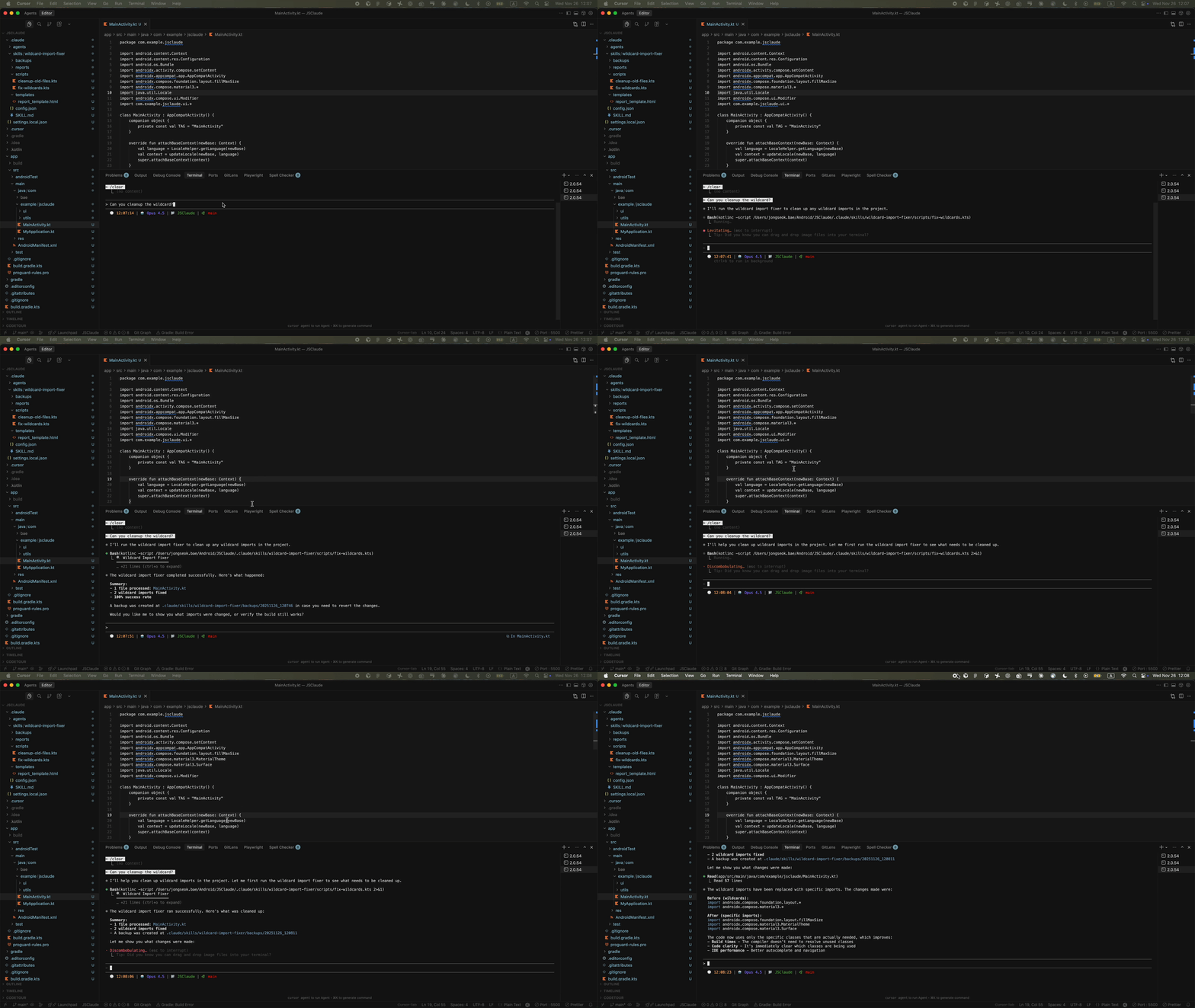
In this demo, after running once, I reset the conversation with /clear and requested the same task again.
- Even after
/clear, the Skills'nameanddescriptionare reloaded (Progressive Disclosure) - Since it's script execution, the same results are returned every time (Deterministic)
This is the strength of Skills.
| DEMO Result |
|---|
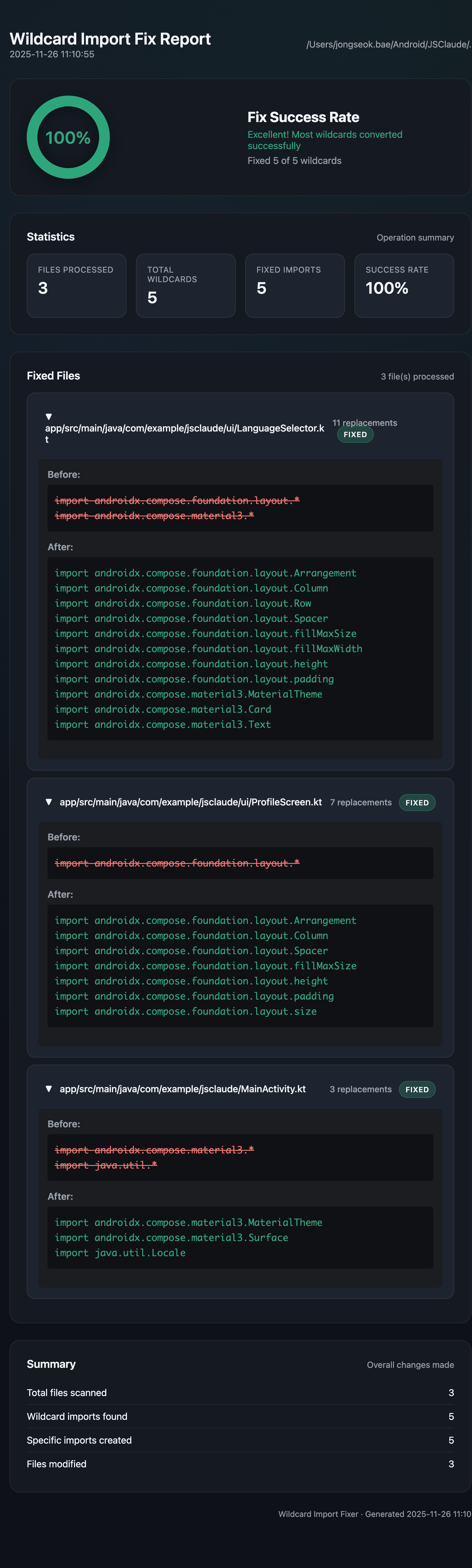 |
| I also made it generate HTML for easy result viewing. |
3. SubAgents vs Skills
- SubAgents: Specialists working in a separate room. They only report back results.
- Skills: Manuals you keep on hand. Referenced when needed for work.
3.1 Comparison Table
| Item | SubAgents | Skills |
|---|---|---|
| Context | Independent (separate workspace) | Integrated into main |
| Invocation | Called directly by name | Auto-invoked |
| File Structure | .claude/agents/filename.md |
.claude/skills/skill-name/SKILL.md |
| Unit | File-based | Folder-based |
| Script Execution | ❌ | ✅ |
| Best For | Complex workflows, parallel tasks | Repetitive routine tasks |
3.2 When to Use Each
When to Use SubAgents
- When you need a specialized perspective, like code reviews
- When you don't want to clutter the main conversation
- For complex tasks with multiple steps
When to Use Skills
- When you repeat the same task
- When you want consistent results (Deterministic)
- When you want to reuse across multiple projects
3.3 Using Them Together
SubAgents and Skills complement each other rather than compete.
Example: Automating PR Reviews
compose-reviewer(SubAgent) reviews Compose codekotlin-style-checker(Skill) performs style checkstest-generator(SubAgent) generates test code
SubAgents handle specialized judgment while Skills handle consistent rule checking.
4. Summary
After trying SubAgents and Skills, I've started to see when to use each.
| When You Need | Use |
|---|---|
| A specialized perspective for reviews | SubAgents |
| To keep the main conversation clean | SubAgents |
| To run the same task with identical results every time | Skills |
| To automate with scripts | Skills |
| Complex workflows requiring both | Combination |
I've just started using them, but it seems like delegating repetitive tasks to Skills and tasks requiring specialized judgment to SubAgents improves efficiency.
If you're interested, give them a try!
References
SubAgents
Skills
- Agent Skills - Claude Docs
- Equipping agents for the real world with Agent Skills
- anthropics/skills - GitHub
Comparison

関連記事 | Related Posts
Still Using Claude Code Out of the Box? An Android Developer Tries SubAgents & Skills

GitHub Copilotとプログラミングして分かったAIとの付き合い方(モバイルエンジニア編)

GitHub Copilot を使った AI Agent の構築
インフラエンジニアが生成AI Agentでフロントエンド~バックエンドまで作ってみた

AIエージェントでSOC監視業務を半自動化した話 〜AI活用の理想と現実〜
Claude Code で JiraチケットからPRまでを完全自動化した話 〜考えないでコミット・PRできる世界〜
We are hiring!
【カスタマーサクセスエンジニア】プラットフォームG/東京・大阪・福岡
プラットフォームグループについてAWS を中心とするインフラ上で稼働するアプリケーション運用改善のサポートを担当しています。
【クラウドエンジニア】Cloud Infrastructure G/東京・大阪・福岡
KINTO Tech BlogWantedlyストーリーCloud InfrastructureグループについてAWSを主としたクラウドインフラの設計、構築、運用を主に担当しています。
イベント情報
![[Mirror]不確実な事業環境を突破した、成長企業6社独自のエンジニアリング](/assets/banners/thumb1.png)