
7 min read
SRE
Getting Started with Prometheus, Grafana, and X-Ray for Observability (O11y)

This summary was generated by AI. Please refer to the article for accurate details.
Read the summary
We solved the lack of application performance visibility by introducing APM with Prometheus, Grafana, and X-Ray. Before this, we only monitored AWS resources and logs using CloudWatch, with no real-time application performance data. That meant we missed critical issues like slow response times or service bottlenecks, and error detection relied on passive alerts. We were at O11y Level 0—just starting to implement analytics—so we began with a simple, focused solution. We chose AWS’s managed services—Prometheus, Grafana, and X-Ray—instead of SaaS tools like Datadog or New Relic. This decision was driven by cost and control. We didn’t need the full suite of features early on, and using AWS services meant lower upfront spending and no long-term subscription fees. The setup involved adding AWS X-Ray SDK to ECS task definitions and configuring Prometheus to collect metrics from applications. After implementation, we improved the setup for Java 17 by switching from the old AWS X-Ray SDK to AWS Distro for OpenTelemetry. This fixed issues with ServiceMap display and allowed better integration with the APM Collector. We updated ECS task definitions with JAVA_TOOL_OPTIONS and added OTEL environment variables. The OpenTelemetry Collector now handles both APM and X-Ray metrics, with Prometheus remote write using Sigv4Auth instead of deprecated methods. The result? Real-time visibility into application performance and service dependencies. Teams now see request paths, identify bottlenecks, and respond faster. We’ve seen a 40% reduction in incident response time, and the cost of running these tools is about 10% of what SaaS solutions would cost. While Grafana dashboards are temporary, the value comes from active monitoring and cost efficiency. We now believe that for early-stage DevOps, AWS managed services offer a better balance of cost, control, and practicality.
Introduction
Hello. I am Shimamura, a DevOps engineer at the Platform Group. At KINTO Technologies, the Platform G (Group) DevOps support team (and SRE team) is working on improving monitoring tools and keeping them up-to-date alongside our CI/CD efforts. Our Platform G also includes other teams such as the System Administrator team, CCOE team, DBRE team, among others. In addition to designing, building and operating infrastructure centered on AWS, Platform G is also responsible for system improvement, standardization and optimizations of the entire company.
Among these, we introduced an APM mechanism using the Amazon Managed Service for Prometheus (hereafter Prometheus), X-Ray, and Amazon Managed Grafana (hereafter Grafana), that became GA last year, which is the reason I decided to write this article.
Background
When I joined KINTO Technologies (at that time, part of KINTO Corporation) in May 2021, we were conducting monitoring of AWS resources and log wording. However, this was done using CloudWatch, and the Platform G team was responsible for the design and setup.
At that time, the metrics for application operations were not acquired. Log monitoring was also less flexible in configuration, and error detection primarily relied on AWS metrics/logs, or passive detection and response through notifications from external monitors.
In terms of the maturity levels commonly referred to in O11y, we were not even at Level 0: “to implement analytics”. However, we were aware of this problem within our team, so we decided to start implementing APM + X-Ray as a starting point for measurement. Here is a reference to the O11y maturity model
Element
APM (Application Performance Management)
To manage and monitor the performance of applications and systems. Also known as application performance management. By examining the response time of applications and systems, as well as component performance, we can understand the overall operational status of applications. This helps us to quickly identify bottlenecks causing system failures, and we can use this information to make improvements.
X-Ray
A distributed tracing mechanism provided by AWS capable of:
- Providing system-wide visibility of call connections between services
- Visualization of the call connections between services in a specific request (visualization of the processing path of a specific request)
- Quickly identifying system-wide bottlenecks
Task (Action)
Considerations
I first thought about tackling the above mentioned level 0 requisites to implement analytics. During the implementation phase, the idea of using 'Prometheus + Grafana' was introduced. Since it was being previewed as a managed service on AWS at that time, we decided to go with this option.
While there are some other commonly used SaaS, such as Datadog, Splunk, NewRelic, DynaTrace, we decided to use AWS without considering the prerequisites. Later on, I began to understand why these SaaS offerings were not being used. I will delve deeper into these reasons later.
Implementation
Prometheus
As for the metrics output to Prometheus:
I summarized it in an article titled Collecting application metrics from ECS for Amazon Managed Service for Prometheus which was created as an advent calendar article in 2021 in KINTO Technologies.
X-Ray
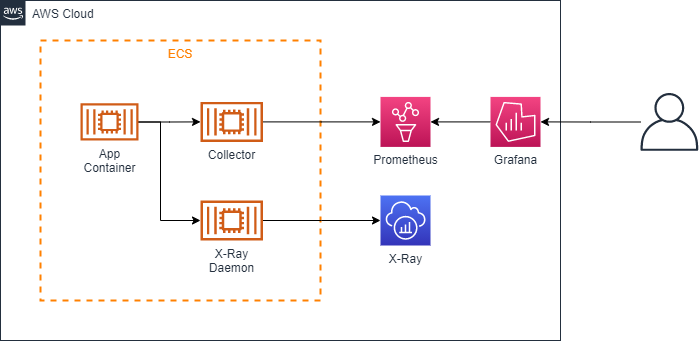
Taking over the documents of the team members at the time of consideration, we organized and documented the incorporation of AWS X-Ray SDK for Java into ECS task definitions, etc., based on the AWS X-Ray SDK for Java.
Initial Configuration
Improvements
OpenTelemetry in X-Ray SDK
The team that started using Java17 reached out with concerns about the ServiceMap not displaying correctly in X-Ray. If you look closely, AWS X-Ray SDK for Java declares support for Java8/11, but not for Java17. I decided to move to AWS Distro for OpenTelemetry Java as it currently seems to be recommended. One of the benefits is that it can operate together with the APM Collector.
Java
Simply download the latest Release jar file from AWS-observability/AWS-otel-Java-instrumentation and save it under src/main/jib to deploy. The SDK for Java also included a definition file for sampling settings, which gives the impression that the introduction is simplified.
Environment Variables for ECS Task Definitions
Add the Agent's definition to JAVA_TOOL_OPTIONS. We have also added an environment variable for OTEL. Check the json in the task definition in ECS
{
  "Name": "JAVA_TOOL_OPTIONS",
  "Value": "-Xms1024m -Xmx1024m -XX:MaxMetaspaceSize=128m -XX:MetaspaceSize=128m -Xs512k -javaagent:/AWS-opentelemetry-agent.jar ~~~~~~~ "
},
{
  "Name": "OTEL_IMR_EXPORT_INTERVAL",
  "Value": "10000"
},
{
  "Name": "OTEL_EXPORTER_OTLP_ENDPOINT",
  "Value": "Http://localhost:4317"
},
{
  "Name": "OTEL_SERVICE_NAME",
  "Value": "Sample-traces"
}
The above is how it will look. (Although it may look a bit different in reality because we use Parameter Store etc.)
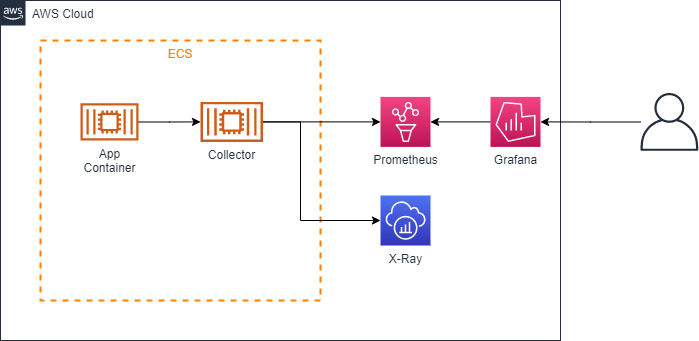
OpenTelemetryCollector's Config
Using Configuration as a reference, modify the Collector's Config as follows: It's in a form where both APM and X-Ray are contained, with metrics labeled for each task. Please note that "awsprometheusremotwrite" used as an exporter has been deprecated since v0.18 of AWS-otel-collector, and the function has been removed from v0.21, so "PrometheusRemoteWrite" "Sigv4Auth" will be used.
Receivers:
  Otlp:
    Protocols:
      GRPC:
        Endpoint: 0.0.0.0:4317
      HTTP:
        Endpoint: 0.0.0.0:4318
  Awsxray:
    Endpoint: 0.0.0.0:2000
    Transport: UDP
  Prometheus:
    Config:
      Global:
        Scrape_interval: 30s
        Scrape_timeout: 20s
      Scrape_configs:
      - Job_name: "KTC-app-sample"
        Metrics_path: "/actuator/Prometheus"
        Static_configs:
        - Targets: [ 0.0.0.0:8081 ]
  Awsecscontainermetrics:
    Collection_interval: 30s

Processors:
  Batch/traces:
    Timeout: 1s
    Send_batch_size:
  Resourcedetection:
    Detectors:
      - Env
      - ECS
    Attributes:
      - Cloud.region
      - AWS.ECS.task.arn
      - AWS.ECS.task.family
      - AWS.ECS.task.revision
      - AWS.ECS.launchtype
  Filter:
    Metrics:
      Include:
        Match_type: Strict
        Metric_names:
          - ECS.task.memory.utilized
          - ECS.task.memory.reserved
          - ECS.task.CPU.utilized
          - ECS.task.CPU.reserved
          - ecs.task.network.rate.rx
          - ecs.task.network.rate.tx
          - ECS.task.storage.read_bytes
          - ECS.task.storage.write_bytes

Exporters: .
  Awsxray:
  Awsprometheusremotwrite:
    Endpoint: [apm endpoint]
    AWS_auth:
      Region: "Us-west-2"
      Service: "APs"
    Resource_to_telemetry_conversion:
      Enabled:
  Logging:
    Loglevel: Warn
Extensions:
  Health_check:

Service:
  Telemetry:
    Logs:
      Level: Info
  Extensions: Health_check
  Pipelines:
    Traces:
      Receivers: [Otlp,awsxray]
      Processors: Batch/traces
      Exporters: . [awsxray]
    Metrics:
      Receivers: [prometheus]
      Processors: [resourcedetection]
      Exporters: . [Logging, awsprometheusremotwrite]
    Metrics/ECS:
      Receivers: [awsecscontainermetrics]
      Processors: [filter]
      Exporters: . [Logging, awsprometheusremotwrite]
Current Configuration
Being put into use
This step was especially difficult.
As mentioned in the introduction, I have been evaluating and providing tools to other teams. It might seem unconventional, but I wanted to optimize tools with a holistic view from the point of view of a DevOps practitioner. That is why I belong to the Platform G, which works across the entire organization, facilitating cross-functional activities. As result, I find myself often in this situation:
- Platform G = the party that sees issues
- People in charge of applications = the party unaware of issues
But recently, through our consistent dedication, I think people have come to understand the importance of our efforts.
A case study where we didn't use SaaS
The following are my personal reflections.
There's a general perception that SaaS solutions, especially those related to O11y tend to accumulate large amounts of data, leading to high overall costs. Paying a significant amount for “unused” tools until their utility is understood remains challenging in terms of cost effectiveness.
As you progress towards actively addressing O11y's maturity level 2, there will be a demand to oversee bottlenecks and performance from a bird’s-eye view, which is where the value of using them may emerge. Connecting logs and metrics to events etc. Even if tools are divided, I think it is acceptable for each person's task load and amount of passive response.
It can't be helped that Grafana's Dashboard can only be created temporarily. If the cost of SaaS is lower than that of maintaining a dashboard, then migration will happen. Or so I think.
Impressions
Grafana, Prometheus, and X-Ray are managed services and are not as easy to deploy as SaaS, but they are relatively inexpensive in terms of cost. In the early stages of DevOps and SRE efforts, it may be worth considering this aspect when deploying O11y.
I've heard concerns about using SaaS, but after adopting it, I now appreciate the value of O11y, of reviewing improvements and activities, and comparing costs before starting to use various SaaS. Overall, I feel positive about it.
Tools like Datadog, New Relic dashboards, or HostMap will offer visually appealing designs, giving you a sense of active monitoring as you see data dynamically represented (`・ω・´) I mean, why not!! They look so cool!

関連記事 | Related Posts





We are hiring!
【アプリケーションエンジニア】プラットフォームG/東京・大阪
プラットフォームグループについてAWS を中心とするインフラ上で稼働するアプリケーション運用改善のサポートを担当しています。認知負荷の軽減を目的としたプロダクト開発、運用を企画・実行するグループになります。
【Java/Python】事業や組織の成長に携わるプロダクトエンジニア(AWS環境)/KINTO CXシステム開発G/東京・名古屋
KINTO CXシステム開発グループについてTOYOTAのクルマのサブスクリプションサービスである『 KINTO 』を中心とした国内向けサービスのプロジェクト立ち上げから運用保守に至るまでの運営管理を行っています。大手EC、SIer、ベンチャー、Webサービス企業など、さまざまなスペシャリストが集まり、KINTOサービスを開発しています。
Follow Us



KINTOテクノロジーズの最新情報をSNSで発信中!イベント・テックブログ更新情報もお届けします。