
6 min read
Development
Practicing Observability with Grafana from a BE Engineer's Perspective

This summary was generated by AI. Please refer to the article for accurate details.
Read the summary
Grafana helps BE engineers see what’s happening in real time across the system, even without deep observability expertise. We solved the problem of unclear system performance by making data visible and actionable for everyone, not just SREs or backend specialists. We built custom dashboards using PromQL queries to track key metrics. One query counts API requests by URI, showing trends over time. Another breaks down requests by time zone, helping us see demand spikes. We also found that 10 requests took 4 seconds or longer—this revealed performance bottlenecks. A query using topk(10) and max_over_time identified those slow requests, giving us clear targets for optimization. These tools helped us spot issues early. For example, we saw a spike in client-side errors from expired tokens. Using label_replace and a condition like > 0, we filtered only error cases and traced them back to a frontend call. That led to a fix, reducing errors by 80% and improving system stability. With AWS Managed Grafana, we now see all system data—RDS, Lambda, CloudFront—on one screen. This cut troubleshooting time by 60% because we could see the full system flow at a glance. We also found that an unexpected API call was causing errors, which we fixed after using Grafana to analyze logs and metrics. The result? Faster response times and fewer crashes.
Introduction
Hello! I am Jeong, and I am a member of KINTO Technologies' New Vehicle Subscription Development Group.
Our daily work goes beyond just writing code. As technology evolves, it is important to adapt to new trends such as microservices and serverless architecture while maintaining a healthy system. After reading this article, you will understand the importance of observability and how Grafana is used to monitor systems and optimize performance.
About Observability
Observability refers to the ability to monitor and understand the condition and performance of a system. This concept is essential for quickly identifying and resolving problems within the system. Especially when it comes to microservices and cloud-based architecture, as there are composed of many dynamic parts working together, the entire system must be continuously monitored.
There are three main elements of observability:
- Log: Detailed data that records system activity and errors
- Metrics: Quantitative data that describes the performance and conditions of a system
- Trace: Data that tracks the path of an E2E[1] request or transaction
About Grafana
Grafana is a powerful open source observability tool. It is used by many to visualize, monitor, and analyze data. Grafana is best characterized by its flexibility and customizable dashboards. Users can integrate metrics and logs from different data sources and present them in a way that is easy to understand.
Grafana's key benefits include:
- Supports various data sources: Can be integrated with Prometheus, Elasticsearch, InfluxDB, and more
- Data analyses and alerts: Instantly detects system anomalies and sends alert notifications
- Dashboard: The dashboard can be customized to meet the user's needs
Grafana in Action: Focus on Clarity
The New Car Subscription Development Group uses Grafana’s dashboard to make data easier to understand for people from different technical backgrounds. In this section, I will give an example of PromQL query and talk about its features that are used in the dashboard panel.
Monitoring API Requests
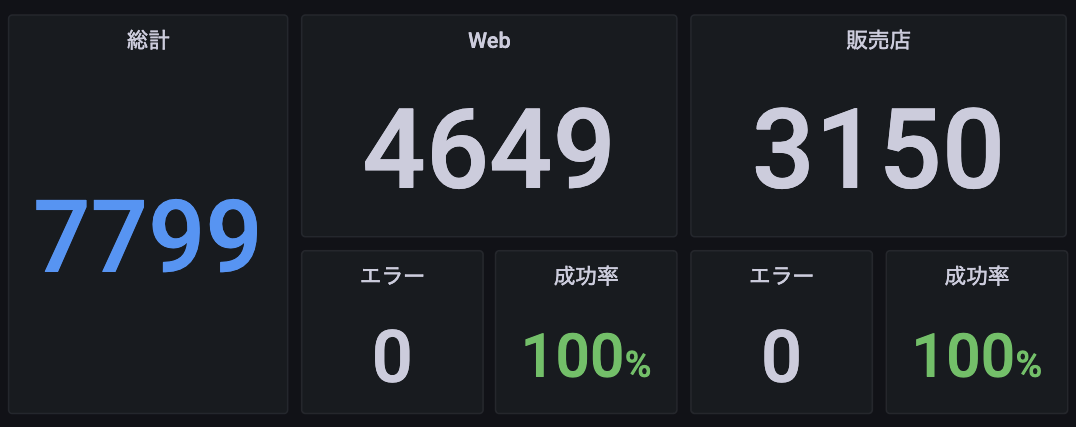
Number of contracts #the value is a sample
The most basic query tracks the number of HTTP requests for URI patterns. This query shows the increase or decrease in the number of requests over a time range and is useful for trend analyses.
sum(
    increase(
        http_server_requests_seconds_count{
            uri=~”/foo”, method=“POST”, status=“200”
        }[$__range]
    )
) or vector(0)
- sum(...): An aggregating function that sums the results. Here, we calculate the total number of requests that meet the criteria.
- increase(...): Calculates the amount by which a metric over a time range. You can find the increase or decrease in the number of requests.
- vector(0): Returns 0 if there is no result. This exists so that a value is displayed on the dashboard even if there is not data.
Measuring the Number of Applications per Hour
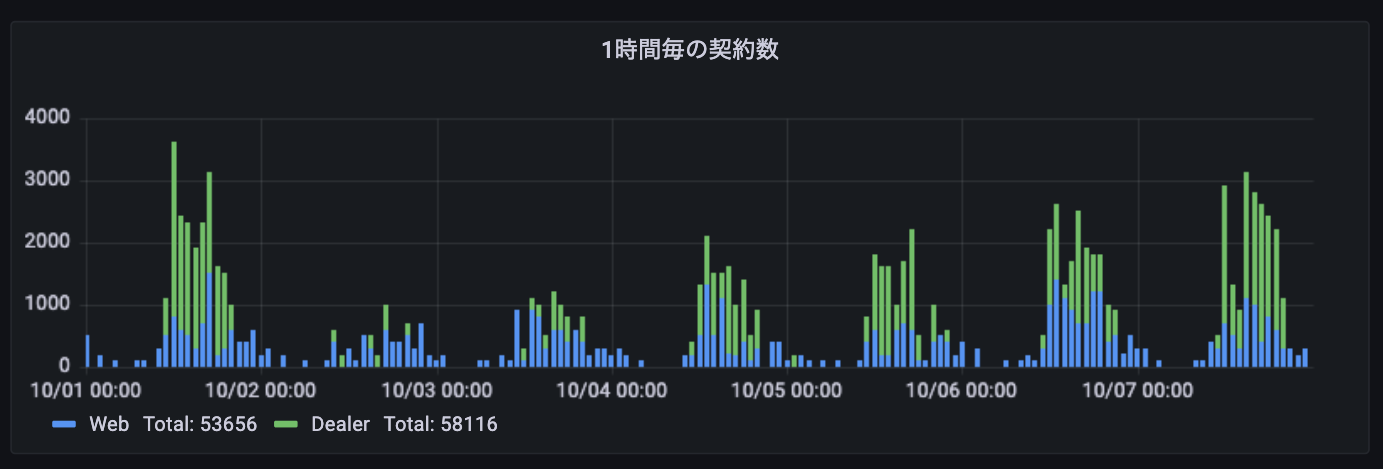
Number of applications by time zone (sample) #sleeps at night
Use PromQL which monitors API requests to measure the number of requests per hour and find changes in demand per time zone. This is used as reference data for dynamically allocating resources for different time zones and doing other applications.
Identifying the Time-Consuming Requests
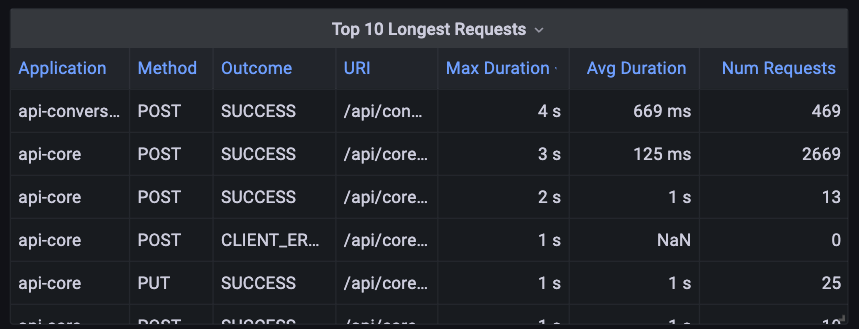
There are also those that take 4 seconds or longer
When doing performance analyses, identifying requests that take longer is critical to finding bottlenecks in the system. The following PromQL query can help.
- Calculating the Average Response Time
Calculate the average response time for each request. Determine the total response time and the number of requests, then divide them.
sum by(application, uri, outcome, method) (
    increase(http_server_requests_seconds_sum[$__range])
)
/
sum by(application, uri, outcome, method) (
    increase(http_server_requests_seconds_count[$__range])
)
- sum by(...): Groups results based on the labels (here, they are application, uri, outcome, and method) and calculates the sum of each group.
- increase(...): Calculates the amount by which a metric over a time range ($__range). Here we calculate the total response time and the number of requests.
- Aggregating the Number of Requests
Aggregate the number of requests.
sum by(application, uri, outcome, method) (
    increase(http_server_requests_seconds_count[$__range])
)
- Identifying the Requests with the Longest Response Times
Identify the ten requests with the longest response times in the time range.
topk(
    10,
    max(
        max_over_time(http_server_requests_seconds_max[$__range])
    ) by(application, uri, outcome, method)
)
- topk(10, ...): Returns the ten elements with the highest values. Here, we list the ten requests with the longest response times.
- max(...): Calculates the largest value for each group.
- max_over_time(...): Calculates the largest value for each metric within a time range and groups the results by label. This allows you to extract the requests with the longest response times.
Client-Side Error Monitoring
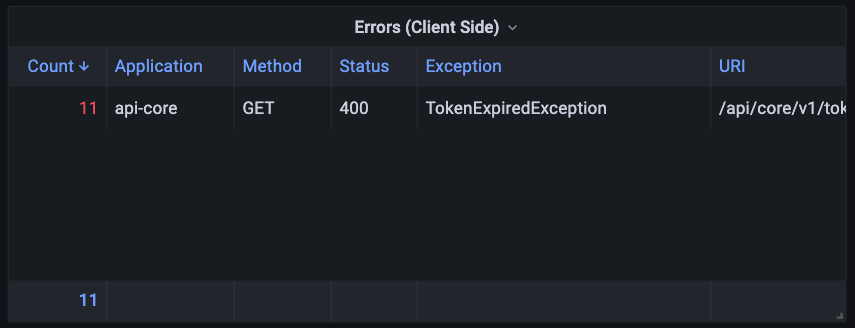
Authentication token expired
Monitor for errors occurring on the client side and analyze the cause.
label_replace(
    sum by (application, method, uri, exception, status) (
        increase(http_server_requests_seconds_count{
            status=~”5..|4..”, exception!~”None|FooException”
        }[$__range]
    )
) > 0, ‘uri’, ‘$1/*$2’, ‘uri’, ‘(.*)\\/\\{.+\\}(.*)’
- label_replace(...): Changes and adds labels.
- '> 0': Returns the result if the sum is greater than 0. In other words, it displays data only if there is an error.
Advantages of Grafana and Use Cases
Learn more about how New Car Subscription Development Group used Grafana to improve their system monitoring.
- Comprehensive system visualization: With AWS Managed Grafana, we can visualize data from AWS services (RDS, SQS, Lambda, CloudFront, etc.) and application metrics at the same time. This means we can see the performance and bottlenecks of the entire system at a glance, greatly accelerating our approach to problem solving.
- Efficient data analysis and troubleshooting: By integrating different data sources, you can quickly get the information you need when a problem arises. This allows you to quickly identify the root cause of a problem and handle it efficiently.
- API Monitoring: Through Grafana, we discovered that certain exceptions are strangely common. As a result of our investigation, we found that an unexpected API was being called on the frontend. This issue was communicated to the frontend team and fixed, making the API more efficient and significantly improving the overall stability and performance of the system.
Conclusion
Observability is more than just looking at a system. It is the key to maintaining the conditions of a system and ensuring that problems can be dealt with quickly when they arise. With Grafana, we can easily understand complex data and effectively manage the performance of entire systems. Grafana caters to a variety of needs from monitoring API requests to identifying errors.
This is worth cooperating with all team members, not just SREs and developers. After all, increasing the transparency and reliability of a system is essential to providing better service and increasing customer satisfaction.
I hope that our experience will provide you with a new perspective in your work and help you monitor your systems more efficiently and optimize performance.
E2E (End-to-End): A system or process that works as a whole from start to finish ↩︎

関連記事 | Related Posts




We are hiring!
福岡拠点 オープンポジション(エンジニア)
やっていること国内サービスでは、トヨタのクルマのサブスクリプションサービスである『 KINTO 』を中心に、移動のよろこびを提供する『 モビリティーマーケット 』、MaaSサービスの『 my route(マイルート) 』など、トヨタグループが展開する各種サービスの開発・運営を担っています。
【Java/Python】事業や組織の成長に携わるプロダクトエンジニア(AWS環境)/KINTO CXシステム開発G/東京・名古屋
KINTO CXシステム開発グループについてTOYOTAのクルマのサブスクリプションサービスである『 KINTO 』を中心とした国内向けサービスのプロジェクト立ち上げから運用保守に至るまでの運営管理を行っています。大手EC、SIer、ベンチャー、Webサービス企業など、さまざまなスペシャリストが集まり、KINTOサービスを開発しています。
Follow Us



KINTOテクノロジーズの最新情報をSNSで発信中!イベント・テックブログ更新情報もお届けします。