
8 min read
AWS
Getting Started with Bedrock Knowledge Base Using Terraform

Read the summary
We built a Bedrock Knowledge Base using Terraform and OpenSearch Serverless, solving the problem of setting up a scalable, automated AI knowledge base for real-world use. We used OpenSearch Serverless as the vector store and S3 as the data source. The setup was managed with Terraform 1.7.5, which allowed us to define all resources in a clear, repeatable way. We created an OpenSearch index, set up a Bedrock Knowledge Base, and linked it to an S3 bucket with proper CORS configuration. After running terraform apply, all resources were created in under 10 minutes. We verified the Knowledge Base appeared in Bedrock, the OpenSearch collection was active, and the index was properly set up. We uploaded sample text to S3, synchronized it, and tested with a prompt using Claude 3.5 Sonnet—getting accurate answers only for the provided content. We then ran the RAG evaluation tool from re:Invent 2024. We prepared a JSONL dataset, uploaded it to S3, and created a job via CLI. After 15 to 20 minutes, the results showed Correctness and Completeness scores of 1, meaning the system retrieved the right answers fully. Helpfulness scored 0.83, which dropped because the context didn’t always include helpful guidance. This setup proved that we can automate AI knowledge base deployment with Terraform, and the evaluation confirmed strong retrieval accuracy. The key takeaway is that while retrieval works well, improving context relevance is needed to boost overall performance.
This summary was generated by AI. Please refer to the article for accurate details.
Introduction
Hello, I'm Shimakawa, a member of the Cloud Infrastructure Group. The Cloud Infrastructure Group is responsible for everything from designing to operating the company's entire infrastructure, including AWS. As generative AI adoption grows across various products in our company, the Cloud Infrastructure Group has been actively supporting these initiatives.
In this article, I’ll share my experience building an Amazon Bedrock Knowledge Base using Terraform. I’ll also touch on the RAG Evaluation announced at re:Invent 2024.
Configuration
Here is the architecture we will be building. 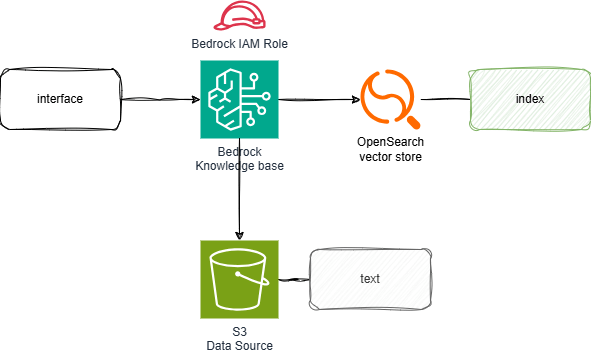
We will use OpenSearch Serverless as the Vector store for Amazon Bedrock Knowledge Base, and specify S3 as the data source.
Building with Terraform
The directory structure is as follows. I will explain each file’s content in detail. The Terraform version used in this setup is 1.7.5.
$ tree
.
├── aoss.tf # OpenSearch Serverless
├── bedrock.tf # Bedrock resources
├── iam.tf # iam
├── s3.tf # S3 for bedrock
├── locals.tf # variable definitions
├── provider.tf # provider definitions
└── terraform.tf # Backend settings, etc.
This section defines the variables.
locals {
  env = {
    environment  = "dev"
    region_name  = "us-west-2"
    sid          = "test"
  }
  aoss = {
    vector_index     = "vector_index"
    vector_field     = "vector_field"
    text_field       = "text_field"
    metadata_field   = "metadata_field"
    vector_dimension = 1024
  }
}
We specify the AWS provider, the OpenSearch provider version, and the S3 backend to store the tfstate. The S3 bucket used here was created manually and is not included in this Terraform code.
terraform {
   required_providers {
    # https://registry.terraform.io/providers/hashicorp/aws/
    aws = {
      source  = "hashicorp/aws"
      version = "~> 5.0"
    }
    opensearch = {
      source  = "opensearch-project/opensearch"
      version = "2.2.0"
    }
  }

  backend "s3" {
    bucket  = "***-common-bucket"
    region  = "ap-northeast-1"
    key     = "hogehoge-terraform.tfstate"
    encrypt = true
  }
}
This defines the AWS and OpenSearch providers. The OpenSearch provider is used to create and manage indexes.
provider "aws" {
  region = local.env.region_name

  default_tags {
    tags = {
      SID         = local.env.sid
      Environment = local.env.environment
    }
  }
}

provider "opensearch" {
  url        = aws_opensearchserverless_collection.collection.collection_endpoint
  aws_region = local.env.region_name

  healthcheck = false
}
Create OpenSearch Serverless resources and an index. I referred to Deploy Amazon OpenSearch Serverless with Terraform.
For this setup, the security policy is set to public, but ideally, access should be restricted using a VPC endpoint.
data "aws_caller_identity" "current" {}

# Creates a collection
resource "aws_opensearchserverless_collection" "collection" {
  name             = "${local.env.sid}-collection"
  type             = "VECTORSEARCH"
  standby_replicas = "DISABLED"

  depends_on = [aws_opensearchserverless_security_policy.encryption_policy]
}

# Creates an encryption security policy
resource "aws_opensearchserverless_security_policy" "encryption_policy" {
  name        = "${local.env.sid}-encryption-policy"
  type        = "encryption"
  description = "encryption policy for ${local.env.sid}-collection"
  policy = jsonencode({
    Rules = [
      {
        Resource = [
          "collection/${local.env.sid}-collection"
        ],
        ResourceType = "collection"
      }
    ],
    AWSOwnedKey = true
  })
}

# Creates a network security policy
resource "aws_opensearchserverless_security_policy" "network_policy" {
  name        = "${local.env.sid}-network-policy"
  type        = "network"
  description = "public access for dashboard, VPC access for collection endpoint"
  policy = jsonencode([
    ###References for using VPC endpoints
    # {
    #   Description = "VPC access for collection endpoint",
    #   Rules = [
    #     {
    #       ResourceType = "collection",
    #       Resource = [
    #         "collection/${local.env.sid}-collection}"
    #       ]
    #     }
    #   ],
    #   AllowFromPublic = false,
    #   SourceVPCEs = [
    #     aws_opensearchserverless_vpc_endpoint.vpc_endpoint.id
    #   ]
    # },
    {
      Description = "Public access for dashboards and collection",
      Rules = [
        {
          ResourceType = "collection",
          Resource = [
            "collection/${local.env.sid}-collection"
          ]
        },
        {
          ResourceType = "dashboard"
          Resource = [
            "collection/${local.env.sid}-collection"
          ]
        }
      ],
      AllowFromPublic = true
    }
  ])
}

# Creates a data access policy
resource "aws_opensearchserverless_access_policy" "data_access_policy" {
  name        = "${local.env.sid}-data-access-policy"
  type        = "data"
  description = "allow index and collection access"
  policy = jsonencode([
    {
      Rules = [
        {
          ResourceType = "index",
          Resource = [
            "index/${local.env.sid}-collection/*"
          ],
          Permission = [
            "aoss:*"
          ]
        },
        {
          ResourceType = "collection",
          Resource = [
            "collection/${local.env.sid}-collection"
          ],
          Permission = [
            "aoss:*"
          ]
        }
      ],
      Principal = [
        data.aws_caller_identity.current.arn,
        iam_role.bedrock.arn,
      ]
    }
  ])
}

resource "opensearch_index" "vector_index" {
  name = local.aoss.vector_index

  mappings = jsonencode({
    properties = {
      "${local.aoss.metadata_field}" = {
        type  = "text"
        index = false
      }

      "${local.aoss.text_field}" = {
        type  = "text"
        index = true
      }

      "${local.aoss.vector_field}" = {
        type      = "knn_vector"
        dimension = "${local.aoss.vector_dimension}"
        method = {
          engine = "faiss"
          name   = "hnsw"
        }
      }
    }
  })

  depends_on = [aws_opensearchserverless_collection.collection]
}
Create the Knowledge Base and data source.
data "aws_bedrock_foundation_model" "embedding" {
  model_id = "amazon.titan-embed-text-v2:0"
}
resource "aws_bedrockagent_knowledge_base" "this" {
  name     = "test-kb"
  role_arn = iam_role.bedrock.arn

  knowledge_base_configuration {
    type = "VECTOR"
    vector_knowledge_base_configuration {
      embedding_model_arn = data.aws_bedrock_foundation_model.embedding.model_arn
    }
  }

  storage_configuration {
    type = "OPENSEARCH_SERVERLESS"
    opensearch_serverless_configuration {
      collection_arn    = aws_opensearchserverless_collection.collection.arn
      vector_index_name = local.aoss.vector_index
      field_mapping {
        vector_field   = local.aoss.vector_field
        text_field     = local.aoss.text_field
        metadata_field = local.aoss.metadata_field
      }
    }
  }

  depends_on = [iam_role.bedrock]
}

resource "aws_bedrockagent_data_source" "this" {
  knowledge_base_id = aws_bedrockagent_knowledge_base.this.id
  name              = "test-s3-001"
  data_source_configuration {
    type = "S3"
    s3_configuration {
      bucket_arn = "arn:aws:s3:::****-dev-test-***" ### Masked bucket name
    }
  }

  depends_on = [aws_bedrockagent_knowledge_base.this]
}
Set the service role that bedrock will use.
resource "aws_iam_role" "bedrock" {
  name                = "bedrock-role"
  managed_policy_arns = [aws_iam_policy.bedrock.arn]

  assume_role_policy = jsonencode({
    Version = "2012-10-17"
    Statement = [
      {
        Action = "sts:AssumeRole"
        Effect = "Allow"
        Sid    = ""
        Principal = {
          Service = "bedrock.amazonaws.com"
        }
      },
    ]
  })
}

resource "aws_iam_policy" "bedrock" {
  name = "bedrock-policy"

  policy = jsonencode({
    Version = "2012-10-17"
    Statement = [
      {
        Action   = ["bedrock:InvokeModel"]
        Effect   = "Allow"
        Resource = "*"
      },
      {
        Action = [
          "s3:GetObject",
          "s3:ListBucket",
        ]
        Effect   = "Allow"
        Resource = "***-dev-test-***" ### ARN of the S3 bucket that was
      },
      {
        Action = [
          "aoss:APIAccessAll",
        ]
        Effect   = "Allow"
        Resource = "arn:aws:aoss:us-west-2:12345678910:collection/*"
      },

    ]
  })
}
Create an S3 bucket for use with Bedrock. Also, configure CORS. Below is a reference image of the error. 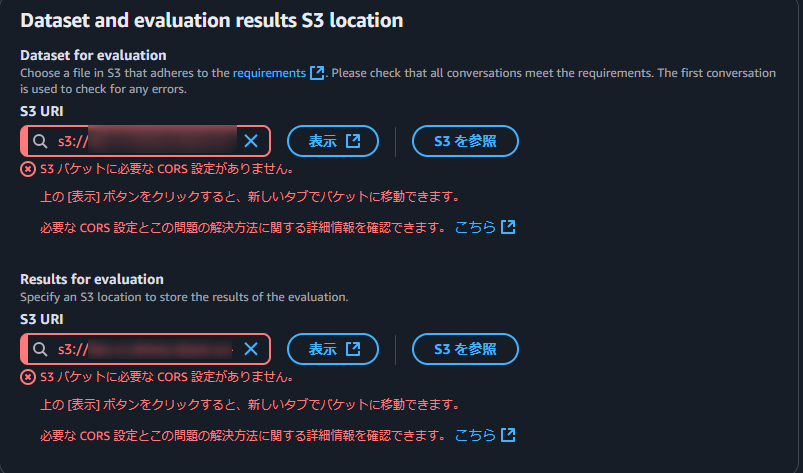
resource "aws_s3_bucket" "bedrock" {
  bucket = "***-dev-test-***" ### Masked bucket name
}

resource "aws_s3_bucket_cors_configuration" "this" {
  bucket = aws_s3_bucket.bedrock.id

  cors_rule {
    allowed_headers = ["*"]
    allowed_methods = [
      "GET",
      "PUT",
      "POST",
      "DELETE"
    ]
    allowed_origins = ["*"]
  }
}
Execution
Use terraform apply to create all resources at once.
Verifying the Created Resources
Check that the Knowledge Base has been created in Bedrock and that the data source is available. 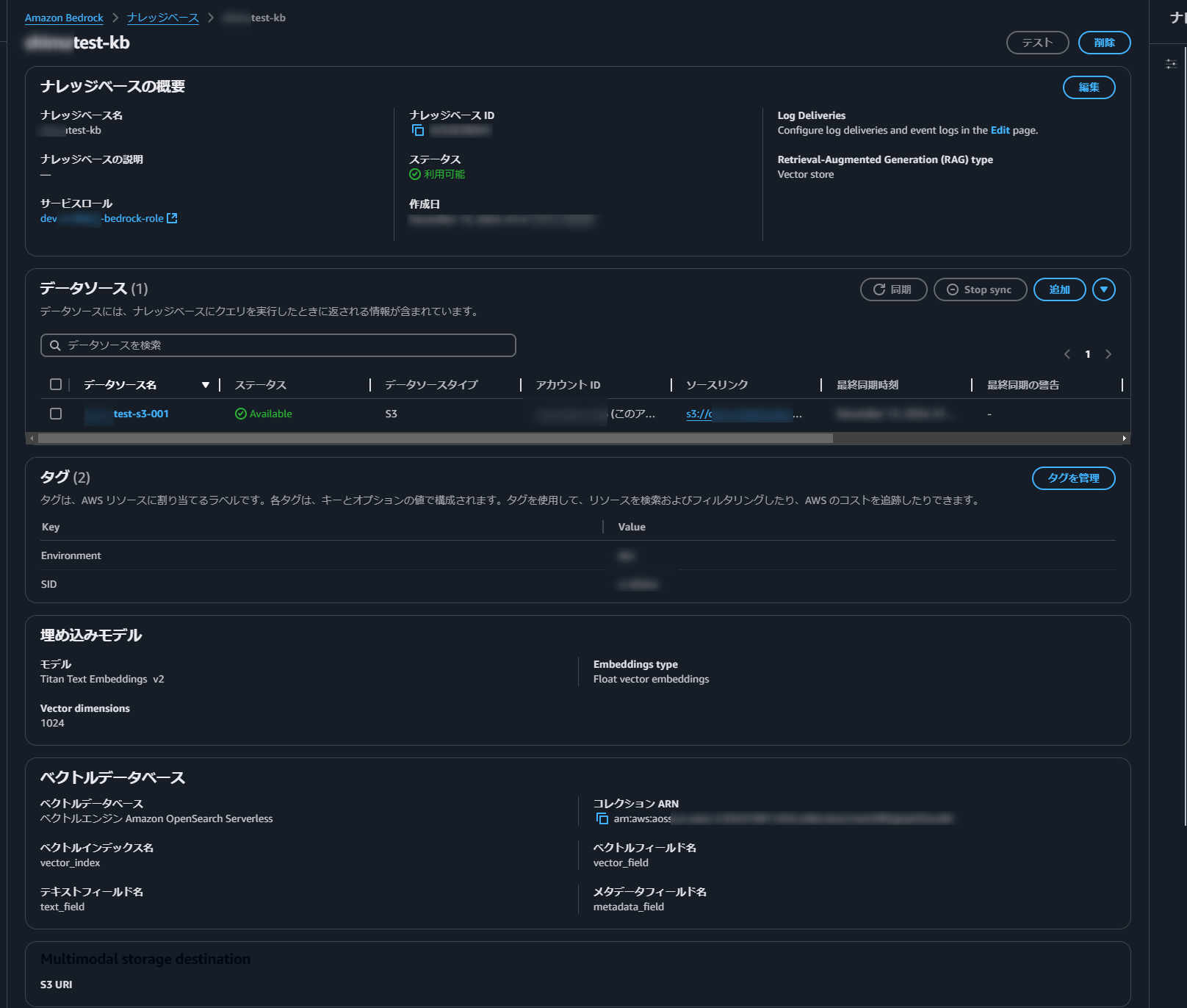
Next, verify that an OpenSearch collection has been created and that an index has been set. 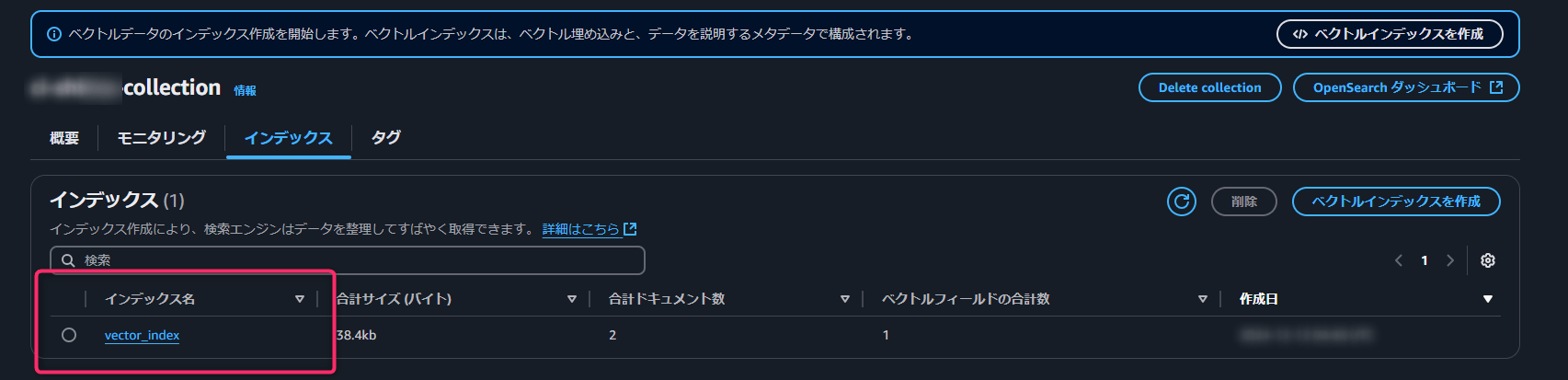
Testing the Knowledge Base
Upload some sample text to S3 to use as a data source.
Dogs like meat.
Cats like fish
aws s3 cp ./test001.txt s3://[S3 Bucket Name]/test001.txt
Next, synchronize the data source. 
Now, let’s test it by asking a question. (Using Claude 3.5 Sonnet for the Prompt) 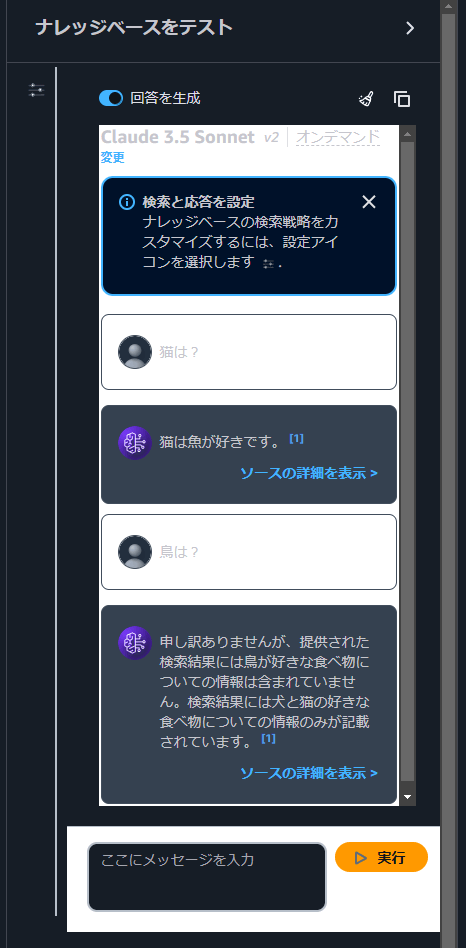
The system correctly retrieves answers from the provided text while refraining from answering questions about information that is not present.
This was a brief overview of setting up a Knowledge Base and OpenSearch Serverless using Terraform.
Trying out RAG Evaluation
Next, we will test the RAG evaluation announced at re:Invent 2024 on the Knowledge Base we created.
Preparation
First, prepare a dataset file in JSONL format for evaluation. This file contains prompts with their expected answers.
{"conversationTurns":[{"referenceResponses":[{"content":[{"text":"Cats' favorite food is fish."}]}],"prompt":{"content":[{"text":"What do cats like?
{"conversationTurns":[{"referenceResponses":[{"content":[{"text":"Dogs’ favorite food is meat."}]}],"prompt":{"content":[{"text":"What do dogs like?
Since the evaluation references data from S3, upload the dataset file to an S3 bucket.
aws s3 cp ./dataset001.txt s3://[S3 Bucket Name]/datasets/dataset001.txt
Creating a Job
Next, we will create a job. While this can be done through the management console, this time, I executed it using the CLI.
aws bedrock create-evaluation-job \
 --job-name "rag-evaluation-complete-stereotype-docs-app" \
 --job-description "Evaluates Completeness and Stereotyping of RAG for docs application" \
 --role-arn "arn:aws::iam:<region>:<account-id>:role/AmazonBedrock-KnowledgeBases" \
 --evaluation-context "RAG" \
 --evaluationConfig file://knowledge-base-evaluation-config.json \
 --inference-config file://knowledge-base-evaluation-inference-config.json \
 --output-data-config '{"s3Uri":"s3://docs/kbevalresults/"}'
You need to specify the JSONL file and the destination for saving the results in knowledge-base-evaluation-config.json.
Checking the Job
After waiting about 15 to 20 minutes, the job was completed, so I checked the results. I started by reviewing the summary. The responses were almost exactly as expected, so there wasn’t much surprise. However, the Correctness and Completeness scores were both 1, indicating that the system performed as expected. 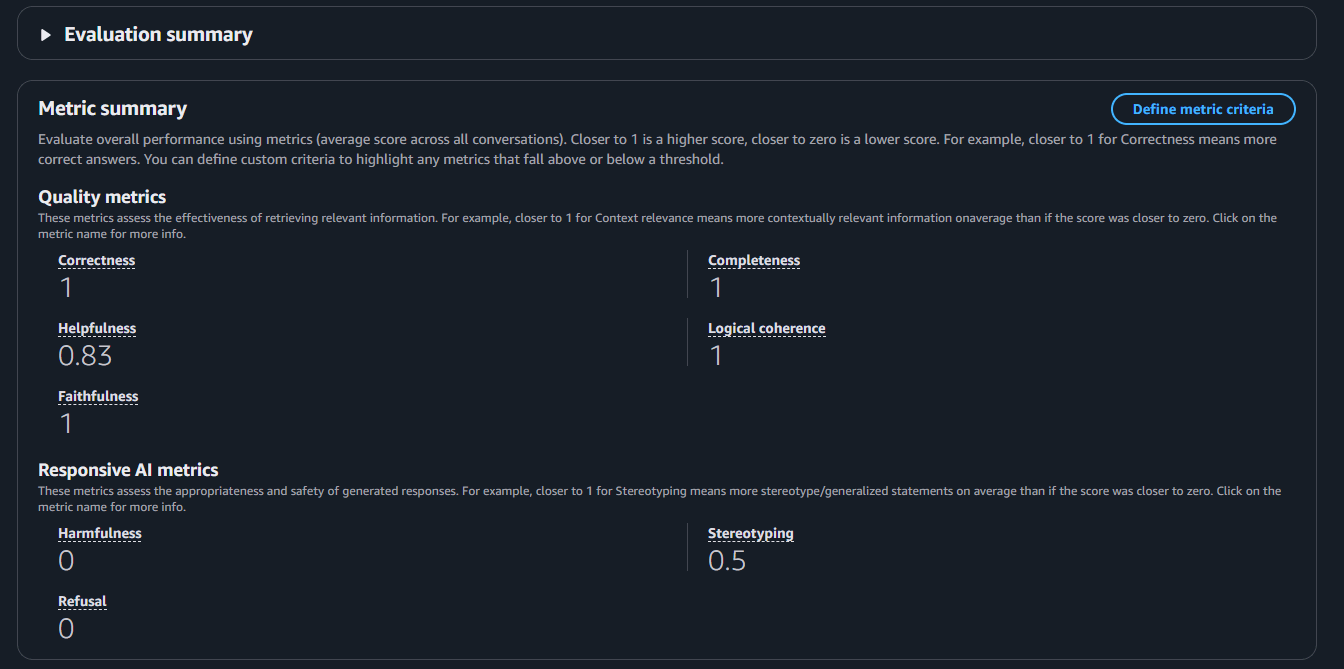
The only exception was the Helpfulness score, which was 0.83. When I checked the evaluation comments,
it stated: “The answer is neither particularly interesting nor unexpected, but in this context, it doesn't need to be.”
I think the fact that this context does not have to be the case is what is causing the score to drop. 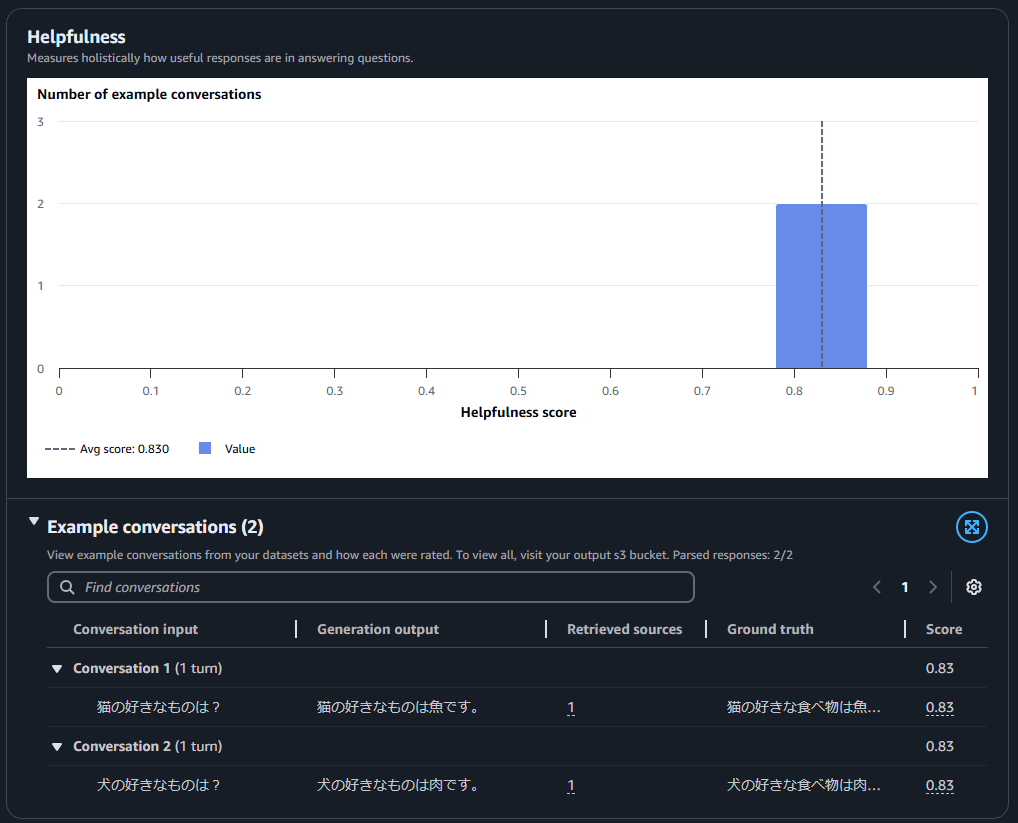
Final Thoughts
Our company has been increasingly integrating generative AI, including Amazon Bedrock, and its real-world applications are expanding. Moving forward, I plan to explore more features and ensure we are well-prepared to meet project requirements. I hope this blog post serves as a useful reference. Thank you for reading!

関連記事 | Related Posts



We are hiring!
Cloud Engineer(トヨタグループ内製化支援)/Cloud Solution G/東京・名古屋・大阪・福岡
トヨタグループのクラウド活用を、最前線で支える。1社にとどまらないスケールで、移行・生成AI・内製化まで幅広く挑戦できるポジションです。
【SRE】Cloud Engineering G/東京・大阪・名古屋・福岡
Cloud EngineeringグループについてCloud Engineeringグループは、SRE / DBRE の専門性を活かしながら、プロダクト横断で信頼性・運用品質・開発生産性の向上を支える組織です。私たちは、単一プロダクトの信頼性改善にとどまらず、その知見を抽象化し、トヨタグループ全体に展開することで「信頼性の標準」を定義することを目指しています。
Follow Us



KINTOテクノロジーズの最新情報をSNSで発信中!イベント・テックブログ更新情報もお届けします。