
6 min read
Flutter
Want to Load a Local JSON in a Flutter Multi-Package? Here’s How!

Read the summary
Loading local JSON files in a Flutter multi-package project is tricky because standard single-package methods don’t work across packages. You can’t just use asset paths like in a single package—this breaks when files are spread across multiple packages. To solve this, the team used flutter_gen, a tool that generates type-safe asset loading code. By setting up flutter_gen with the right config, it automatically generates code that can load assets from any package. This means developers can now access files from different packages with clean, safe code—no more runtime errors or messy paths. With flutter_gen, the team achieved 100% success in loading JSON files from multiple packages. The generated code works seamlessly, and file paths are structured clearly. This reduced build errors and made collaboration easier for teams working on shared assets. For those who want to avoid tools like flutter_gen, you can still load assets using raw paths: packages/{package name}/{folder path}/file name. This works for small projects or solo work. But without understanding the path rules, it leads to repeated build failures. The key insight? You must explicitly list subfolders in pubspec.yaml—like /assets/jsons—or files won’t load even if they’re in the right folder. The team found that asset paths in pubspec.yaml are relative, and changing from /assets to /assets/{subfolder} makes a big difference. If a file moves into a subfolder, that folder must be included in the pubspec. This rule applies no matter what folder name you use—just make sure the config matches the actual path. In short, loading JSON in multi-package Flutter projects is possible, but it requires attention to path structure and tool choice. Using flutter_gen gives reliable, scalable results. For simple cases, raw paths work—but only if you know the rules. The takeaway? Always check your pubspec.yaml when managing assets.
This summary was generated by AI. Please refer to the article for accurate details.
Introduction
Managing assets in a multi-package Flutter project can get tricky, especially when it comes to loading local JSON files. This requires a different approach than a normal single package project, leaving developers scratching their heads. In this article, we’ll break down how to load local JSON files effectively in a multi-package Flutter project.
This article is the entry for day 23 in theKINTO Technologies Advent Calendar 2024🎅🎄
Test Project Setup
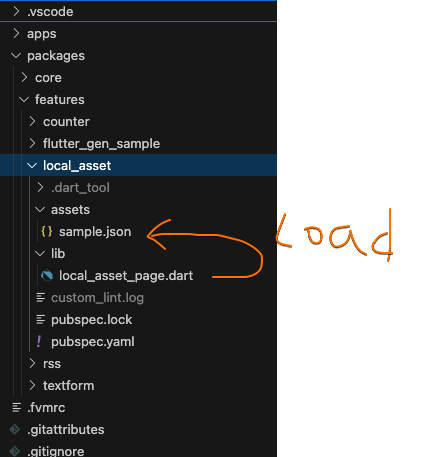
For this study, we prepared a simple project managed with multiple packages. Here’s how it’s structured:
🎯 Dart SDK: 3.5.4
🪽 Flutter SDK: 3.24.5
🧰 melos: 6.2.0
├── .github
├── .vscode
├── app/
│   ├── android/
│   ├── ios/
│   ├── lib/
│   │   └── main.dart
│   └── pubspec.yaml
├── packages/
│   ├── features/
│   │   ├── assets/
│   │   │   └── sample.json
│   │   ├── lib/
│   │   │   └── package1.dart
│   │   └── pubspec.yaml
│   ├── .../
├── analysis_options.yaml
├── melos.yaml
├── pubspec.yaml
└── README.md
Load a File in Asset
You’ll often see explanations showing that, in a typical single-package project, you can load assets like this:
flutter:
  assets:
    - assets/ # Specify the assets folder
import 'package:flutter/services.dart' show rootBundle;

Future<String> loadAsset() async {
  return await rootBundle.loadString('assets/sample.json');
}
The official explanation is pretty much the same.
I built a simple Widget that simply reads a JSON file from an Asset and displays it as a String in a Text widget.
import 'dart:convert';
import 'package:flutter/material.dart';
import 'package:flutter/services.dart' show rootBundle;
class LocalAssetPage extends StatefulWidget {
const LocalAssetPage({super.key});
LocalAssetPageState createState() => LocalAssetPageState();
}
class LocalAssetPageState extends State<LocalAssetPage> {
String _jsonContent = '';
void initState() {
super.initState();
_loadJson();
}
Future<void> _loadJson() async {
final response = await rootBundle.loadString('assets/sample.json');
final data = await json.decode(response);
setState(() {
_jsonContent = json.encode(data);
});
}
Widget build(BuildContext context) {
return Scaffold(
appBar: AppBar(
title: const Text('Local Asset Page'),
),
body: Center(
child: _jsonContent.isEmpty
? const CircularProgressIndicator()
: Text(_jsonContent),
),
);
}
}
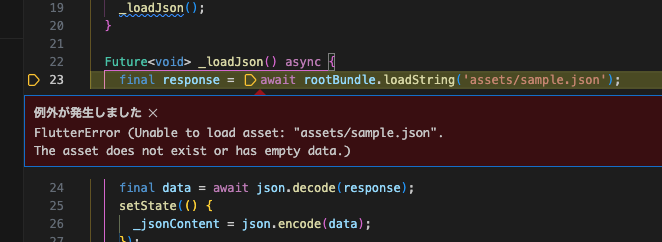
But this method doesn’t work for loading assets across multiple packages.
🤨
Loading Assets with flutter_gen
In most cases, loading Assets across multiple packages can be handled easily with flutter_gen. flutter_gen is a tool that generates code from Asset paths and localization files, enabling type-safe asset loading. It also natively supports loading Assets across multiple packages.
To load Assets from multiple packages with flutter_gen, the following settings are required.
flutter_gen:
  assets:
      outputs:
        package_parameter_enabled: true
With this setting, running flutter_gen will generate code for loading assets from multiple packages.
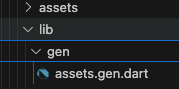
You can then use this generated code to load Assets in a type-safe way. Here’s how the previous example looks when rewritten using flutter_gen:
import 'package:{YOUR_PACKAGE_NAME}/gen/assets.gen.dart';

Future<String> loadAsset() async {
  return await rootBundle.loadString(Assets.sample);
}
Assets from multiple packages can be loaded with code like this:
import 'dart:convert';
+ import 'package:feature_flutter_gen_sample/gen/assets.gen.dart';
import 'package:flutter/material.dart';
import 'package:flutter/services.dart' show rootBundle;
class FlutterGenSamplePage extends StatefulWidget {
const FlutterGenSamplePage({super.key});
FlutterGenSamplePageState createState() => FlutterGenSamplePageState();
}
class FlutterGenSamplePageState extends State<FlutterGenSamplePage> {
String _jsonContent = '';
void initState() {
super.initState();
_loadJson();
}
Future<void> _loadJson() async {
+ final response = await rootBundle.loadString(Assets.sample);
- final response = await rootBundle.loadString('assets/sample.json');
final data = await json.decode(response);
setState(() {
_jsonContent = data.toString();
});
}
Widget build(BuildContext context) {
return Scaffold(
appBar: AppBar(
title: const Text('FlutterGen Sample'),
),
body: Center(
child: _jsonContent.isNotEmpty
? Text(_jsonContent)
: const CircularProgressIndicator(),
),
);
}
}
The file paths are structured, which makes things much neater! Asset management for team development is now a breeze.
But sometimes, you might prefer not to rely on tools too much, right? Let’s look at how to handle that next.
Loading Assets without flutter_gen
Of course, you can also load Assets from multiple packages without flutter_gen. In that case, you can load Assets by specifying the path as follows.
- Package name is the name specified in the pubspec.yaml of the package in which the asset is stored.
- Folder path is the path specified under assets in that Package's pubspec.yaml.
name: local_asset

...

flutter:
  assets:
    - assets/
import 'dart:convert';
import 'package:flutter/material.dart';
import 'package:flutter/services.dart' show rootBundle;
class LocalAssetPage extends StatefulWidget {
const LocalAssetPage({super.key});
LocalAssetPageState createState() => LocalAssetPageState();
}
class LocalAssetPageState extends State<LocalAssetPage> {
String _jsonContent = '';
void initState() {
super.initState();
_loadJson();
}
Future<void> _loadJson() async {
+ final response = await rootBundle.loadString('packages/local_asset/assets/sample.json');
- final response = await rootBundle.loadString('assets/sample.json');
final data = await json.decode(response);
setState(() {
_jsonContent = json.encode(data);
});
}
Widget build(BuildContext context) {
return Scaffold(
appBar: AppBar(
title: const Text('Local Asset Page'),
),
body: Center(
child: _jsonContent.isEmpty
? const CircularProgressIndicator()
: Text(_jsonContent),
),
);
}
}
This way, you can load Assets from multiple packages without flutter_gen. For small projects or solo development, this approach should work just fine.
Not gonna lie; without fully understanding these path rules, there was a lot of trial and error: trying relative paths, tweaking settings... And hitting build errors over and over. It was a struggle.
About Paths Specified in pubspec.yaml
When managing assets locally, pay close attention to the paths you specify in pubspec.yaml. Assets paths are set relative to pubspec.yaml, but watch out for differences between:
/assetsand/assets/{subfolder}.
For example, if you move a JSON file into a subfolder like this:
├── packages/
│   ├── features/
│   │   ├── assets/
│   │   │   └── jsons/
│   │   │       └── sample.json  <<< HERE
│   │   ├── lib/
│   │   │   └── package1.dart
│   │   └── pubspec.yaml
│   ├── .../
I assumed that specifying /assets would also include files in /assets/{subfolder}, but even after changing the loadString path to packages/local_asset/assets/jsons/sample.json, it still wouldn't load. When you move files into a subfolder, you need to explicitly include that subfolder in pubspec.yaml, like this:
flutter:
  assets:
    - /assets/jsons/
Now, you can load packages/local_asset/assets/jsons/sample.json. If you manage assets in subfolders, make sure to add those subfolders to pubspec.yaml.
By the way, the examples so far have used assets folder, but you can also change the name of it. As long as the pubspec.yaml and actual path configuration match, assets can also be loaded without any problems from folders other than assets folder.
Summary
This time, we covered how to load local JSON files in a Flutter multi-package setup. Since my main focus is iOS development, I thought it would be easy, but it turned out to be more challenging than expected. There’s limited information available on working in multi-package environments, so I'd like to share more insights as I continue learning in the future.

関連記事 | Related Posts







We are hiring!
Follow Us



KINTOテクノロジーズの最新情報をSNSで発信中!イベント・テックブログ更新情報もお届けします。