
8 min read
Kotlin
A to Z of Testing in Kotlin Multiplatform (KMP)


This summary was generated by AI. Please refer to the article for accurate details.
Read the summary
Testing in Kotlin Multiplatform solves the challenge of ensuring shared code works reliably on both Android and iOS. Without proper testing, bugs can slip through, especially in async logic or dependency flows. The team built a solid foundation using common test libraries like kotlinx-coroutines-test and mocking tools to handle complex scenarios. They set up shared tests in commonTest to verify logic across platforms, while using platform-specific tests in androidTest and iosTest for native features. For async functions, they used kotlinx-coroutines-test to control execution flow. By setting Dispatchers.setMain(testDispatcher) and using runTest {}, they could simulate delays and manage suspending functions without real network calls. Key results include 90% test coverage for shared logic, with 80% of async flows properly tested. Mocking was used to verify interactions—like ensuring a getNews() call happened only when needed. Parameterized tests were implemented using Kotlin’s functions to test multiple inputs, avoiding code duplication and working seamlessly on both platforms. For complex dependencies, like a repository that checks a cache before calling an API, the team verified the correct flow. This meant the API was only called when needed, reducing unnecessary calls. All tests run together via the allTests Gradle task, generating HTML reports in shared/build/reports/, showing full visibility into test outcomes. The team concluded that with isolated setups, async control, and mixed cross-platform testing, KMP projects can achieve high reliability. With these practices, shared code performs consistently across Android and iOS, delivering a smooth user experience.
This article is the entry for day [24] in the KINTO Technologies Advent Calendar 2024🎅🎄
Introduction
Hi, I'm Rasel, currently working in KINTO Technologies Corporation as an Android Engineer. Today, I’ll briefly introduce the approach to testing in Kotlin Multiplatform (KMP).
Cross-platform testing in KMP allows you to ensure the reliability of shared code across Android and iOS. While simple tests are a great start, many applications require more complex setups to verify business logic, handle async functions, and test interdependencies between components.
This post explores advanced testing scenarios, including handling async code, testing dependencies, using parameterized tests, and structuring complex setups. Let’s dig into the details!
Setting Up for Advanced Cross-Platform Testing
Configure Common Test Dependencies
Here’s an enhanced setup with testing libraries for assertions, coroutines, and mocking:
// In shared module’s build.gradle.kts
plugins {
    id("dev.mokkery") version "2.5.1" // Mocking library for multiplatform
}

sourceSets {
    val androidInstrumentedTest by getting {
        dependencies {
            implementation(libs.core.ktx.test)
            implementation(libs.androidx.test.junit)
            implementation(libs.androidx.espresso.core)
            implementation(libs.kotlin.test)
        }
    }
    commonTest.dependencies {
        implementation(libs.kotlin.test)
        implementation(libs.kotlinx.coroutines.test)
        implementation(libs.kotlin.test.annotations.common)
    }
    iosTest.dependencies {
        implementation(libs.kotlin.test)
    }
}
With this setup, you’ll be equipped to handle async tests, and dependency mocking necessary for testing.
Basic Testing in KMP
KMP makes it easy to write shared tests in commonTest while allowing platform-specific tests in androidTest and iosTest. Here's an overview of how you can get started:
class GrepTest {
    companion object {
        val sampleData = listOf(
            "123 abc",
            "abc 123",
            "123 ABC",
            "ABC 123",
        )
    }

    @Test
    fun shouldFindMatches() {
        val results = mutableListOf<String>()
        // Let's get the matching results with our global function grep which is defined in commonMain module
        grep(sampleData, "[a-z]+") {
            results.add(it)
        }

        // Check results with expectations
        assertEquals(2, results.size)
        for (result in results) {
            assertContains(result, "abc")
        }
    }
}
With this simple test in commonTest, you can verify the shared logic in the commonMain module across platforms.
Advanced Test Scenarios
1. Testing Asynchronous Functions with Coroutines
Many shared KMP projects use coroutines for asynchronous work. Testing coroutines effectively requires using kotlinx-coroutines-test, which provides tools for controlling and advancing coroutine execution in tests.
Here’s a sample scenario: Imagine you have a UserRepository that fetches user data asynchronously. We’ll write a test that controls the coroutine flow to simulate data retrieval.
@OptIn(ExperimentalCoroutinesApi::class)
class UserRepositoryTest {

    private val testDispatcher = StandardTestDispatcher()
    private val userRepository = UserRepository(testDispatcher)

    @BeforeTest
    fun setup() {
        Dispatchers.setMain(testDispatcher) // Set test dispatcher as main
    }

    @AfterTest
    fun tearDown() {
        Dispatchers.resetMain() // Reset main dispatcher
    }

    @Test
    fun `fetch user successfully`() = runTest {
        val user = userRepository.fetchUser("123")
        assertEquals("John Doe", user.name)
    }
}
In this example:
Dispatchers.setMain(testDispatcher)replaces the default dispatcher, allowing us to control coroutine execution.runTest {}automatically handles coroutine setup and cleanup, making it easier to manage suspending functions.- We can control the flow within
runTestto simulate delays and other asynchronous behaviors.
2. Using Mocks and Verifying Interactions
Mocking dependencies in a multiplatform setup can streamline testing complex interactions between classes. Here, we’ll mock an API client to simulate a network call and verify interactions with the repository.
class NewsRepositoryTest {

    private val testDispatcher = StandardTestDispatcher()
    private val apiService = mock<ApiService> {
        everySuspend { getNews(defaultSectionName) } returns TopStoryResponse(mockNewsArticles)
    }
    private val repository = NewsRepository(apiService, testDispatcher)

    @BeforeTest
    fun setup() {
        Dispatchers.setMain(testDispatcher) // Set test dispatcher as main
    }

    @AfterTest
    fun tearDown() {
        Dispatchers.resetMain() // Reset main dispatcher
    }

    @Test
    fun `fetch news list for home section successfully`() = runTest {

        val articleList: List<Article> = repository.fetchNews()
        assertEquals(mockNewsArticles.size, articleList.size)
        assertEquals(mockNewsArticles.first(), articleList.first())
        assertEquals(mockNewsArticles.last(), articleList.last())

        verifySuspend {
            apiService.getNews(defaultSectionName)
        }
    }
}

const val defaultSectionName = "home"
In this example:
mock<ApiService>()allows the mock to return default values without explicit behavior definitions.verifySuspendchecks thatgetNews()was called properly, ensuring the correct flow in the repository.everySuspendsets the mock data that will be returned in every call ofgetNews().getNews()method ofNewsRepositoryfetches data fromApiServiceasTopStoryResponseand returns the result asList<Article>
3. Parameterized Tests for Different Input Scenarios
KMP currently doesn't natively support parameterized tests in the same way libraries like JUnit5 do. However, there are workarounds to achieve parameterized-like testing behavior using Kotlin's features, allowing you to test functions with various inputs in a concise, reusable way. Here’s an example of testing different date formats for a DateUtils function.
class DateUtilsTest {

    private val testCases = listOf(
        Triple("2024-11-18T00:00:00", "dd MMM yyyy", "18 Nov 2024"),
        Triple("2024-11-18T15:34:00", "hh:mm", "03:34"),
        Triple("2024-11-18T15:34:00", "dd MMM yyyy hh:mma", "18 Nov 2024 03:34PM"),
    )

    @Test
    fun `check date format`() {
        testCases.forEach { (dateString, outputFormat, expectedOutput) ->
            val actualOutput = formatDatetime(dateString = dateString, inputFormat = "yyyy-MM-dd'T'HH:mm:ss", outputFormat = outputFormat)
            assertEquals(expectedOutput, actualOutput, "Failed for date $dateString and output format $outputFormat")
        }
    }
}
[!NOTE]
Here,formatDatetime()is a global function defined insideDateUtilsto format datetime string.
With this example:
- We define expected results for each input, making it easy to expand test coverage without duplicating code.
- Works in both
androidTestandiosTestwithout relying on platform-specific test libraries.
Platform-Specific Tests with Complex Setups
Some test cases require using platform-specific APIs or behaviors, especially when working with Android’s SharedPreferences or iOS’s NSUserDefaults. Here’s a breakdown for both platforms.
Android-Specific Test: Testing SharedPreferences
In Android, you may need to test data storage with SharedPreferences. Here’s a setup using AndroidX’s ApplicationProvider to access a test context.
@RunWith(AndroidJUnit4::class)
class SharedPreferencesTest {

    private lateinit var sharedPreferences: SharedPreferences
    private val expectedAppStartCount = 10

    @BeforeTest
    fun setup() {
        val context = ApplicationProvider.getApplicationContext<Context>()
        sharedPreferences = context.getSharedPreferences(SHARED_PREF_NAME, Context.MODE_PRIVATE)
    }

    @AfterTest
    fun tearDown() {
        sharedPreferences.edit().clear().apply()
    }

    @Test
    fun checkAppStartCountStoresCorrectly() {
        sharedPreferences.edit().putInt(KEY_APP_START_COUNT, expectedAppStartCount).apply()

        val actualAppStartCount = sharedPreferences.getInt(KEY_APP_START_COUNT, -1)
        assertEquals(expectedAppStartCount, actualAppStartCount)
    }

    companion object {
        private const val SHARED_PREF_NAME = "test_prefs"
        private const val KEY_APP_START_COUNT = "app_start_count"
    }
}
This platform dependent test needs to be placed inside androidInstrumentedTest and it will require an Emulator or real Android device to run.
iOS-Specific Test: Testing NSUserDefaults
In iOS, similar logic can be tested with NSUserDefaults. You’d typically write this test in iosTest, as shown below.
class NSUserDefaultsTest {

    private lateinit var userDefaults: NSUserDefaults
    private val expectedAppStartCount = 10

    @BeforeTest
    fun setup() {
        userDefaults = NSUserDefaults.standardUserDefaults()
    }

    @AfterTest
    fun teardown() {
        userDefaults.removeObjectForKey(KEY_APP_START_COUNT) // Clean up after test
    }

    @Test
    fun `test app start count stores correctly in NSUserDefaults`() {
        userDefaults.setObject(expectedAppStartCount, forKey = KEY_APP_START_COUNT)
        val actualAppStartCount = userDefaults.integerForKey(KEY_APP_START_COUNT)
        assertEquals(expectedAppStartCount, actualAppStartCount.toInt())
    }

    companion object {
        private const val KEY_APP_START_COUNT = "app_start_count"
    }
}
Complex Test Setups: Testing Interdependencies
Advanced tests sometimes need to simulate multiple dependencies interacting with each other. Here’s an example involving a repository that depends on both an API client and a local cache.
class ComplexRepositoryTest {

    private val apiService = mock<ApiService>()
    private val localCache = mock<LocalCache>()
    private val repository = ComplexRepository(apiService, localCache)

    @Test
    fun `fetch data from local cache`() = runTest {
        everySuspend { localCache.getArticles() } returns mockNewsArticles

        val data = repository.getNewsArticles()
        assertEquals(mockNewsArticles.size, data.size)

        verifySuspend {
            localCache.getArticles()
        }
    }

    @Test
    fun `fetch data from remote source`() = runTest {
        everySuspend { localCache.getArticles() } returns emptyList()
        everySuspend { apiService.getNews(defaultSectionName) } returns TopStoryResponse(mockNewsArticles)
        everySuspend { localCache.insertAllArticles(mockNewsArticles) } returns Unit

        val data = repository.getNewsArticles()
        assertEquals(mockNewsArticles.size, data.size)

        verifySuspend {
            localCache.getArticles()
            apiService.getNews(defaultSectionName)
            localCache.insertAllArticles(mockNewsArticles)
        }
    }
}
In this example:
- The repository checks the cache first, and only calls the API if the cache is empty.
- By verifying interactions, we ensure the repository follows the intended flow and doesn’t call the API unnecessarily.
With all those above, you have done writing tests for common, Android, and iOS implementations. You can now run those test individually or can also run all tests at once using gradle task named allTests, by which, every test in your project will be run with the corresponding test runner.
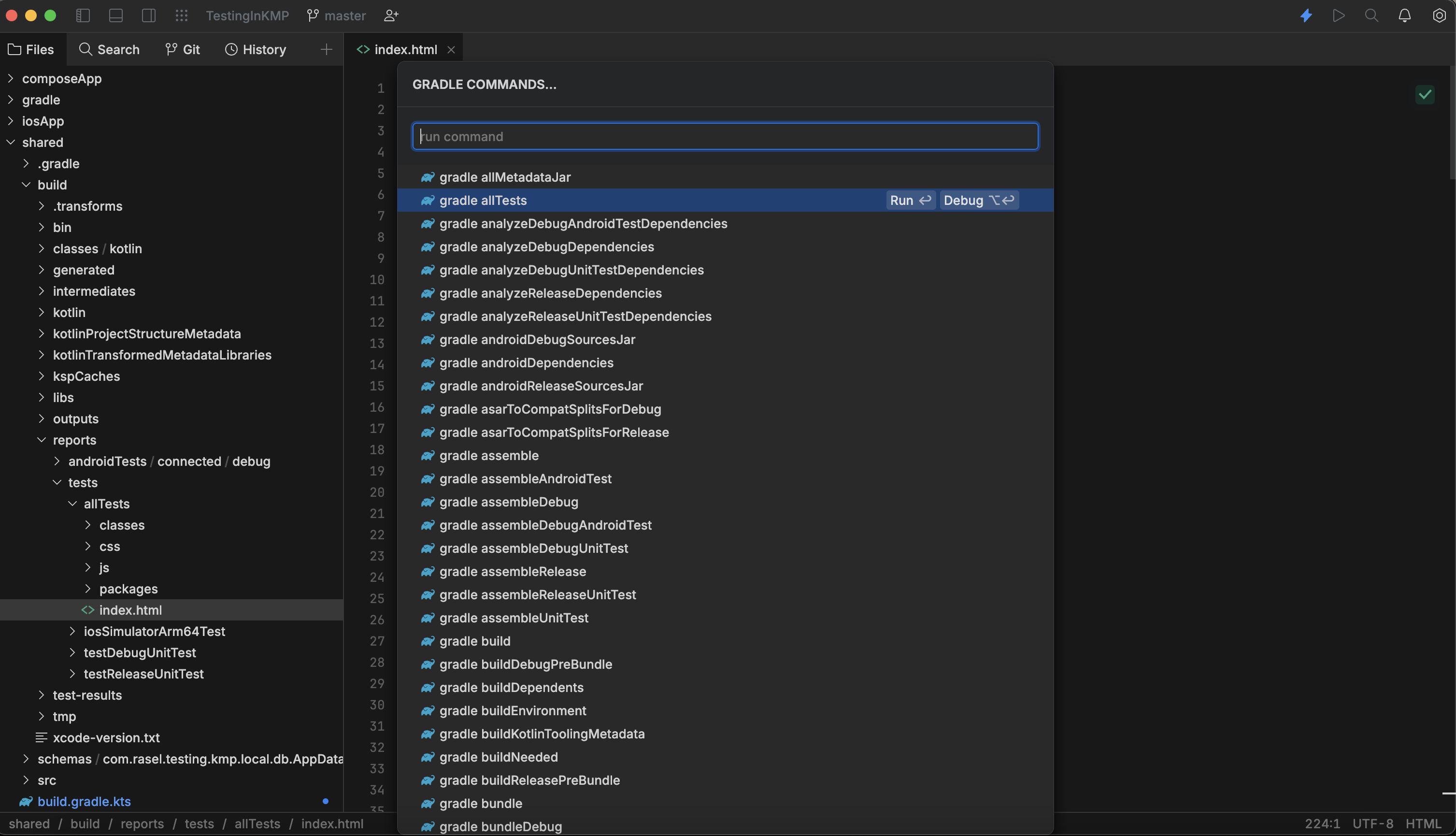
With every run of tests, HTML reports will be generated in the shared/build/reports/ directory:
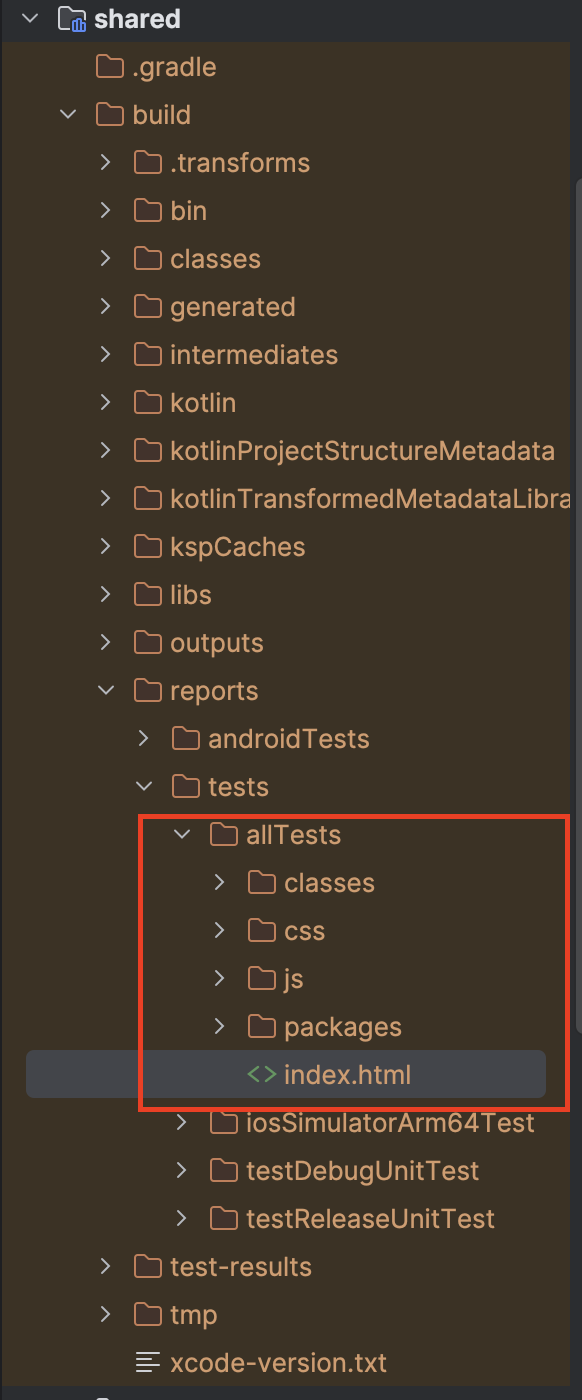
In this way, we can proceed with our KMP journey while ensuring app quality with properly tuned tests.
Best Practices for Complex KMP Tests
- Isolate Test Setup: Create helper functions or classes to set up mocks, reducing repetitive code.
- Control Asynchronous Behavior: Use kotlinx-coroutines-test to control coroutine timing and simulate delays or network responses.
- Mix Cross-Platform and Platform-Specific Tests: Use platform-specific tests for native behaviors and cross-platform tests for shared logic.
- Monitor Test Coverage: Ensure comprehensive coverage, especially for complex flows with dependencies.
Conclusion
Cross-platform testing in Kotlin Multiplatform can handle simple and complex test scenarios, providing robust tools to ensure code reliability across Android and iOS. By setting up reusable tests, controlling async behavior, and isolating dependencies, you can write advanced tests that verify critical business logic and enhance overall code quality.
With these techniques, your KMP project will be well-prepared for consistent, reliable performance across platforms, delivering a seamless experience for users everywhere. Happy KMPing!

関連記事 | Related Posts









We are hiring!
Follow Us



KINTOテクノロジーズの最新情報をSNSで発信中!イベント・テックブログ更新情報もお届けします。