
4 min read
Event
Advancement of Windows Kitting Automation: Introducing Windows Autopilot

This summary was generated by AI. Please refer to the article for accurate details.
Read the summary
We reduced PC kitting work by about 40% after introducing Windows Autopilot. Before, every PC had to be manually registered in Intune, and setup steps like language selection and license agreement had to be done by hand. With Windows Autopilot, we pre-registered all PCs’ hardware hashes in Intune. Once a PC is turned on and signed in, it automatically joins Intune without any manual input. This cut down the setup time and eliminated the need for staff to manually register each device. We didn’t need to do much new research because all hardware hashes were already set up. We just assigned the Autopilot profile to those hashes and replaced old static groups with dynamic groups. The dynamic group now automatically includes any device with the Autopilot attribute, so device policies and app deployments are applied instantly. As a result, kitting became much smoother and less error-prone. While we still need to install apps and run Windows updates, which take time, the process is now automated from registration to policy assignment. This means fewer missed steps and less human error. We haven’t reached full zero-touch kitting yet—manual steps are still needed for updates and app installs. But by automating device registration and policy rollout, we’ve improved kitting efficiency significantly. We’re already planning to use new features to get even closer to full automation.
Introduction
Hello! I am Uemura from KINTO Technologies' Development Support Division.
As a corporate engineer, I am mainly responsible for mobile device management (MDM).
We recently held a "case study presentation & roundtable study session, specializing in the field of corporate IT" under the title "KINTO Technologies MeetUp! - 4 cases to share for information systems by information systems."
In this article, I will introduce the contents of the case study "Advancement of Windows Kitting Automation: Introducing Windows Autopilot" which was presented in our recent study session, along with supplementary information.
What is Windows Autopilot?
Windows Autopilot is a way to register Windows devices in Intune. By pre-registering the hardware hash (HW hash) of the device, it is automatically registered in Intune during the setup.
I would like to talk about how we introduced this Windows Autopilot into KINTO Technologies' environment to improve the efficiency of PC kitting.
How Windows Autopilot automates kitting
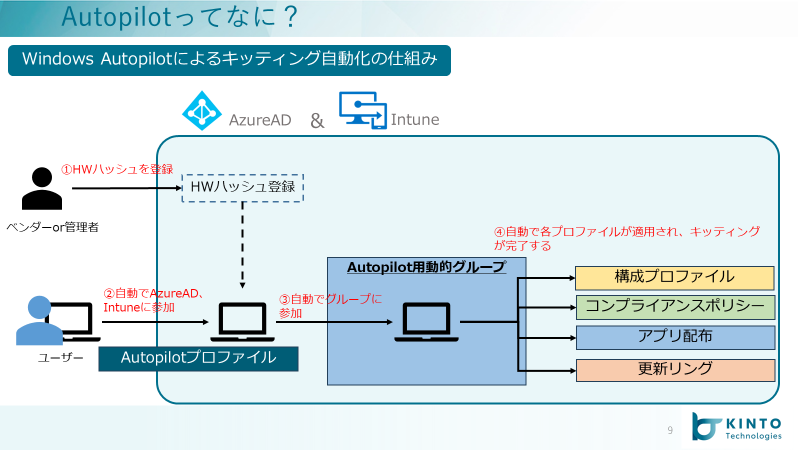
Firstly, I will explain the mechanism of kitting automation with Windows Autopilot.
-
The vendor or administrator should register the HW hash of the PC in Intune in advance before kitting.
-
Then, the user (or administrator) starts the PC and signs in. By pre-registering the HW hash, the PC will be automatically registered in Intune.
-
By creating a dynamic group that includes the PC registered with Windows Autopilot, any PC registered in Intune will automatically enrolled to that dynamic group.
-
By assigning the dynamic group shown in step 3 to each configuration profile and app deployment settings, device control and app deployment will be performed automatically.
As Windows Autopilot itself is responsible for the device registration function, it falls under step 1 and 2.
Dynamic groups should be utilized so that profile control and app deployment of registered devices can be done automatically at step 3 and 4.
In other words, it is possible to automate kitting by configuring not only Windows Autopilot registration settings but also device control settings and app deployment to run automatically.
Introducing Windows Autopilot
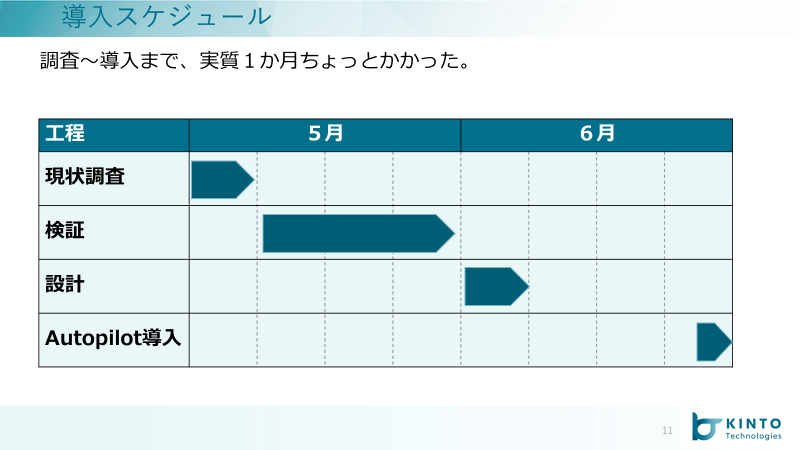
It took us about a month and a half to introduce Windows Autopilot, including research and verification.
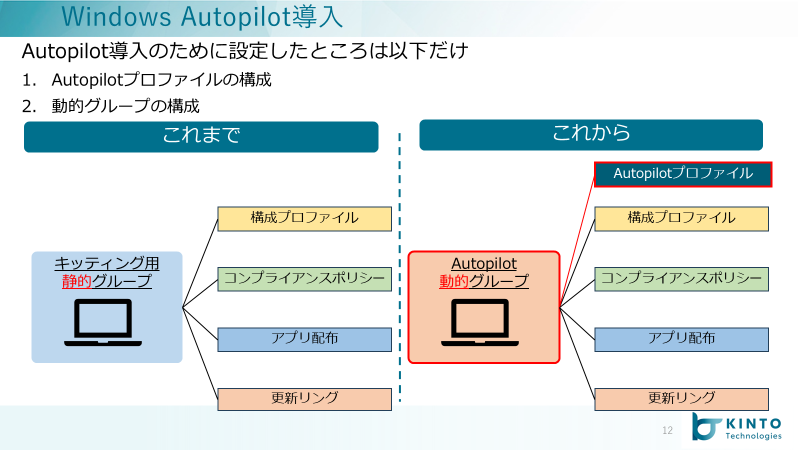 In KINTO Technologies' environment, the HW hash registration of all PCs had already been completed, so only the following two things were done this time.
-
Assigning the Autopilot profile, which is the first thing to be executed during kitting, to the HW hash that had already been registered.
-
Replacing static groups for kitting that have been used for kitting with dynamic groups
Autopilot Profile Configuration
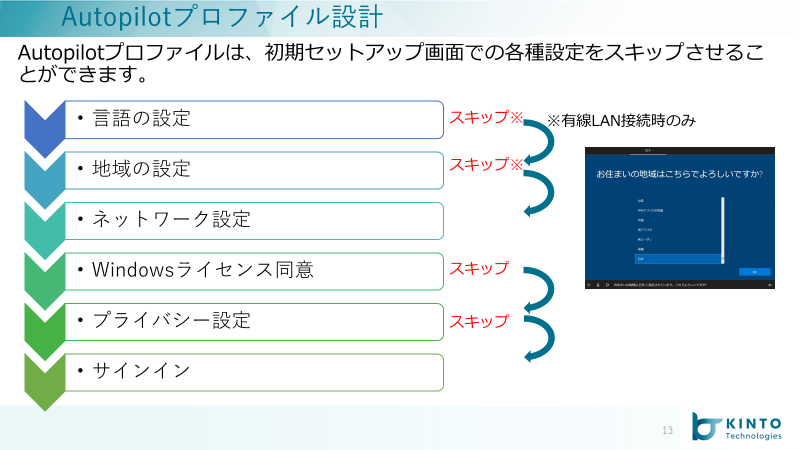 Assigning the Autopilot profile to the HW hash determines that the corresponding PC is registered in Intune by the Windows Autopilot method.
As for the contents of the profile, it is possible to set whether or not to skip the selection such as "Language Setting" and "Windows License Agreement" that are mainly selected on the PC setup screen.
Dynamic Group Configuration
Since Autopilot-registered devices have an Autopilot device attribute, set this attribute to a dynamic membership rule.
*For details, please refer to the following Microsoft site.
Create a device group for Windows Autopilot | Microsoft Learn
Then specify the dynamic group you created to the "Assign" in configuration profile and app deployment settings.
This makes it possible to automate the process from device registration to device control. 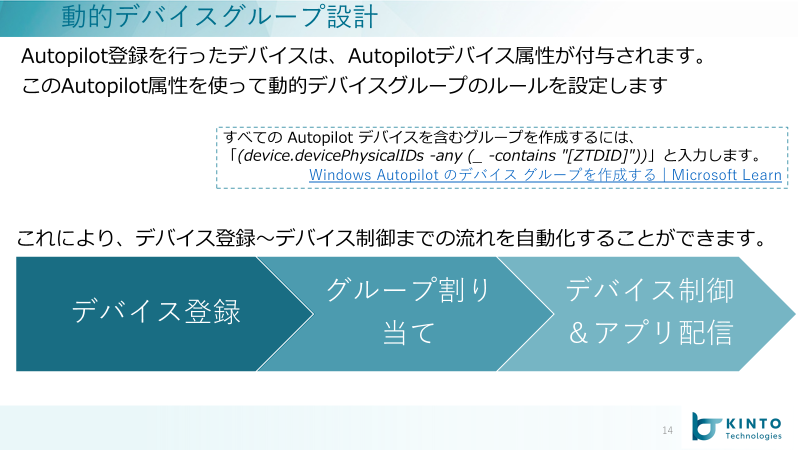
This completes the kitting automation with Windows Autopilot.
Results of Introduction
How effective has the introduction of Autopilot been?
As a quantitative result, we were able to reduce the work items by about 40% compared to before the introduction. On the other hand, we were not able to achieve that much efficiency in working hours due to the significant time required for installing apps and performing Windows Updates.
As a qualitative result, the automation and simplification of kitting process has made it less likely to cause human errors, such as work omissions.
Conclusion
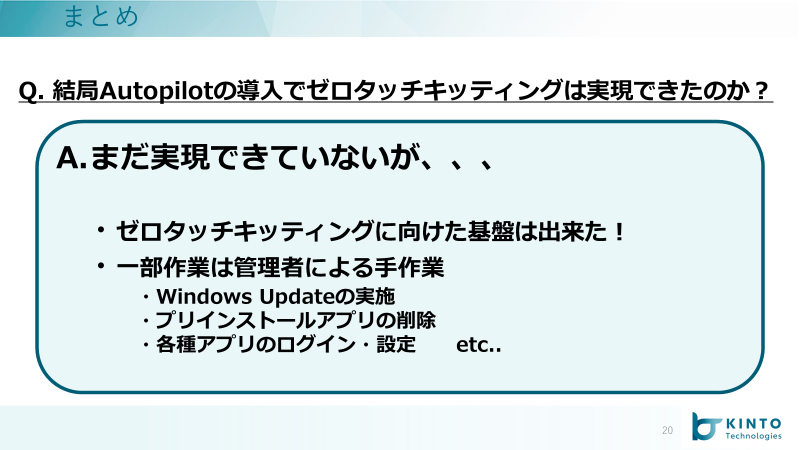 Ideally, I would like to achieve so-called zero-touch kitting, but if asked whether it has been achieved with the introduction of Autopilot, manual work is still necessary.
However, I think that being able to automate a series of processes from device registration to device control has greatly improved the efficiency of PC kitting.
We will continue to incorporate new features in our ongoing efforts to further improve efficiency!

関連記事 | Related Posts






We are hiring!
【Java/Python】事業や組織の成長に携わるプロダクトエンジニア(AWS環境)/KINTO CXシステム開発G/東京・名古屋
KINTO CXシステム開発グループについてTOYOTAのクルマのサブスクリプションサービスである『 KINTO 』を中心とした国内向けサービスのプロジェクト立ち上げから運用保守に至るまでの運営管理を行っています。大手EC、SIer、ベンチャー、Webサービス企業など、さまざまなスペシャリストが集まり、KINTOサービスを開発しています。
【PdM】契約管理システム開発G/東京
契約管理システム開発グループについて契約管理システム開発グループは、クルマのサブスクリプションサービス『KINTO』(新車・中古車)を中心とした国内向けサービスにおいて、申込から契約満了(中途解約を含む)までの社内業務プロセスのシステム化と、契約状態の管理を担っています。
Follow Us



KINTOテクノロジーズの最新情報をSNSで発信中!イベント・テックブログ更新情報もお届けします。