
8 min read
Android
We Upgraded Apollo Kotlin to V4


Read the summary
We upgraded Apollo Kotlin from version 3 to version 4 to get better performance and new features. This change required several manual steps because the official plugin didn’t handle all cases. We found that the migration wasn’t smooth—there were unexpected errors and build issues that took time to fix. We manually updated the library to use com.apollographql.apollo4, changed the Gradle file to wrap Apollo in a service, updated imports by removing the “3” from the package name, and modified error handling so that DefaultApolloException replaced ApolloException under the same conditions as before. We also replaced all direct ApolloException instances with DefaultApolloException since it’s now a sealed class. The build failed initially due to a missing class in KSP, which was used with Hilt. After investigation, we fixed it by switching from KSP to kapt, adding specific build configurations, or adjusting how Hilt’s AssistedInject works. The issue wasn’t unique to v4—it existed in v3 too, but we resolved it during the upgrade. With these changes, the app built and ran exactly as before. We also fixed two deprecation warnings: one for ApolloResponse.Builder where the data field moved outside, and another for error instance creation, which we updated to use the Builder pattern. Both changes eliminated warnings and kept our code consistent. The Apollo plugin in Android Studio automates three of the five steps—library update, Gradle setup, and import changes—but doesn’t handle exception handling or the sealed class update. So we recommend using the plugin to speed up the process, then manually fixing the remaining parts. It’s especially useful for spotting unused fields and improving code quality.
This summary was generated by AI. Please refer to the article for accurate details.
This article is the entry for day 22 in the KINTO Technologies Advent Calendar 2024 🎅🎄
Nice to meet you! I am kikumido, and I am developing the Unlimited (Android) app at KINTO Technologies. For our app, we use Apollo Kotlin for the GraphQL client. Apollo Kotlin v4 introduces numerous enhancements, including better performance and new features. To take advantage of these benefits, we decided to upgrade from v3 to v4.
In this article, I will explain in detail the process of migrating to Apollo Kotlin v4 (which was released this July), and the issues we encountered along the way. We had initially been hoping for a nice, smooth migration, but ran into some unexpected exceptions, and sometimes struggled to find solutions. I would be delighted if this article proves to be a helpful resource for those considering the upgrade themselves.
Migrating From v3 to v4
We will proceed in accordance with the official website.
You can also do the upgrade semi-automatically by installing a plugin into Android Studio. We wanted to check what the necessary steps were as we went along, so we did it manually without using the plugin.
On the other hand, I was curious about how much the plugin can automate, so in the second half of this article, I will compare the manual approach with the automated process.
1. Things We Had to Do
When migrating from v3 to v4, there were five things we had to do in Android Studio to eliminate errors in our app. I will go through them one by one below.
1.1. Upgrading the Library
Anyway, first, we will update the library.
apollographql = "3.8.5"
apollo-runtime = { module = "com.apollographql.apollo3:apollo-runtime", version.ref = "apollographql" }
apollographql-apollo = { id = "com.apollographql.apollo3", version.ref = "apollographql" }
↓
// At the time of writing this article, v4.1.0 has been released. However, I have based my explanation on 4.0.1, which was the latest version when we did the migration ourselves.
apollographql = "4.0.1"
apollo-runtime = { module = "com.apollographql.apollo:apollo-runtime", version.ref = "apollographql" }
apollographql-apollo = { id = "com.apollographql.apollo", version.ref = "apollographql" }
Hmm. Instead of turning into com.apollographql.apollo4, com.apollographql.apollo3 lost its “3” instead.
1.2. Modifying the Gradle File
This did not need to be done for v3, but wrapping in a service is required for v4.
apollo {
    packageName.set("com.example.xxx.xxx.xxx")
    ・・・
}
↓
apollo {
    service("service") {
        packageName.set("com.example.xxx.xxx.xxx")
        ・・・
    }
}
1.3. Changing the Import
We could see this coming when the “3” disappeared, but you need to change the import package name. Just delete the “3.”
import com.apollographql.apollo3.*
↓
import com.apollographql.apollo.*
1.4. Modify the Exception Handling
We changed things so that execute() will not throw a fetch error, so we will deal with that.
I expect that the approach will vary by project, but for now, we have chosen to take measures to minimize the impact on existing processes. This method consists of modifying things so that DefaultApolloException will be thrown under the same conditions as when a fetch error arose and ApolloException was thrown with v3. By adjusting the common handling, we ensured that the behavior remained the same for the calling side without modifying its implementation.
apolloClient.query(query).execute()

apolloClient.mutation(mutation).execute()
↓
execute(apolloClient.query(query))

execute(apolloClient.mutation(mutation))

private suspend inline fun <D : Operation.Data> execute(apolloCall: ApolloCall<D>): ApolloResponse<D> {
    val response = apolloCall.execute()

    if (response.data == null) {
        response.exception?.let { // Fetch error if response.data is null and response.exception is not null.
            throw DefaultApolloException(it.message, it.cause)
        }
    }

    return response
}
If it is difficult to migrate all in one go due to the existing implementation or the v4 support policy, executeV3() has been provided as a helper for migrating without changing the v3 behavior, so you can temporarily replace it with that.
apolloClient.query(query).executeV3()

apolloClient.mutation(mutation).executeV3()
This approach is a good choice if you want to migrate to v4 gradually (for example, feature by feature).
1.5. Modifying ApolloException to DefaultApolloException
ApolloException has become a sealed class, so replace any places where instances were being generated with DefaultApolloException.
The above are the steps required to eliminate errors in Android Studio.
2. Build
Now that we’ve cleared all the errors...let’s try running the long-awaited build!
Drum roll, aaand...ta-daaa!
Yes! We got something!
Build errors...!
Although we didn’t expect everything to go perfectly smoothly, it was still quite a shock....
Okay, we will pull ourselves back together and check the error log.
2.1. Checking the Error Log
A flood of unfamiliar error log entries suddenly appeared. In short, it seems that KSP[1] is missing a class required for AssistedInjectProcessingStep.[2]
If 'error.NonExistentClass' is a generated type, check for compilation errors above that may have prevented its generation. Otherwise, ensure that 'error.NonExistentClass' is included in your classpath.
e: [ksp] AssistedInjectProcessingStep was unable to process 'XXXXXViewModel(java.lang.String,long,com.xx.xx.XXXXXRepository)' because 'error.NonExistentClass' could not be resolved.
Of course, it is a class that exists in the source, and the build had been succeeding with no problems before we started doing this upgrade. Had we missed out something that was necessary for the v4 migration? We checked that and various other possibilities, but still couldn't pinpoint the issue...
After much investigation, we managed to get the build to succeed by using the following three methods.
- A. Change
Hiltback fromKSPtokapt - B. Add some code to build.gradle.kts: Pattern 1
androidComponents {
    onVariants(selector().all()) { variant ->
        afterEvaluate {
            val variantName = variant.name.replaceFirstChar { if (it.isLowerCase()) it.titlecase(Locale.getDefault()) else it.toString() }
            val generateTask = project.tasks.findByName("generateServiceApolloSources")
            val kspTask = project.tasks.findByName("ksp${variantName}Kotlin")
                as? org.jetbrains.kotlin.gradle.tasks.AbstractKotlinCompileTool<*>

            kspTask?.run {
                generateTask?.let {
                    setSource(it.outputs)
                }
            }
        }
    }
}
- C. Add some code to build.gradle.kts: Pattern 2
apollo {
    service("service") {
        packageName.set("com.example.xxx.xxx.xxx")
        // Start of additional code
        outputDirConnection {
            connectToAndroidSourceSet("main")
        }
        // End of additional code
        ・・・
    }
}
By the way,
- we are using
Hilt’sAssistedInject(which is apparently sometimes not a problem depending on how it is defined); - we are using
KSPinHilt; and - we wrap it in a
servicein “1.2. Modifying the Gradle file” above.
If all the above conditions are met, the issue also occurs in v3, meaning it isn't strictly a 'v4-specific' support update. However, since we addressed it at the same time, I have included it here. For our app, we initially went with “B.” However, due to a bug in ApolloExtension’s service,[3] we subsequently found that we could do it using “C,” so we adopted that.
With the above changes, the build succeeded, allowing us to migrate to v4 while ensuring the app launched and functioned just as before!
3. Dealing with Deprecated Parts
Next, we will address the following two things that caused deprecation warnings.
3.1. Modifying ApolloResponse.Builder
@Deprecated("Use 2 params constructor instead", ReplaceWith("Builder(operation = operation, requestUuid = requestUuid).data(data = data)"))
We received the above warning and made the necessary modifications accordingly
ApolloResponse.Builder(operation(), UUID_CONST, data).build()
↓
ApolloResponse.Builder<D>(operation(), UUID_CONST).data(data).build()
data has been moved outside, correct It seems to have been modified to follow the Builder pattern.
3.2. Modifying the Error Instance Creation Processing to Builder
Update any instances where a constructor was used to create an Error instance to instead use the Builder pattern.
Error("occurred Error", null, null, mapOf("errorCode" to responseCode), null)
↓
Error.Builder(message = "occurred Error")
    .putExtension("errorCode", responseCode)
    .build()
Doing the above also successfully eliminated a warning.
4. Migrating Using the Plugin
Using the Apollo plugin in Android Studio will automate the migration to some extent. It is very simple to do: just install the Apollo plugin in Android Studio, then tap Tools > Apollo > Migrate to Apollo Kotlin 4.... Easy, right? 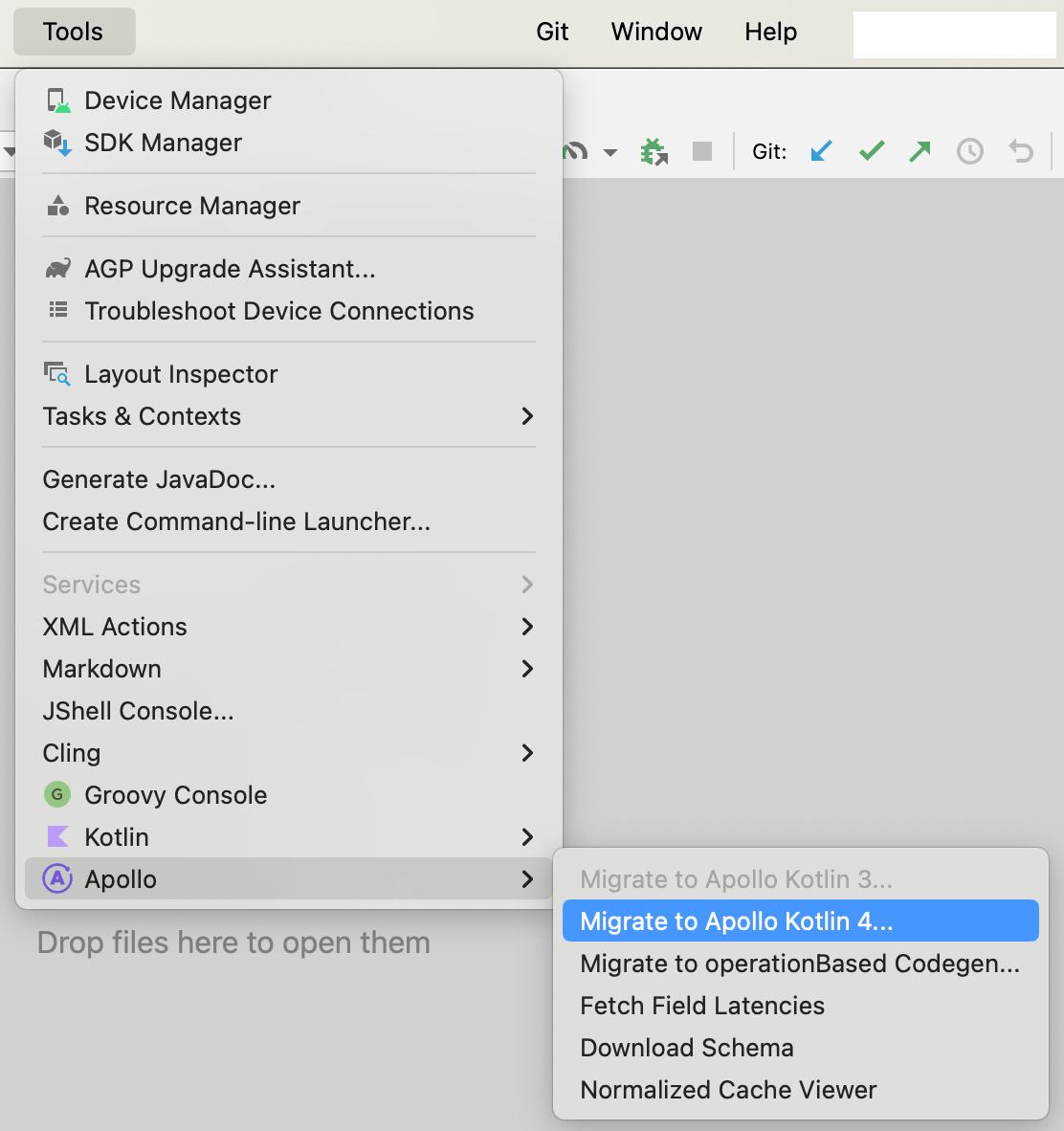
Okay, let’s check the results of running it.
The aforementioned
- 1.1. Upgrading the Library
- 1.2. Modifying the Gradle File
- 1.3. Changing the Import
got done automatically.
- 1.4. Modifying the Exception Handling
only consists of switching to executeV3(), so the appropriate action for v4 needs to be taken manually.
- 1.5. Modifying ApolloException to DefaultApolloException
Was not completed, so it must be done manually.
Essentially, it automates any migration tasks that can be handled mechanically. Therefore, another viable approach is to use the plugin for migration and then manually address only the necessary parts.
5. Summary
That concludes the discussion of migrating Apollo Kotlin from v3 to v4. It's been a while since we actually completed this, so I imagine many people have already done it themselves. Still, I hope this article provides something useful. Thank you for reading all the way to the end.
6. Related links

関連記事 | Related Posts





We are hiring!
福岡拠点 オープンポジション(エンジニア)
やっていること国内サービスでは、トヨタのクルマのサブスクリプションサービスである『 KINTO 』を中心に、移動のよろこびを提供する『 モビリティーマーケット 』、MaaSサービスの『 my route(マイルート) 』など、トヨタグループが展開する各種サービスの開発・運営を担っています。
【大阪拠点】オープンポジション
やっていること国内サービスでは、トヨタのクルマのサブスクリプションサービスである『 KINTO 』を中心に、移動のよろこびを提供する『 モビリティーマーケット 』、MaaSサービスの『 my route(マイルート) 』など、トヨタグループが展開する各種サービスの開発・運営を担っています。
Follow Us



KINTOテクノロジーズの最新情報をSNSで発信中!イベント・テックブログ更新情報もお届けします。