
7 min read
AI
I Paid for Both GitHub Copilot and Cursor: Pros and Cons


Read the summary
As of February 2025, there’s almost no difference in functionality between GitHub Copilot and Cursor. I tested both tools from December 2024 to February 2025, and while Cursor had some early advantages, Copilot has caught up quickly. I used Cursor as an AI-powered editor built on Visual Studio Code, and GitHub Copilot as a plugin for multiple IDEs. The test covered common features like code completion, error fixes, model selection, and test generation. Both tools cost about the same—$39 for Copilot Enterprise and $40 for Cursor Business. Cursor wins in some areas: its AI shortcuts appear instantly when you select code, which cuts down on memorizing commands. It also predicts where and how to fix code across multiple lines, which helps with bulk edits. Cursor lets you switch between different AI models easily, and its @Docs feature loads framework docs ahead of time, improving accuracy. In agent mode, it can auto-run trial commands—something Copilot now also offers, though still in preview. Still, Cursor has downsides. Import fixes require hovering and clicking, unlike Copilot’s smooth, automatic suggestions. Generated test code often fails and needs editing—same for Copilot, but Cursor doesn’t improve much over it. Some features in Cursor feel overpowered or confusing for teams. The key difference is in how Cursor splits its tools: Composer handles quick, inline code edits with automatic context, while Chat is better for long conversations and complex questions. If you’re doing fast code fixes, use Composer. For deeper analysis or long chats, go with Chat. In the end, both tools are nearly equal. If Copilot is already standard in your team, stick with it. But if you want strong AI-driven editing and chat, Cursor’s features are worth trying—especially for large-scale code changes.
This summary was generated by AI. Please refer to the article for accurate details.
My name is Yuya Sakamaki from KINTO Technologies.
I am usually involved in anything from data analysis to proposing strategies, and developing features using machine learning. Previously, I was in charge of AI functional development at Prism Japan.
I conducted an internal comparison test of Cursor and GitHub Copilot, and I would like to share the results with you.
Premise
- At KINTO Technologies, there's a policy that allows GitHub Copilot to be used as a standard tool.
- I will test whether using Cursor Editor can further improve productivity.
Cursor
An AI-powered code editor, created as a fork of Visual Studio Code.
Github Copilot
It’s a tool co-developed by GitHub and OpenAI, available as a plug-in for various IDEs such as Visual Studio Code, JetBrains, Eclipse, and more.
Disclaimer
- This article contains many of my own opinions. This is not meant to undermine the usefulness of Cursor.
Tested Plans
- Copilot Enterprise ... $39 / month
- Cursor Business ... $40 / month
Conclusion
- As of February 2025, I feel that there is almost no difference in functionality between GitHub Copilot and Cursor.
- As of December 2024, I would have liked to recommend Cursor, but with the incredible speed at which Copilot has progressed, I no longer feel the need to choose Cursor Editor again.
Evaluation Period
- December 2024 to February 2025
Comparison Table (Copilot vs. Cursor)
I have put together a table of some of the most common points that came up in the discussions using Copilot and Cursor together. The details of each item will be provided later.
| Item | GitHub Copilot | Cursor |
|---|---|---|
| UI/Operability | - Inline suggestions and chat ability in VSCode - Many operations by right-clicking |
- AI-powered shortcuts are displayed instantly - Inline menus are easy to understand |
| QuickFix (completion of import, etc.) | - VSCode standard quick fixes are powerful | - Sometimes it is unstable and doesn't work - Fix in Composer etc., is a little troublesome |
| Automatic reflection of similar corrections | - Need to start writing something first | - Tabs predict and suggest the next correction to make (useful for making corrections to multiple places) |
| Model selection | - Can be changed, but the variety is limited | - Abundant additions and selections (multiple AI models can be used) |
| Rule file | - Can be done by changing the settings in .github/copilot-instructions.md |
- The .cursorrules file enables you to apply rules per project |
| Loading documents (such as @Docs) | - Supported by plug-ins, etc. | - The @Docs feature enables you to load documents for frameworks and libraries |
| Agent functions | - Similar functions available in Copilot Chat / Copilot CLI | - Automatic execution in agent mode, try & error |
| Automatic test code generation | - Generation is possible (although accuracy varies) | - Can be generated in the same way, but the accuracy is questionable. Corrections are needed. |
| Price (Business/Enterprise) | $39 | $40 |
*The content of the evaluation is subjective as of February 2025.
Pros of Cursor (when compared to GitHub Copilot)
-
AI-powered shortcuts are displayed immediately
Since AI-powered shortcuts are displayed automatically when you select a code, the need to remember special operations can be eliminated.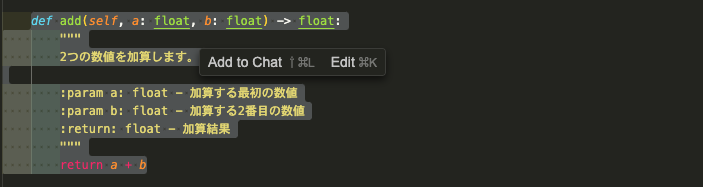
- Is there something similar in Copilot?
- Inline chat is possible. However, there is no COMPOSE mode to reference other files, and you need to call it up from the right-click menu, so it requires a little bit of effort.
- Is there something similar in Copilot?
-
Suggests similar corrections together
When you want to apply similar corrections to multiple places, Cursor will predict "where and how to fix next" in order on the tab.
- Is there something similar in Copilot?
It doesn't make predictions until you start writing something first, so it is difficult for it to provide bulk suggestions as smoothly as with Cursor.- A similar function is now available in Copilot *There were some changes as I was writing this article.
- Is there something similar in Copilot?
-
Flexibility with selecting and adding models
Cursor is designed to make it easy to add and select any model you want.- Is there something similar in Copilot?
- Copilot Chat also enables model switching, but the scope of what can be done is currently limited.
- Is there something similar in Copilot?
-
The @Docs feature enables you to load documents for frameworks and libraries
Having it read the documents in advance will improve the accuracy of its answers.- Is there something similar in Copilot?
- It is possible to achieve something similar using plug-ins, but the standard features are not that extensive.
- Is there something similar in Copilot?
-
Automatic execution of try & error in agent mode
In agent mode within Cursor, the AI will automatically execute commands under a certain level of authority and perform trial and error.- Is there something similar in Copilot?
Similar features are starting to appear in Copilot CLI and Copilot Chat, but they still require some fine tuning.- While still just a preview version, agent mode is now available in Copilot.
- Is there something similar in Copilot?
Cons of Cursor (when compared to GitHub Copilot)
-
Import completion is a bit troublesome
VSCode + Copilot will automatically complete imports, but Cursor will not import unless you hover the mouse cursor over it and select a quick fix.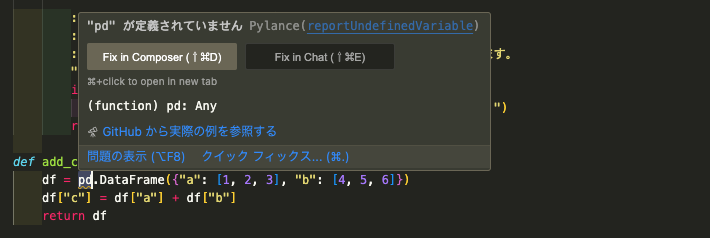
- Copilot offers greater stability and overall superiority
-
Automatic test code generation is not very accurate
Automatically generated tests often don’t pass on the first run and usually require some adjustments.- The same is true for Copilot, but I didn't get the impression that Cursor was much of an improvement.
-
There are still many parts that are not suitable for operation
Depending on the app being developed, Cursor contained more AI functions than needed, which confused some team members.
The Difference between Cursor's "Composer" and "Chat"
Cursor is divided into two main modes: Composer and Chat. Since there are differences in usage and the handling of context, I have put together a quick summary of the results of the internal comparison.
| Functional Items | Composer | Chat |
|---|---|---|
| Context understanding | Automatically links to the current file. Auto-suggests related files. |
Initially the context is empty. Must be shared manually as needed |
| Main uses | Mainly code generation and editing. Easy to correct suggested content immediately using inline |
Mainly used for receiving general questions and explanations. Suitable for longer exchanges |
| History management | Auto-saves in the control panel | Chat history is selectable |
| UI | Also usable in inline menu. Can also be operated from the side menu |
Side menu only |
| Code block execution | Not possible | Possible (execute commands via Chat in the side menu) |
When to use Composer
- Code corrections with simple context
- When you want to generate and edit code quickly
When to use Chat
- Code corrections with larger context
- Analyzing error messages, general programming questions
- When you want to work while maintaining context for a long period of time
Conclusion Again
-
As of February 2025, there are no huge functional differences between Copilot and Cursor
In fact, Copilot's progress has been faster than expected, and it seems that within a few months, Copilot filled the gap that I thought Cursor was going to win as of December 2024. -
There are certainly pros to using Cursor
As an AI-powered IDE, Cursor still has its strengths, such as dedicated shortcuts and agent mode. However, since Copilot has also been making progress in supporting these features, the pros of newly introducing it may be somewhat diminishing. -
Which one will you use in the end?
- If GitHub Copilot is already available as standard equipment within the company, you will likely be able to get by with just Copilot for the time being.
- That said, if you're wanting to embrace large-scale code corrections and chat-driven development, it's worth giving Cursor's Composer / Chat features a try, even though the Github Copilot AI agent is currently available to VSCode Insiders.
- Since they are almost the same in terms of price, it is good idea to choose based on the UI and ease of use.
Development App
References
The above are the results of my extensive use of Cursor and GitHub Copilot.
The speed of product updates is accelerating, so I would like to continue to test them regularly.

関連記事 | Related Posts








We are hiring!
シニアQEエンジニア(責任者候補)/Quality Engineering G/東京・大阪
「テストするQA」から「品質戦略を描くQE」へ。AIがコードを書くことが当たり前になりつつある今、品質保証のあり方そのものが問われています。
【クラウドセキュリティエンジニア】CNAPP運用×AIセキュリティ。次世代のクラウドセキュリティに挑む(東京・名古屋・大阪・福岡)
AI Agent時代のクラウドセキュリティを、 ゼロから作る。KINTOテクノロジーズのCloud Engineering G/セキュリティチームは、2022年にCCoE(Cloud Center of Excellence)として立ち上がり、わずか2年で専門組織として独立しました。
Follow Us



KINTOテクノロジーズの最新情報をSNSで発信中!イベント・テックブログ更新情報もお届けします。