S3 Event Notifications Failing? The cause was multipart uploads.

Introduction
Hello! This is Matsuo from the Cloud Infrastructure Group.
Before I knew it, this August marked the start of my third year with the company.
This time, I encountered a minor stumbling block with S3 event notifications, so I decided to put together a brief summary as a way to share what I've learned. I hope this serves as a helpful reference for anyone facing similar issues.
How it started
📋 We received a request for a system where a Lambda function uploads a file to S3, and the upload triggers an SQS message. We implemented this by configuring S3 event notifications to send messages to SQS when an ObjectCreated:Put event occurs.
However, shortly after configuration, it was pointed out that no messages were arriving in SQS, and we investigated this.
What is S3 Event Notification?
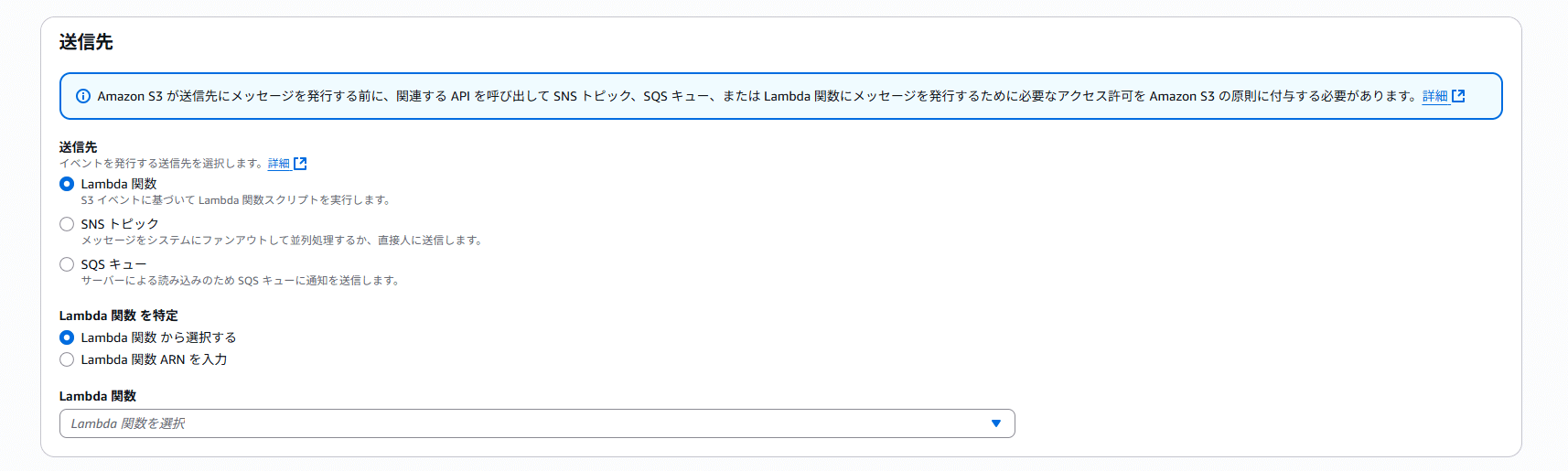
S3 Event Notification, in simple terms, is an S3 feature that allows you to send event-driven notifications to other AWS services when events occur within an S3 bucket. You can select( Lambda/SNS/SQS ) as the notification destinations.
📝 Additional Notes
This time, we use S3 events to send notifications directly to SQS, but notifications via Amazon EventBridge are also possible. When integration with multiple services or complex configurations is required, you should also consider using EventBridge integration.
The Initial Hypothesis and Response
In fact, the destination SQS queue had been renamed once, and the S3 event notification settings were updated accordingly. Since the requester confirmed immediately after the configuration that there were no issues, we formed the following hypothesis.
💭 Could it be that the SQS or S3 event notification configurations weren't updated due to an internal AWS issue?
Therefore, we deleted and recreated the S3 event notification and SQS configuration. After uploading a sample .txt file to S3 using a PUT operation, the event was successfully received. At this point, we thought the problem had been resolved.
Unresolved issues and new findings
After communicating the results of our investigation and the actions taken, we received a follow-up message from the requester indicating that the problem still remains unresolved. It included other information.
💬 I tried it with a .txt file and received the message. It seems that message reception may not be working properly with .csv files.
The requester mentioned above. I wondered what it is. And I checked the contents of S3, and then. I found something!
| File Extension | Size |
|---|---|
| .txt | Several bytes |
| .csv | Approximately 20 MB |
After determining that the file size was likely the cause rather than the file extension, we investigated again!
Identification of the Cause
Upon reviewing the code for the Lambda function handling file uploads, I found S3.upload_file.
def upload_file(temp_file_path: str, S3_bucket_name: str, S3_file_name: str):
    """
    ファイルアップロード
    """
    logger.info('---- Upload ----')
    S3 = boto3.client('s3')
    res = S3.upload_file(temp_file_path, S3_bucket_name, S3_file_name)
    logger.info(f"ファイル {S3_file_name} をアップロードしました")
The boto3 upload_file method automatically performs multipart uploads when the file size exceeds a certain threshold (8 MB).[1]
This seems to be the cause.🔍
Wrong S3 Event Type
The event type configured for S3 was
ObjectCreated:Put
In this configuration, only creations via ObjectCreated:Put will be notified.
However, the event triggered during a multipart upload is
ObjectCreated:CompleteMultipartUpload
With multipart uploads, a completely different event is triggered, not ObjectCreated:Put!
In the case of large files, the following sequence prevented the event from being triggered:
- Lambda uploads the file to S3
- During this process, the
upload_filemethod automatically performs a multipart upload - Consequently, the event generated is
ObjectCreated:CompleteMultipartUpload - As a result, since the event notification configuration is set only to
ObjectCreated:Put, it is not notified to SQS.
By the way, what is multipart upload?
Multipart upload is a mechanism that divides large files into multiple parts for uploading. Here are the benefits.[2]
High-speed: Upload multiple parts in parallel
Reliability: Resend only failed parts
Resume interrupted: Resuming from where you left off is possible even during network outages
Solution
S3 event notification settings change
The event type settings have been changed as follows:
All object creation events (ObjectCreated:*)
With this setting, all of the following events will be subject to notification.
ObjectCreated:Put
ObjectCreated:Post
ObjectCreated:Copy
ObjectCreated:CompleteMultipartUpload
After changing the settings, we confirmed that S3 event notifications are successfully sent to SQS even for large CSV files!
In this case, since it was clear that the file upload source was solely the Lambda function, we set it to
ObjectCreated:*(all object creation events).
Other solutions are available
In addition to modifying S3 event notification settings, you can also handle this by using the put_object method in boto3 code. However, this time we chose to modify the S3 event notification configurations. The reasons:
- No need to modify the application code
- Stable even against future changes
- Other upload methods are also supported.
I believe modifying S3 event configurations is the most versatile and reliable approach, but depending on the situation, handling it in code can also be effective.
What We've Learned
1. Testing with file size in mind
When validating with small test files, multipart uploads may not occur, potentially causing issues to be overlooked. When processing involves S3, it is crucial to conduct testing using file sizes expected in the production environment.
2. Understanding boto3's internal behavior
While upload_file method in boto3 is convenient, it may automatically execute multipart uploads internally. You need to understand this behavior and configure the appropriate events.
3. Considerations for event notification configurations
For this specific requirement, where the upload source was limited solely to Lambda functions, we selected s3:ObjectCreated:*.However, in general, it is recommended to narrow down the event types to only those that are strictly necessary. The key is to understand what upload method SDKs like boto3 use internally and configure the appropriate events accordingly.
Conclusion
This issue occurred due to the following factors overlapping.
1. boto3 automatically performed multipart uploads
2. S3 event notifications were configured to target only ObjectCreated:Put events
3. The issue could not be reproduced with small test files
Feeling reassured after testing with small files, only to encounter issues in actual operation, is a common pitfall.
If you're experiencing similar issues, please check the following:
- The size of the file uploaded to S3
- The event type targeted by your S3 event notification
I hope this blog post has been a little helpful.

関連記事 | Related Posts

We are hiring!
【クラウドエンジニア】Cloud Infrastructure G/東京・大阪・福岡
KINTO Tech BlogWantedlyストーリーCloud InfrastructureグループについてAWSを主としたクラウドインフラの設計、構築、運用を主に担当しています。
シニア/フルスタックエンジニア(JavaScript・Python・SQL)/契約管理システム開発G/東京
契約管理システム開発グループについて◉KINTO開発部 :66名・契約管理開発G :9名★←こちらの配属になります・KINTO中古車開発G:9名・KINTOプロダクトマネジメントG:3名・KINTOバックエンド開発G:16名・KINTO開発推進G:8名・KINTOフロントエンド...