
4 min read
Operation
A story about JavaScript error detection in browser

This summary was generated by AI. Please refer to the article for accurate details.
Read the summary
We solved a client-side JavaScript error that caused users to see a broken screen when ordering products. The error happened on an old Android device using a browser older than Chrome 85, which didn’t support the JavaScript replaceAll function. This was missed during QA because we hadn’t tested older browser versions. We fixed it by adding error detection directly in the browser using AWS CloudWatch RUM. Instead of just relying on backend logs, we now send custom error events whenever JavaScript throws an error. This lets us catch issues at the user’s device level, not just in the backend. When an error occurs, CloudWatch RUM sends a message to CloudWatch Alarms, which triggers SNS. SNS then passes the alert to SQS, where a Lambda function picks it up and forwards it to OpenSearch. This chain ensures real-time alerts to our operations team. After running this system for months, we’ve seen no critical JavaScript errors from users. We’ve also detected unintended access from bots and crawlers—cases we previously missed. This shows that proactive monitoring catches problems before customers even notice them. The key takeaway is that while we can’t guarantee flawless performance across all devices and browsers, we can now detect and respond to errors faster. We now show clear, user-friendly messages when something goes wrong and have a clear path to identify and fix issues quickly. This system is now part of our ongoing effort to keep the site stable and reliable.
Introduction
Hello! Thank you for reading! My name is Nakamoto and I develop the front end of KINTO FACTORY ('FACTORY' in this article), a service that allows you to upgrade your current car.
In this article, I would like to introduce a method of how to detect errors that occur in clients such as browsers using AWS CloudWatch RUM.
Getting Started
The reason why we introduced it was due to an enquiry we received by our Customer Center (CC), where a user tried to order products from the FACTORY website, only to encounter an error where the screen did not transition. This prompted an investigation request. I immediately parsed the API log and checked if there were any errors, but I could not find anything that would lead to an error.
Next, I checked what kind of model and browser was being used to access the front end. When examining the access logs from Cloud Front, I looked into the access of the relevant user and checked the User-Agent where I could see:
Android 10; Chrome/80.0.3987.149
It was accessed from a relatively old Android device.
With that in mind, while analyzing the source of the page where the problem occurred, a front end development team member advised that replaceAll in JavaScript might be the culprit... This function requires compatibility with Chrome version 85 or higher... (Since FACTORY recommends using the latest version of each browser, we hadn't tested cases with old versions such as this case in QA.)
*Other members of the team also told me that you can easily search for functions here to see which browsers and versions are supported!
Until now, monitoring in FACTORY has detected errors in the BFF layer and notified PagerDuty and Slack, but it has not been possible to detect errors in the client-side, so it was the first time we noticed them through communication from customers. If we continued as-is, we would not be able to notice such errors on the client side unless we received customer feedback, so we decided to take countermeasures.
Detection Method
Originally, FACTORY's frontend had been loading client.js from AWS's CloudWatch RUM (Real-time User Monitoring). However, this function was not being used for anything in particular (user journeys, etc. are analyzed separately with Google Analytics), so it was a bit of a waste.
As I investigated, I learned that RUM allows JavaScript to send events to CloudWatch on a client such as a browser. So using this mechanism, I decided to create a system to send and detect custom events when some kind of error occurs.
Notification Method
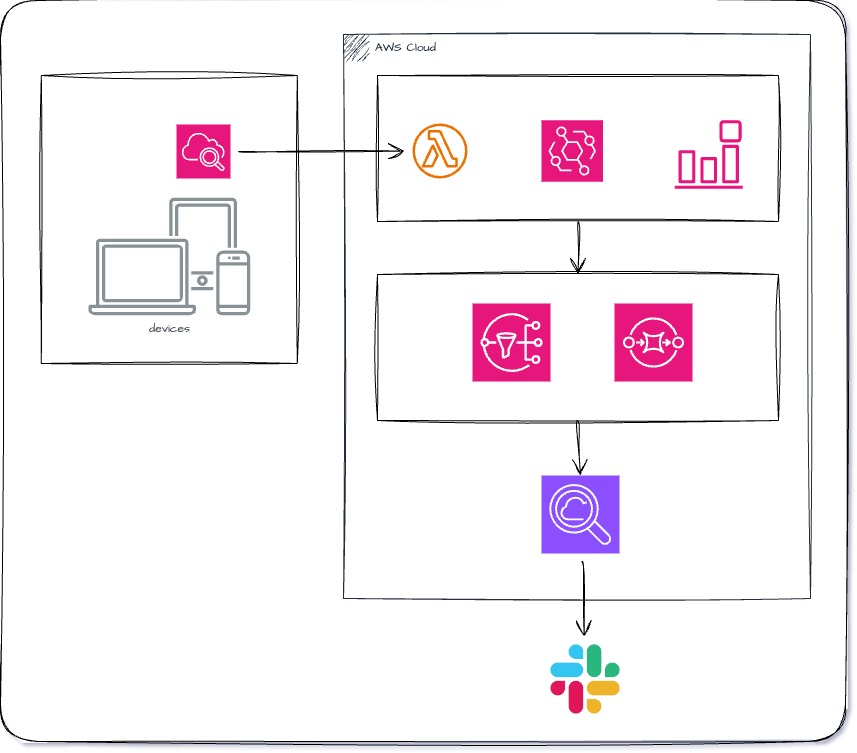
The general flow of notifications are as follows:
- When an error is detected in the browser, CloudWatch RUM sends a custom event with the error description in the message
window.crm("recordEvent", {
  type: "error_handle_event",
  data: {
    /* Information required for analysis. The contents of the exception error */
  },
});
- Cloud Watch Alerm detects the above events and sends the error details via SNS when the event occurs
- The above SNS notifies SQS, Lambda picks up the message and notifies the error to OpenSearch (this mechanism uses the existing API error detection and notification mechanism)
After Implementation
After implementing this mechanism in the production environment and operating it for several months, I can luckily say that critical issues, such as the JavaScript error that resulted in its introduction, have not occurred.
However, I have been able to detect cases where errors occur due to unintended access from search engine crawlers and bots, and I have become aware of accesses that I did not pay particular attention to until I introduced it, so it became a reminder of the importance of monitoring and being vigilant.
Conclusion
In order to enable the best online purchase experiences on websites such as FACTORY, it's very important to prevent as many errors as possible (such as problems when buying items, viewing pages, etc.). However, there is unfortunately a limit as to how much we can guarantee that it works on all customers' devices and browsers. That is why, if an error occurs, it is necessary to show easy to understand messages for the customers (with what they should do next), and a mechanism in place for us, the developers on the operation side, so that we can quickly identify the occurrence and details of the problem.
I would like to continue using different tools and mechanisms to ensure stable website operation.

関連記事 | Related Posts





We are hiring!
Follow Us



KINTOテクノロジーズの最新情報をSNSで発信中!イベント・テックブログ更新情報もお届けします。